Telepen Barcode Reader SDK
Telepen is a 1D barcode that encodes the full ASCII character set, best known from UK university and public libraries. barKoder reads Telepen with the phone and tablet cameras in your iOS, Android and web apps.
Telepen is a 1D barcode that encodes the full ASCII character set, best known from UK university and public libraries. barKoder reads Telepen with the phone and tablet cameras in your iOS, Android and web apps.
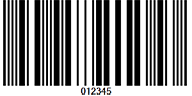
| Type | Continuous linear (1D) symbology with two element widths in a fixed 3:1 ratio |
| Character set | All 128 ASCII characters, including control characters, with no shift characters. A numeric mode packs two digits into each character. |
| Capacity | Variable length. Up to 8 ASCII characters or 16 digits per inch at the maximum recommended density. |
| Check character | Even parity on every character plus a modulo 127 block check character |
| Standard | AIM Uniform Symbology Specification Telepen. Devised by SB Electronic Systems Ltd (UK) in 1972. |
| Typical uses | UK university and public libraries, the motor industry, the Ministry of Defence |
Telepen is a linear barcode symbology devised in 1972 by George Sims of SB Electronic Systems Ltd in the UK. It was designed to represent the full ASCII character set directly, so it encodes numbers, upper- and lowercase letters, punctuation and control characters such as carriage return and tab.
Telepen is a variable-length symbology. A symbol consists of:
In numeric mode, sometimes called double-density mode, each character carries a pair of digits, which doubles the packing density for numeric data. The bars look the same in both modes; the reader's configuration decides whether to read the data as ASCII or as digit pairs. barKoder reads Telepen in ASCII mode. Numeric-mode labels are not returned as digits today, so test your labels in the demo app before you rely on them.
| Mode | What it encodes | Notes |
|---|---|---|
| ASCII (Telepen Alpha) | All 128 ASCII characters | The default mode |
| Numeric (Telepen Numeric) | Digits 0-9, two per character | Twice the density of ASCII mode for numeric data |
Telepen is used in many countries and very widely in the UK.
Most UK universities and academic libraries use Telepen, as do many public libraries. Scan a shelf of labeled books in one pass with Batch MultiScan.
Barcode scanning for education →Outside libraries, Telepen's users include the motor industry. Its full ASCII set lets one label carry letters, digits and punctuation.
Barcode scanning for automotive →The UK Ministry of Defence is among the organizations that use Telepen.
Barcode scanning for government →The barKoder Barcode Scanner SDK reads Telepen on iOS, Android, the web, Windows and Linux, and in Flutter, React Native, .NET MAUI, Capacitor, Cordova and NativeScript apps.
Reads all supported 1D barcodes with strong deformation, such as labels on rounded surfaces or wrinkled cards, where no straight line crosses all the bars.
Segment Decoding →Decodes several barcodes in one camera view, whatever their type or size. The feature page names library bookshelf management as a use case.
Batch MultiScan →Enable only the decoders you need. This Web SDK call enables Telepen, using the decoder constant from the barKoder docs.
Barkoder.setEnabledDecoders(Barkoder.constants.Decoders.Telepen);On Android the same decoder is Barkoder.DecoderType.Telepen.
Decoder lists for other platforms: Android general example and Android API reference.
Install the free barKoder demo app, or open the web demo, and scan your own Telepen labels before you integrate the SDK. To create test codes, use the free barcode generator, which makes Telepen Alpha and Telepen Numeric barcodes.
iPhone and iPad
Scan with your camera, or point it at the QR code to open the App Store.

Android phones and tablets
Scan with your camera, or point it at the QR code to open Google Play.

Any modern browser
Runs the Web SDK in your browser, on desktop or mobile, with nothing to install.

Test with known samples. Print or display the testing sheet and scan each 1D and 2D barcode with the demo app. The data sheet summarizes the SDK for your team.
Verified credentials
Certified information security management built around internationally recognized controls.
Official Solution Provider supporting standards-based barcode and data-capture workflows.
Solution Provider listing covering barcode, mobile application and 2D barcode capabilities.
Discover the barKoder Web SDK listing and connect through Microsoft Marketplace.
Registered Independent Software Vendor in Zebra's PartnerConnect ecosystem.
Telepen is a linear barcode symbology devised in 1972 by George Sims of SB Electronic Systems Ltd in the UK. It encodes all 128 ASCII characters without shift characters, and a numeric mode packs two digits into each character. A Telepen symbol has a start character, the data, a modulo 127 check character and a stop character.
Mostly in the UK, where most universities and academic libraries use it, as do many public libraries. Other users include the motor industry and the Ministry of Defence. If you build a library app for UK institutions, enable Telepen alongside Codabar.
All 128 ASCII characters: digits, upper- and lowercase letters, punctuation and control characters such as carriage return, line feed and tab. In numeric mode it encodes digits only, two per character, at twice the density.
Add the ASCII values of the data characters, divide by 127 and subtract the remainder from 127, unless the remainder is zero. The character with the resulting ASCII value is the check character. For the data "Telepen", the sum is 717, the remainder is 82, and the check character is ASCII 45, a minus sign. Each character also carries an even parity bit.
Test the SDK on your own library and asset labels with a free 30-day trial, or talk to an SDK expert about your project.




 Codabar
 Code 128
 Code 39
 Code 93
 MSI Plessey
 Code 32