Code 128 Barcode: Code Sets, GS1-128 and Reader SDK

Code 128 is a high-density linear barcode that encodes all 128 ASCII characters, with a mandatory check character. As GS1-128, it carries the shipment data on GS1 logistic labels. barKoder reads Code 128 and GS1-128, including deformed labels, in your iOS, Android and web apps.

Code 128

Code 128 at a glance

Code 128 key facts
Type Linear (1D), continuous symbology of variable length, readable in both directions
Character set and data All 128 ASCII characters (0-127), plus byte values 128-255. Three code sets (A, B and C) and four function characters, FNC1 to FNC4.
Density 11 modules per character, or 5.5 modules per digit in Code Set C, which packs two digits into one character. GS1-128 allows up to 48 data characters per symbol.
Check digit One mandatory symbol check character. Every character is also self-checking through bar parity.
Standard ISO/IEC 15417 (current edition 2007). GS1-128 is defined in the GS1 General Specifications.
Typical uses Shipping and logistics labels (GS1-128), warehouse inventory, automotive parts and VINs, medication and patient labels

What Code 128 is and how it is built

Code 128 was created by Ted Williams and introduced by Computer Identics in 1981. It packs more data into a label than older codes such as Code 39 and can encode the full ASCII set. Every character is 11 modules wide and made of three bars and three spaces, each 1 to 4 modules wide. A symbol has five parts:

  • 1. Quiet zones: blank margins before and after the bars.
  • 2. Start character: Start A, B or C, which also picks the first code set.
  • 3. Data characters: the encoded text. Code A, Code B, Code C and Shift characters switch code sets inside the symbol.
  • 4. Check character: calculated from the start and data characters, so a misread is caught.
  • 5. Stop character: 13 modules, with an extra bar that ends the symbol.

The same data can be encoded with different combinations of start, code set and shift characters, and encoders pick the shortest. A long number in Code Set C takes about half the space it would in Code Set B.
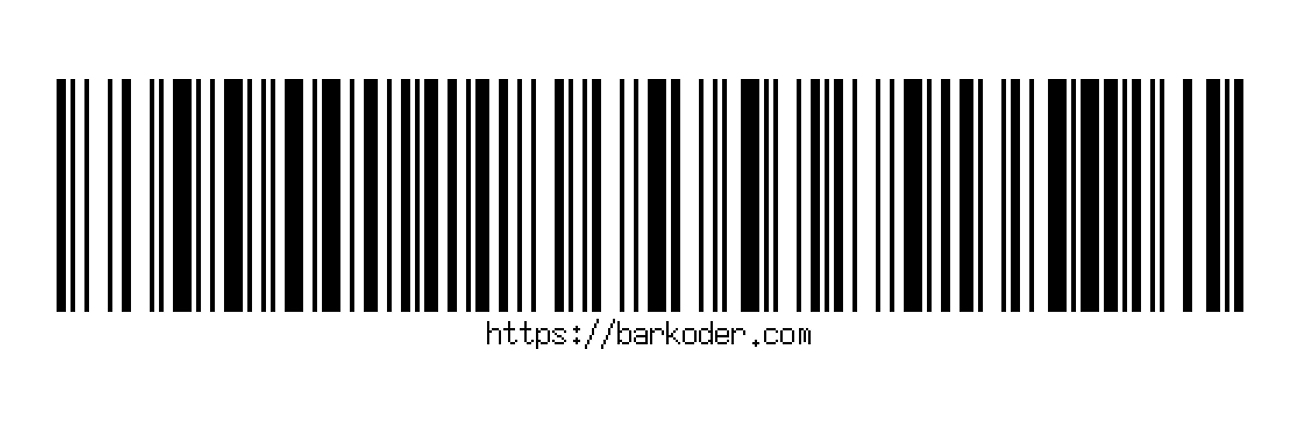

Code 128 barcode with its quiet zones, start character, data characters, check character and stop character marked 1 to 5 1 2 3 4 5 1
This sample encodes https://barkoder.com in Code Set B: start, 20 data characters, check character and stop. Numbers match the list.

Code 128 code sets and GS1-128

The same bar patterns mean different characters depending on the active code set. GS1-128 is Code 128 with a fixed data structure.

Code 128 code sets and variants
Variant What it encodes Typical use
Code Set A Uppercase letters, digits, punctuation and ASCII control characters (NUL to US) Data that includes ASCII control characters
Code Set B Uppercase and lowercase letters, digits and punctuation (printable ASCII to DEL) Mixed-case text, URLs and alphanumeric IDs
Code Set C Pairs of digits, 00 to 99, one pair per character Long numbers such as serial, order and shipment numbers
Extended characters Byte values 128 to 255, through the FNC4 character Characters outside the ASCII range
GS1-128 Code 128 with FNC1 after the start character and GS1 Application Identifiers for data such as the SSCC, GTIN, batch or lot and expiration date. Up to 48 data characters. Formerly UCC-128. GS1 logistic labels on cases and pallets. Parse it with the GS1 parser

Where Code 128 barcodes are used

Code 128 is the general-purpose linear code for identifiers that need letters, mixed case or long numbers.

Logistics and shipping

GS1-128, SSCC

GS1-128 carries the SSCC that identifies each case or pallet on a GS1 logistic label, often with GTIN, batch and dates. FedEx packages, for example, carry Code 128 and PDF417.

Barcode scanning for logistics →

Warehousing

Receiving, storage, dispatch

Warehouses scan Code 128 labels at receiving, storage and dispatch, because the code fits detailed product and location data on a small label and its check character catches misreads.

Barcode scanning for warehousing →

Automotive

Parts labels, VINs

Part numbers on parts packaging are encoded in Code 128 or Data Matrix, and Code 128 is widely used to encode vehicle identification numbers. It holds a 17-character VIN in less space than Code 39.

Barcode scanning for automotive →

Healthcare

Medication, patients, inventory

Hospitals use Code 128 for medication labeling, patient identification and inventory management.

Barcode scanning for healthcare →

Scanning Code 128 with barKoder

The barKoder Barcode Scanner SDK reads Code 128 on iOS, Android, the web, Windows and Linux, and in Flutter, React Native, .NET MAUI, Capacitor, Cordova and NativeScript apps. These features matter most for this code.

Segment Decoding® for deformed labels

Reads 1D barcodes deformed along the Z axis, where no straight line crosses all the bars: labels on bottles, tubes and other curved or uneven surfaces. It is off by default and enabled in the SDK settings.

Segment Decoding® →

VIN scanning

VIN mode enables Code 128 together with Code 39, Data Matrix and QR Code, with settings tuned for 17-character VINs. Segment Decoding also reads highly distorted Code 128 VINs.

VIN Scanner SDK →

GS1 parser for GS1-128

Turns the GS1-128 string into labeled fields such as SSCC, GTIN, batch and expiry. It handles fixed- and variable-length Application Identifiers and follows the GS1 General Specifications.

GS1 Barcode Parser →

Batch MultiScan for many labels

Decodes several barcodes in a single camera view, whatever their type or size. Use it to capture all the Code 128 labels on a pallet or shelf in one pass.

Batch MultiScan →

Code 128 barcode reader SDK and API

Enable only the decoders you need. These lines from the barKoder Flutter general example enable Code 128, Code 39 and EAN-13.

Flutter

Dart
                  // Enable the barcode types and add others if you need
                  _barkoder!.setBarcodeTypeEnabled(BarcodeType.code128, true);
                

In the Web SDK the decoder is Barkoder.constants.Decoders.Code128. Its configuration also takes a minimum and maximum length, so you can ignore codes that don't match your label format.

Get scanning in three steps

  1. Get a free trial license and install the SDK for your platform.
  2. Enable the Code 128 decoder, and Segment Decoding if your labels are curved or wrinkled.
  3. Read the result in your callback, and pass GS1-128 strings to the GS1 parser.
See the Flutter example

General examples for other platforms: Web SDK, Android, iOS, React Native, Capacitor, Cordova, .NET MAUI and NativeScript. VIN mode with Code 128: Web SDK VIN example.

Scan a Code 128 barcode on your phone or in your browser

Install the free barKoder demo app, or open the web demo, and scan your own shipping, warehouse and parts labels before you integrate the SDK.

iPhone and iPad

barKoder demo app for iOS

Scan with your camera, or point it at the QR code to open the App Store.

Download on the App Store
QR code linking to the barKoder demo app on the App Store

Android phones and tablets

barKoder demo app for Android

Scan with your camera, or point it at the QR code to open Google Play.

Get it on Google Play
QR code linking to the barKoder demo app on Google Play

Any modern browser

barKoder web demo

Runs the Web SDK in your browser, on desktop or mobile, with nothing to install.

Open the web demo
QR code linking to the barKoder web demo

Test with known samples. Print or display the testing sheet and scan each 1D and 2D barcode with the demo app. The data sheet summarizes the SDK for your team.

Code 128 barcode questions

What is Code 128?

Code 128 is a linear (1D) barcode defined in ISO/IEC 15417. It encodes all 128 ASCII characters, has variable length and ends with a mandatory check character. Its three code sets let it encode mixed-case text or pack two digits into each character, so it fits more data on a label than older codes such as Code 39. It is used on shipping labels, warehouse and parts labels, VINs and hospital labels.

What is the difference between Code 128 and GS1-128?

GS1-128 is Code 128 used under GS1 rules. The symbol starts with the FNC1 character and carries GS1 Application Identifiers, such as the SSCC, GTIN, batch or lot and expiration date, in up to 48 data characters. Any Code 128 reader decodes it; to get the fields, pass the result to the GS1 parser, which returns them labeled instead of as one string.

What are Code 128 A, B and C?

They are the three code sets. Code Set A covers uppercase letters, digits, punctuation and ASCII control characters. Code Set B covers uppercase and lowercase letters, digits and punctuation. Code Set C encodes pairs of digits from 00 to 99. A symbol can switch sets as it goes, and the reader decodes them all, so you don't choose a set when scanning. "Barcode 128C" usually means a symbol encoded mostly in Code Set C.

What is the best Code 128 barcode reader SDK?

The one that reads your real labels on your target devices. Test SDKs on wrinkled, curved and poorly printed labels, check that they parse GS1-128 and run on your platforms. barKoder reads deformed Code 128 with Segment Decoding®, parses GS1-128 with the GS1 parser, and runs on iOS, Android, the web and frameworks such as Flutter, React Native and .NET MAUI. The free trial runs for 30 days on up to 25 devices.

Is Code 128 better than Code 39?

For most new labels, yes. Code 128 has higher data density, so the same data fits in less space. It has a built-in check character, which is optional in Code 39, and it encodes all 128 ASCII characters, while standard Code 39 covers uppercase letters, digits and a few special characters. Code 39 is still common on older labels and VINs, and barKoder reads both. See Code 39.

Can I decode a Code 128 barcode online?

Yes. To check a single label, scan it with your camera or upload a photo or screenshot to the free online barcode scanner. To decode Code 128 inside your own web app, use the WASM Barcode Scanner SDK, which reads from the camera or from image files.

Add Code 128 scanning to your app

Test the SDK on your own shipping, warehouse and parts labels with a free 30-day trial, or talk to an SDK expert about your project.