SA DL Parser

South African Driver's License, ID and License Disc Scanner SDK

Scan South African driver's licenses, Smart ID cards and vehicle license discs with the phone camera. barKoder decrypts and parses the license PDF417 on the device and returns the ID number, names, vehicle codes and dates as structured fields, in Android, iOS and web apps.
sadl

One parser for three South African documents

The SA DL parser reads the PDF417 barcode on the SA driver's license. Two options of the same parser add the Smart ID card and the vehicle license disc, so one integration covers onboarding, rental, fleet and access control workflows.

South African driver's licenses

SA DL parser

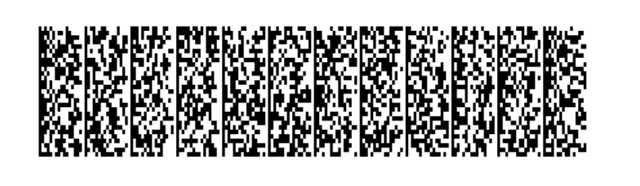
The drivers license barcode is an encrypted, ultra-dense PDF417 that holds up to 720 bytes of data. barKoder decrypts and parses it on the device, without a remote parsing service.

Fields you can map

  • ID number
  • License number
  • Surname and initials
  • Date of birth
  • Vehicle codes
  • Restrictions
  • Issue and expiry dates
  • Holder photo

South African Smart ID cards

SA ID option

Use barKoder as a Smart ID card scanner. The SA ID barcode is parsed into structured, positional data, so your app gets key data such as the ID number, names and dates without custom parsing logic.

Fields you can map

  • ID number
  • Names
  • Dates

South African vehicle license discs

Vehicle license disc option

Turn a phone into a license disc scanner. The license disc barcode is much less dense than the license barcode, so it scans quickly, even through windscreen glare, and is returned as structured data.

Typical workflows

  • Fleet management
  • Vehicle rental
  • Vehicle warranty onboarding
  • Customer verification

The SA ID and vehicle license disc parsers are options of the SA DL parser, not separate products. They are documented for the Android, iOS, Flutter, React Native, Capacitor, .NET MAUI, NativeScript and Cordova SDKs.

From camera frame to labelled fields

Reading the barcode and interpreting its contents are two steps. barKoder does both on the device.

  1. Scan The user points the device camera at the back of the license, the Smart ID card or the license disc.
  2. Decode PDF417-LineSight reads the barcode, even when parts of it are worn or missing.
  3. Decrypt and parse The SA DL parser decrypts the license payload and splits it into labelled fields.
  4. Use Your app receives the fields as JSON, plus the holder photo from the license, and maps them to its own forms.

Why a normal scanner can't read the SA drivers license

Most document barcodes hold readable text. The PDF417 on a South African driver's license is encoded and protected, so a generic reader returns data your app can't use.

It is also very dense, because it contains the holder's facial image, and the lamination on the card makes it harder to read.

barKoder handles both problems. LineSight decodes the dense barcode, and the SA DL parser decrypts the payload and returns structured fields and the photo.

Fields parsed from the SA driver's license
Field What your app gets
ID number The holder's South African ID number
License number The number of the driving license
Surname and initials The holder's name as encoded on the license
Date of birth and gender Personal details for KYC and age checks
License codes The vehicle code classes the holder may drive
Restrictions Restrictions recorded on the license
Issue and expiry dates License validity information
Holder photo The facial image, decrypted and extracted from the barcode

Enable the SA parsers in a few lines

Turn on the PDF417 decoder, select the SA DL formatting, and add the ID and license disc options if your app needs them.

Java
              // Enable PDF417 symbology and South African Driving License parser
              bkdView.config.getDecoderConfig().PDF417.enabled = true;
              bkdView.config.getDecoderConfig().formattingType = Barkoder.FormattingType.SADL;
              // Parsers for data in South African IDs and South African Vehicle License Discs
              Barkoder.SetCustomOption(bkdView.config.getDecoderConfig(), "SADL_decode_ID" , 1);
              Barkoder.SetCustomOption(bkdView.config.getDecoderConfig(), "SADL_decode_vehicle_disk", 1);
              // Get SADL image - called when Barkoder returns a scan result
              Bitmap sadlImage = BarkoderHelper.sadlImage(results[0].extra);
            

The Web SDK parses the SA driver's license in the browser. After a scan, read the fields from formattedJSON:

JavaScript
              //access the parsed result
              let SADL_ParsedData = JSON.parse(result.formattedJSON);
              //access specific fields - most likely you need the following:
              let driver_surname = SADL_ParsedData.Field[0].Value;
              let driver_initials = SADL_ParsedData.Field[1].Value;
              let id_number = SADL_ParsedData.Field[6].Value;
              let license_number = SADL_ParsedData.Field[5].Value;
              let license_codes = SADL_ParsedData.Field[18].Values.join(", ");
              let gender = SADL_ParsedData.Field[14].Value;
              let nationality = SADL_ParsedData.Field[3].Value; //most likely
              let dob = SADL_ParsedData.Field[11].Value;
              let license_expiry = SADL_ParsedData.Field[13].Value;
            

The same options are documented for every framework SDK:

Follow the SA license web example

Built for worn licenses and discs behind glass

Licenses spend years in wallets, and license discs sit behind windscreens in the sun. Their barcodes get scratched, faded and cut off.

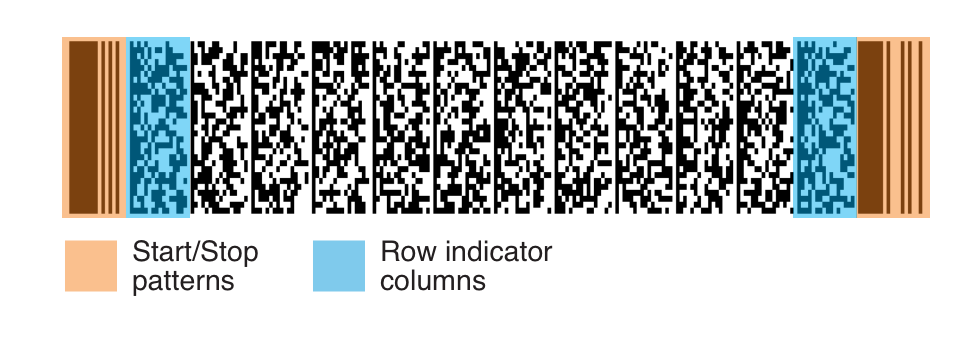
Most PDF417 decoders depend on the Start and Stop patterns and the row indicator columns. barKoder's LineSight doesn't, so it keeps reading when those elements are worn or missing.

See the damage cases on the PDF417 Barcode Scanner SDK page, then test your own samples.

Complete PDF417 barcode with the Start and Stop patterns and the row indicator columns highlighted
A complete PDF417 barcode with all its elements
PDF417 barcode missing both its Start and Stop patterns
barKoder Start and Stop patterns both missing Where other decoders start to fail.
Torn PDF417 barcode with several kinds of damage combined
barKoder Mixed damage Combinations of damage where other decoders don't even attempt a scan.
Test LineSight on your own licenses and discs Use a trial license to see how your hardest samples behave. Start an SDK trial

Where teams scan SA licenses, IDs and discs

Replace manual entry of ID numbers, names and license codes with one scan.

Scan SA licenses, IDs and license discs on every major platform

The SA DL parser ships with the barKoder SDK. License parsing is documented for native, web and cross-platform SDKs; the ID and license disc options for Android, iOS, Flutter, React Native, Capacitor, .NET MAUI, NativeScript and Cordova.

  • 7 native & desktop SDKs
  • 6 cross-platform integrations
  • One consistent scanning core

South African document scanning in production

Teams using barKoder to read South African licenses, ID cards and license discs.

ID data stays on the device

Decoding, decryption and parsing run locally. The SDK goes online only for the license check, at least once every 30 days, and it does not store any personal information retrieved from scanning a barcode. Your application decides what it keeps.

Try barKoder on your phone or in your browser

Install the free barKoder demo app, or open the web demo, and scan your own barcodes before you integrate the SDK.

iPhone and iPad

barKoder demo app for iOS

Scan with your camera, or point it at the QR code to open the App Store.

Download on the App Store
QR code linking to the barKoder demo app on the App Store

Android phones and tablets

barKoder demo app for Android

Scan with your camera, or point it at the QR code to open Google Play.

Get it on Google Play
QR code linking to the barKoder demo app on Google Play

Any modern browser

barKoder web demo

Runs the Web SDK in your browser, on desktop or mobile, with nothing to install.

Open the web demo
QR code linking to the barKoder web demo

Test with known samples. Print or display the testing sheet and scan each 1D and 2D barcode with the demo app. The data sheet summarizes the SDK for your team.

South African license, ID and license disc scanning questions

How do I scan a South African drivers license barcode in my app?

Add the barKoder SDK, enable the PDF417 decoder and set the formatting to SADL. When the user scans the back of the license, the SDK returns the decrypted, parsed fields and the holder photo. The SA driver's license parser docs show the code for each platform.

Can barKoder read South African Smart ID cards and vehicle license discs?

Yes. The SA ID and vehicle license disc parsers are options of the SA DL parser. Turn them on with the SADL_decode_ID and SADL_decode_vehicle_disk options. They are documented for the Android, iOS, Flutter, React Native, Capacitor, .NET MAUI, NativeScript and Cordova SDKs.

Why does a normal barcode scanner return unreadable data from the license?

The PDF417 on the South African driver's license is encoded and protected. A generic reader can decode the barcode symbols but can't interpret the payload. barKoder decrypts it and returns structured fields.

Can I get the photo from the driver's license barcode?

Yes. The SA DL parser decrypts and extracts the facial image embedded in the license barcode. Each SDK has a helper for it, for example BarkoderHelper.sadlImage on Android and getSADLImage in the Web SDK.

Does the drivers license scanner work offline?

Yes. Decoding, decryption and parsing run on the device, without a remote parsing service. The SDK goes online only for the license check, at least once every 30 days, and it does not store personal information from scans.

Can I scan SA licenses in a web app?

Yes. The barKoder Web SDK reads the license PDF417 in the browser and returns the parsed fields in formattedJSON. Start with the SA license web example and the WASM Barcode Scanner SDK page.

Is there a free online license disc scanner?

The free online barcode scanner reads barcodes from an uploaded image. To get parsed license, ID or license disc fields inside your own app, use the SDK with a free trial license.

Does a successful scan prove a license or ID is genuine?

No. Parsing interprets the data encoded in the barcode. It doesn't establish that the document is authentic or that it belongs to the person presenting it, so add the checks your application needs.

Add South African license, ID and license disc scanning to your app

Test the SA DL parser on your own licenses, Smart ID cards and license discs with a free 30-day trial, or talk to an SDK expert about your project.