On this page
The Cognex Mobile Barcode SDK (cmbSDK) and the Manatee Works Barcode Scanner SDK reached end of life on 30 September 2025. Cognex no longer updates or supports either of them.
"barKoder is the majority of the team that created Manatee Works and the Cognex Mobile Barcode SDK, so many of the apps that still run it are apps we helped get into production," says Vladimir Lazarevski, COO and co-founder of barKoder. "Their developers shouldn't be left with a scanner that nobody maintains. barKoder is where that work continues."
If your app still scans with one of them, this post covers what the end of life changes, what to check first, and how to move to an SDK that is still being developed.
What Cognex announced
Cognex published the notice on its Mobile Barcode Developer Network (cmbdn.cognex.com). In short:
- Both SDKs are end of life from 30 September 2025. There are no more updates and there is no support.
- Every subscription ended on that date.
- Existing customers could sign a license addendum for a free, perpetual license. Without it, the SDK stops working.
- The developer site would stay online only for documentation, the final downloads and the license keys you already had.
Cognex doesn't name a replacement product.
As of 12 November 2026, the developer site's address no longer resolves, so the documentation and the downloads can't be reached there.
When | What happened |
|---|---|
August 2015 | Cognex acquires the Manatee Works barcode scanning technology. The SDK becomes the Cognex Mobile Barcode SDK. |
September 2023 | Cognex stops taking new cmbSDK customers. |
30 September 2025 | cmbSDK and the Manatee Works SDK reach end of life. |
What it means for an app that still uses cmbSDK
Scanning depends on the perpetual license. Cognex said the SDK would stop working on or soon after 30 September 2025 for anyone who didn't sign the addendum. If your app still scans, make sure that's because your company signed it.
Nothing gets fixed any more. Every year brings new iOS and Android versions, new Xcode releases and new phone cameras, and scanning SDKs have to follow them. Two examples from our own releases this autumn: barKoder SDK 1.7.2 was needed for apps built with Xcode 27, and Web SDK 1.7.1 followed camera changes in iOS 26 and iOS 27. An SDK that is end of life gets none of this, so each OS update is a risk you carry alone.
There is nobody to ask. When a label won't read or a build fails, there is no support desk behind cmbSDK.
It shows up in reviews. Security and compliance reviews flag unsupported third-party components. That question usually arrives at a bad time, such as in the middle of a customer audit.
Three things to check first
- Where the SDK is. Search your projects for
cmbSDK,cmbsdk_flutter,cmbsdk-react-nativeand theCognex.cmbSDKNuGet packages. Don't forget older app versions that are still installed in the field. - Your license. Find the signed addendum for the perpetual license and your license keys, and keep them with the project.
- What you actually scan. List the barcode types, the devices and the hardest labels your users meet: damaged, blurred, curved, tiny, or marked on metal. This list is your test set for a replacement.
Moving to barKoder
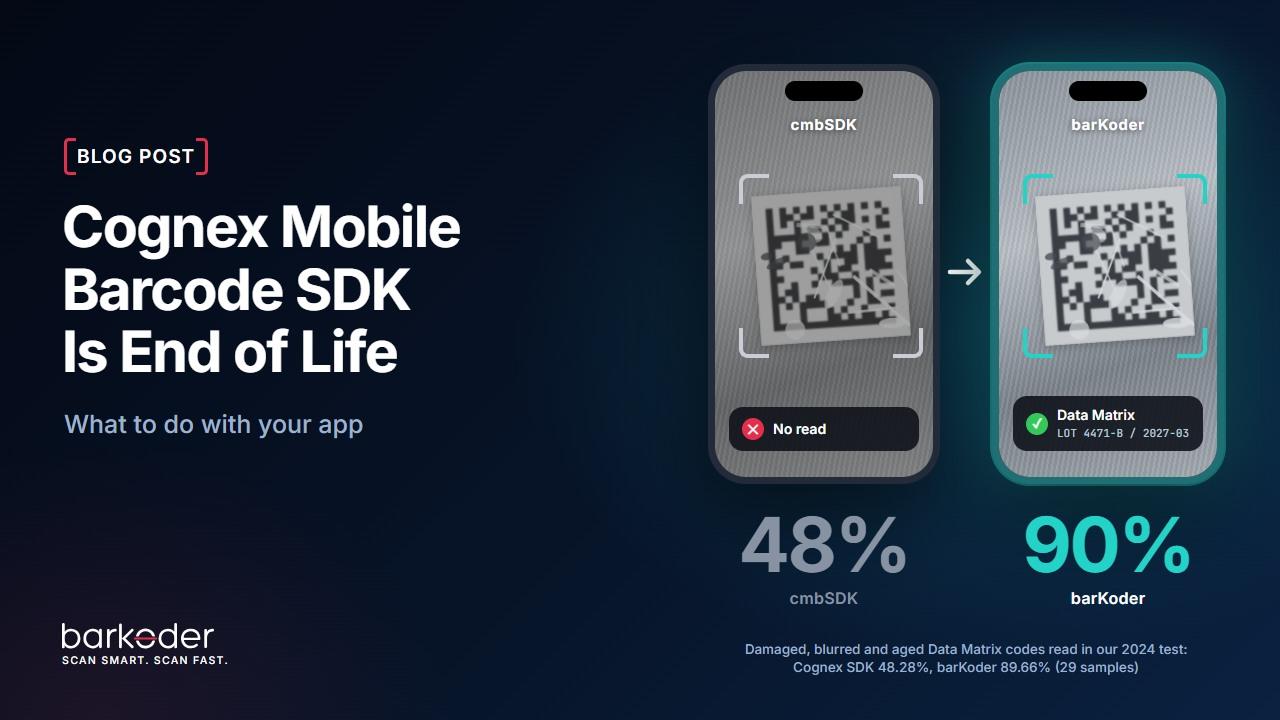
barKoder is what we built next, and it reads the codes cmbSDK gives up on. In our 2024 comparison test, barKoder read 89.66% of 29 damaged, blurred and aged Data Matrix samples, and the Cognex SDK read 48.28%. On 55 blurred EAN and UPC samples, barKoder read 89.09% and the Cognex SDK read none.
It also has what cmbSDK never had:
- MRZ scanning for passports and ID cards;
- VIN scanning, from the barcode or from the printed number;
- batch scanning of many codes in one pass;
- an AR overlay that marks codes on the live camera view.
And unlike cmbSDK, it's still supported.
Where your platform goes
You use | Move to |
|---|---|
cmbSDK for iOS or Android | |
| |
| |
| |
| .NET MAUI. Microsoft ended Xamarin support in May 2024, and barKoder has no Xamarin package. |
barKoder also runs on Capacitor, Cordova and NativeScript, in the browser as WebAssembly, and on Windows and Linux. It reads 40+ barcode types.
What the switch involves
Integration is really easy. There are four steps:
- Remove the cmbSDK package and add the barKoder one.
- Replace the cmbSDK key registration with your barKoder license key.
- Turn on the barcode types you use.
- Point your existing result handling at barKoder's result callback.
For Flutter, How to Replace Flutter Cognex SDK with barKoder API shows each step with the cmbSDK code and the barKoder code side by side.
One limit to know about: barKoder replaces the camera scanner. If your app also uses cmbSDK to connect to a Cognex handheld reader, that part is outside what barKoder does.
Questions we get
Does cmbSDK still work after 30 September 2025?
Only under the free perpetual license that Cognex offered to existing customers. It gets no updates and no support either way.
Is the Manatee Works Barcode Scanner SDK affected too?
Yes. Cognex ended both SDKs on the same date.
Does Cognex offer a replacement?
The end-of-life notice doesn't name one.
Is barKoder part of Cognex?
No. barKoder is an independent company. Our team created Manatee Works and the Cognex Mobile Barcode SDK, and barKoder is what we built next.
Does barKoder need a network connection to scan?
No. barKoder scans on the device, with a periodic license check. Offline licenses are available.
Try it on your hardest codes
Start a free 30-day trial. You generate the key yourself and can test on up to 25 devices. Use the list of difficult labels you made above. If you would like a quote or have a question about your setup, write to us: you'll reach people who know the SDK you're leaving.