barKoder has been a great partner in our digitalization project. The SDK is robust, easy to maintain, and perfectly suited for industrial applications like ours. We look forward to continuing to use it as our app suite grows.
Opens your camera right here. The scanner loads only when you click.
Certified and listed
 ISO/IEC 27001:2022Certified information security management
 GS1 Germany Solution PartnerStandards-based barcode and data capture
 GS1 US Solution PartnerBarcode, mobile application and 2D codes
 Microsoft MarketplaceThe barKoder Web SDK listing
 Zebra ISV PartnerRegistered vendor in Zebra PartnerConnect
In production at
All customer stories







“What truly made us choose barKoder was the simplicity of integration and high performance in DPM barcode scanning, outperforming competitors by 40%-50%, along with the outstanding support and expertise of your development team.”
At the heart of barKoder's cutting-edge decoding solution is MatrixSight, an algorithm that many consider groundbreaking. Exclusively integrated into the Barcode Scanner SDK, MatrixSight is crafted to set new standards for mobile barcode recognition.
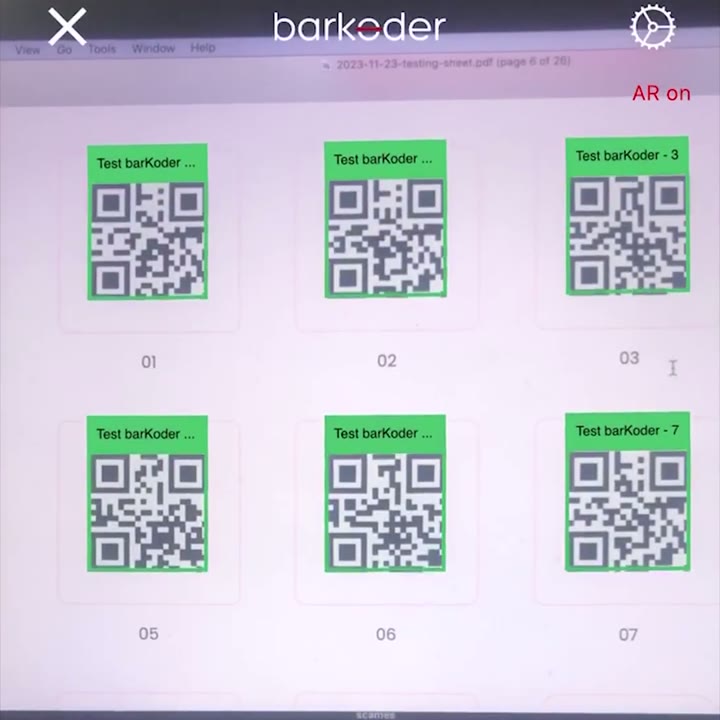
Many barcodes in one camera view, each with a live label on top of it, so your users see what matters without leaving the camera.
Built-in AR settings
Add high-performance barcode scanning to native, desktop, web and cross-platform applications with one proven decoding engine.
Direct SDKs for mobile, browser, desktop and server environments.
Official integrations for teams building one application across platforms.
Up to80%
lower hardware cost
Replace expensive, hard-to-maintain dedicated scanners with the smart devices your team already owns, in a BYOD fashion, without sacrificing scan speed.
See the pricing plansDeploy scanning into your iOS, Android or Web app with just a few lines of code. Zero learning curve for your staff.
Damaged, blurred, low-contrast, distorted and partially obscured barcodes. Zero delays on your warehouse or sales floor.
Work directly with engineers who can help tune scanning configurations and resolve difficult implementation cases.
Evaluate scanning performance with your own barcodes, devices and application workflow. No credit card required.
To fully experience the speed and accuracy of the Barcode Scanner SDK on your Android or iOS device, simply head to your preferred App Store by clicking on the respective button, or scan the QR Code with your camera.
barKoder Demo App
for iOS


barKoder Demo App
for Android


barKoder Demo App
for Web

Optimizing your experience with our app is effortless using our comprehensive Barcode Scanner SDK testing sheet,
encompassing a variety of 1D and 2D barcode types.
Simply print or display the sheet on your device, and proceed to scan each barcode using our demo app. This efficient testing method ensures that our app seamlessly recognizes and processes diverse barcode formats, assuring you of its reliability and versatility across different code types.
barKoder has been a great partner in our digitalization project. The SDK is robust, easy to maintain, and perfectly suited for industrial applications like ours. We look forward to continuing to use it as our app suite grows.
What truly made us choose barKoder was the simplicity of integration and high performance in DPM barcode scanning, outperforming competitors by 40%-50%, along with the outstanding support and expertise of your development team. barKoder offers a major advantage with its broad platform support and outperforms other competitor solutions. Big thanks for your support and the quality of your SDK.

Speed and consistency in scanning

The product works great, and we are very satisfied overall. barKoder offers excellent device coverage and reliable performance, making it a strong long-term solution for our applications.

As a COO of a software company I have seen and experience a lot of technologies. At the end of the day only few truly stick around over time. barKoder will be one of them.

Integrating barKoder into our System was a game-changer. We deployed 500 licenses across mobile and web platforms to support nationwide registrations, and barKoder's PDF417 scanning accuracy and cross-platform reliability exceeded our expectations. Registration processing times improved drastically, and data entry errors virtually disappeared — critical for data integrity. The offline-first architecture was good for remote field operations, and the barKoder team provided outstanding technical support throughout our development and deployment. For high-stakes systems where data accuracy is nonnegotiable, barKoder delivers.

The implementation of the barKoder solution in our application is a success, despite the fact that we are using an uncommon framework (Windev Mobile). The quality of the decoding makes all the difference.
We were using another library, but suddenly their cost went up a lot, and we had to stop using it. We tried other libraries, but they had a lot of errors, for example, multiple different readings of a single barcode, codes cut off in most of them. With barKoder, we got better performance overall.
barKoder is the only camera-based library we evaluated that delivers performance equivalent to a high-end physical barcode reader.
barKoder has proven to be a fast and reliable barcode recognition solution for our RVM system. Its straightforward integration into our camera-based AI pipeline was a major advantage, and its decoding performance has been particularly impressive with blurred and difficult-to-read barcodes. It has become a valuable part of our container identification system.
barKoder gave The Dealer Plate fast, reliable barcode scanning on any phone. We integrated the React Native SDK into both our iOS and Android apps in short order, and scanning went from the flaky part of our product to a feature our dealers just trust.

Choosing barKoder was the right decision, especially with the MRZ Scanner SDK merging into it. It has delivered outstanding performance for our QR and MRZ scanning needs

barKoder has impressed us with its speed and accuracy, even in challenging conditions. The library reliably reads both QR codes and barcodes in low‑light environments and has no trouble detecting extremely small codes, such as those printed on tiny components or screws. In practice, it’s one of the most dependable scanning solutions we’ve worked with.

High performance barcode reading utilising device camera. barKoder is an easy partner to work with helping us to develop an industry leading scanning solution.

Without barKoder working with us on a custom pricing model we would be paying a lot more annually. We have had no issues as far as being able to scan any barcodes.

barKoder is fast and reliable in scanning barcodes and QR codes. The plugin is easy to integrate and it's backed by a responsive support team.
barKoder isn't just a software vendor; they are a partner. Their technical support went above and beyond to ensure our specific regional use-case worked flawlessly, and their executive team gave our startup the flexibility we needed to successfully build our app.
Google ML Kit was not good enough to quickly and accurately capture the barcodes. With barKoder we scan codes faster and scan more dense codes, even in sub-par conditions. When we had a memory leak, the team sorted it out within one day. Really love your customer support.

barKoder SDK demonstrated to be a reliable and very quick solution to integrate scanning capabilities inside a mobile app. The full offline activation of the licence is very relevant to operate in segregated networks, and the level of support is awesome, something bigger companies should learn from.

Having a WASM solution was critical since we run a web app rather than a mobile app. Our drivers, across many different devices, have successfully scanned thousands of VINs in the field. barKoder has proven reliable in real-world conditions and works seamlessly with our web application.

The MRZ scanner is our favorite feature. Its speed and accuracy transformed a previously frustrating and error-prone process of reading ID documents into a seamless, one-click action for our end users. We see barKoder as a long-term partner.

It hits the trifecta that matters in operations: dependable performance, responsive support, and sensible pricing. Continuous scanning lets operators keep their flow and move to the next parcel without extra taps.

We looked at several competitors and open-source solutions. The content of the SDK in comparison with the price made us choose your product, and on the way, the excellent support. Its ability to scan codes in normal and extreme conditions is our favourite feature.

The product delivers exactly what it promises—fast, reliable scanning—while the team behind it is responsive and committed to customer success.

Fast scanning, fast implementation and great support… all hallmarks of a good software provider.

barKoder is a reliable product with an easy integration, the best solution we could find on the market.
Get full production-ready access to our SDK features for 30 days. Implementation takes minutes.