Retail industry

Retail barcode scanning SDK for stores, kiosks and shopper apps

Add fast EAN and UPC scanning to store apps, self-service kiosks and shopper apps. DeBlur reads motion-blurred product barcodes, Batch MultiScan counts a shelf in one view, and the Web SDK runs in the browser on kiosks, tablets and phones.
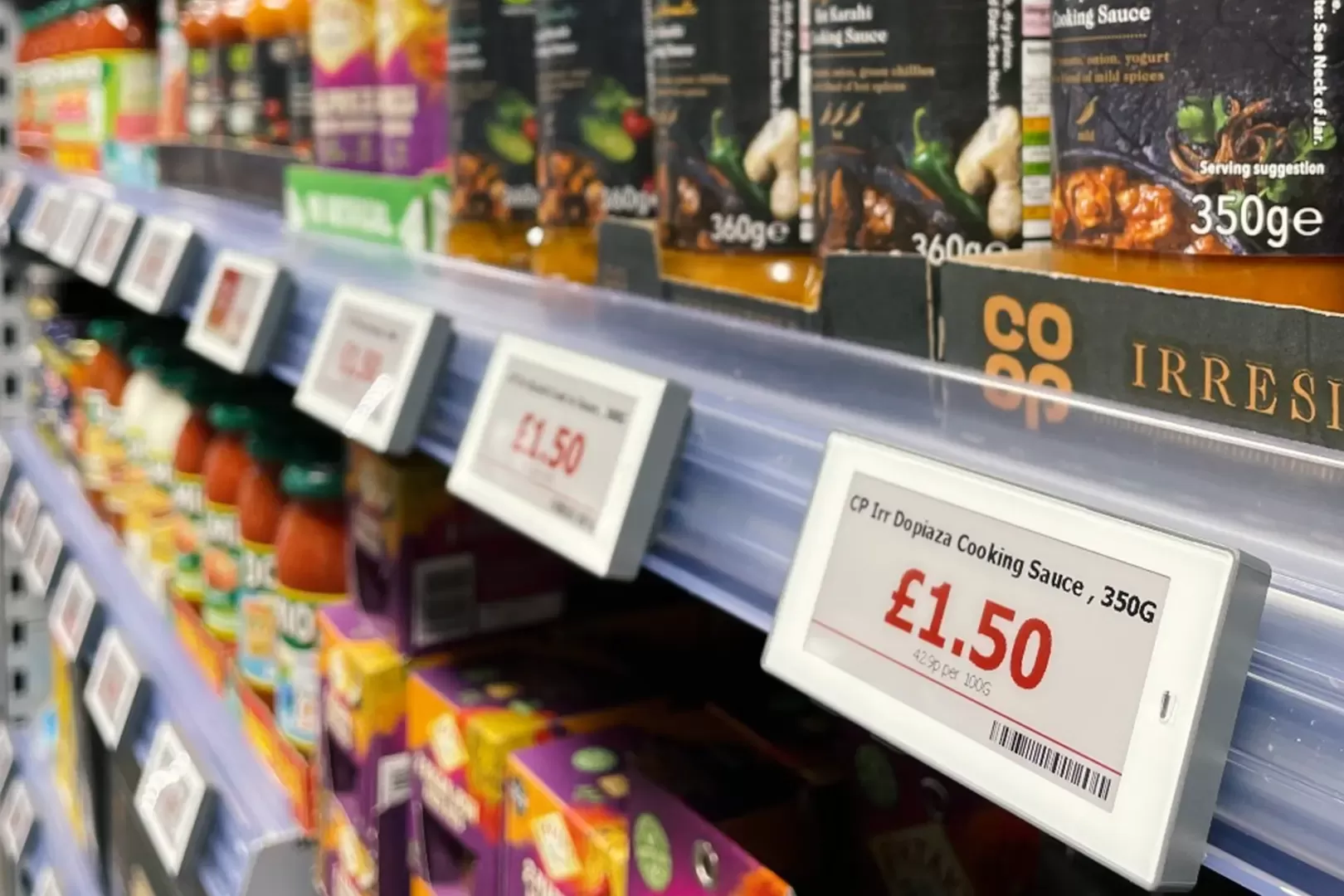

Supermarket shelf with electronic price labels carrying barcodes

A barcode SDK for retail apps your staff and shoppers use

Retail scanning happens on the move: a shopper with a mid-range phone, an associate walking an aisle, a kiosk camera with no one to aim it. barKoder is built to read product codes in those conditions, inside your own app.

Test with your own products

Bring the packs that cause trouble today:

  • Glossy and reflective packs
  • Curved bottles and cans
  • Crumpled bags
  • Shelf and price labels
  • Blurry shots while walking
  • Shoppers' older phones
Start an SDK trial

Start from the retail template

The Web SDK and the barKoder demo apps include a Retail 1D template for UPC-A, UPC-E, EAN-8 and EAN-13 with DeBlur turned on. Try it in your browser, then apply the same settings in your app.

For a full app example, see the barKoder Shopping Cart example: create products, build lists and check items off by scanning them.

Open the web demo

Retail barcode scanning from the stockroom to the checkout

Each use case links to the barKoder feature that handles it.

Self-checkout and unmanned kiosks

Web SDK, Windows and Linux SDKs

Scan products at a kiosk camera in the browser, or in a native kiosk app on Windows or Linux. Pool Digital runs the Web SDK in an unmanned grocery kiosk.

WASM Barcode Scanner SDK →

Blurry and crumpled product codes

DeBlur and Segment Decoding

DeBlur reads heavily blurred EAN and UPC barcodes, even when the bars have fused. Segment Decoding reads 1D codes on cans, bottles and crumpled bags.

DeBlur →

Shelf audits and stocktaking

Batch MultiScan with AR Mode

Read every shelf label and price tag in one camera view. AR overlays can show stock availability, prices or promo tags over each code.

Batch MultiScan →

Finding one product on a crowded shelf

Search & Find

An associate enters the product and points the camera at the display. The scanner keeps checking every visible code and highlights the one they need.

AR barcode scanning →

Continuous scanning at the counter

Continuous Scanning

Keep the camera open for checkout and shelf audits and scan item after item, with a delay so the same product isn't added twice by accident.

Continuous barcode scanning →

2D codes at the point of sale

GS1 Parser, DataBar and QR

By the end of 2027, retail POS systems are expected to scan GS1 2D codes alongside EAN/UPC. barKoder reads GS1 QR, GS1 DataMatrix and DataBar and parses GTIN, batch and expiry.

GS1 Parser →

Barcodes you'll scan in retail

Common symbologies in stores and shopper apps
Symbology Where it appears
EAN and UPC Product identification at checkout; the most common retail barcodes
GS1 DataBar Product labels that also carry weight, dates or serial numbers (DataBar Expanded)
QR Code Loyalty programs, promotions and GS1 Digital Link on packs
Data Matrix Loyalty and product codes; GS1 DataMatrix with batch and expiry
Code 128 Loyalty cards, internal logistics and inventory control
ITF-14 Cases and pallets arriving in the stockroom

Damaged QR and Data Matrix codes on loyalty cards and packs are read with MatrixSight®.

Scan in shopper apps, store devices and kiosks

Use the Web SDK for browser-based shopper apps and kiosks, native Android and iOS SDKs for store devices, Windows and Linux SDKs for kiosks and POS, and plugins for Flutter, React Native, .NET MAUI, Capacitor, Cordova and NativeScript.

  • 7 native & desktop SDKs
  • 6 cross-platform integrations
  • One consistent scanning core

Retail and self-service projects using barKoder

Kiosks and machines where no one is there to aim the scanner.

Try barKoder on your phone or in your browser

Install the free barKoder demo app, or open the web demo, and scan your own barcodes before you integrate the SDK.

iPhone and iPad

barKoder demo app for iOS

Scan with your camera, or point it at the QR code to open the App Store.

Download on the App Store
QR code linking to the barKoder demo app on the App Store

Android phones and tablets

barKoder demo app for Android

Scan with your camera, or point it at the QR code to open Google Play.

Get it on Google Play
QR code linking to the barKoder demo app on Google Play

Any modern browser

barKoder web demo

Runs the Web SDK in your browser, on desktop or mobile, with nothing to install.

Open the web demo
QR code linking to the barKoder web demo

Test with known samples. Print or display the testing sheet and scan each 1D and 2D barcode with the demo app. The data sheet summarizes the SDK for your team.

Retail barcode SDK questions

Can barKoder read blurry EAN and UPC barcodes?

Yes. DeBlur is built for heavily blurred EAN and UPC codes, including bars fused by motion, lens or focus blur. It is off by default; turn it on with the UPC/EAN DeBlur setting or use the Retail 1D template.

Which barcodes do retailers use?

EAN and UPC identify products at checkout. ITF-14 marks cases and pallets, and Code 128 is used for internal logistics and inventory control. Loyalty programs often use QR codes or Code 128, and GS1 DataBar, GS1 DataMatrix and QR codes carry extra data such as batch, expiry or weight. barKoder reads all of them.

Do shoppers need to install an app to scan products?

No. The WASM Barcode Scanner SDK scans in the browser on phones, tablets and kiosks. If you already have a native shopper app, use the Android, iOS, Flutter or React Native SDK instead.

Can store associates scan a whole shelf at once?

Yes. Batch MultiScan reads several barcodes in one camera view, and AR Mode marks which codes are already scanned. To look for a single product among many, use Search & Find.

Is barKoder ready for 2D barcodes at the point of sale?

Retail is moving toward GS1 2D codes alongside UPC and EAN by the end of 2027. barKoder reads GS1 DataMatrix and QR codes, including GS1 Digital Link QR codes. The GS1 Parser breaks GS1 element strings into GTIN, batch, serial and expiry fields; Digital Link web addresses are returned as text.

Does barKoder store data from scanned products or loyalty cards?

No. Scanning runs on the device, and the SDK doesn't store any information retrieved from a scanned barcode. It connects only for the license check, at least once every 30 days.

How do I try barKoder in my store app?

Get a free trial license for 30 days on 25 devices and test it with your own products and devices. Write to support@barkoder.com with questions.

Add retail barcode scanning to your app

Test DeBlur, Batch MultiScan and kiosk scanning with your own products on a free 30-day trial, or talk to an SDK expert about your store or shopper app.