PDF417 Barcode Format and Reader SDK

PDF417 is a stacked 2D barcode that stores up to 1,850 text characters in rows of codewords. It is the barcode on the back of US and Canadian driver's licenses, on many ID cards and on printed boarding passes. barKoder reads and parses it in your iOS, Android and web apps.

PDF417

PDF417 at a glance

PDF417 key facts
Type Stacked (multi-row) 2D symbology. 3 to 90 rows, each with 1 to 30 data columns.
Character set and data All printable ASCII characters in Text mode, all 256 byte values in Byte mode, and a dense Numeric mode. Other character sets through ECI.
Capacity Up to 1,850 text characters, 1,108 bytes or 2,710 digits in one symbol (925 data codewords)
Error correction 9 selectable levels, from 2 to 512 error correction codewords per symbol
Standard ISO/IEC 15438 (current edition 2015). MicroPDF417 is defined in ISO/IEC 24728.
Typical uses Driver's licenses and ID cards (AAMVA), South African driving licenses, printed airline boarding passes (IATA), shipping and parts labels

What a PDF417 barcode is and how it is built

A PDF417 barcode is a stack of short linear barcodes. Each row is read like a 1D code, and the rows together carry one message. The name describes the codeword: every symbol character is 17 modules wide and is made of 4 bars and 4 spaces.

Every row has the same parts, left to right:

  • Quiet zone: a blank margin. PDF417 needs one on all four sides.
  • Start pattern: identical in every row. It tells the reader where the symbol begins.
  • Left row indicator: a codeword with the row number, the number of rows and columns, and the error correction level.
  • Data codewords: 1 to 30 per row, holding the data and the error correction codewords.
  • Right row indicator and stop pattern: the same information again, then the end of the row.

Each row uses one of three codeword patterns in turn, so a reader can tell neighboring rows apart even when a scan line crosses several of them. The error correction codewords let it rebuild missing or misread codewords.

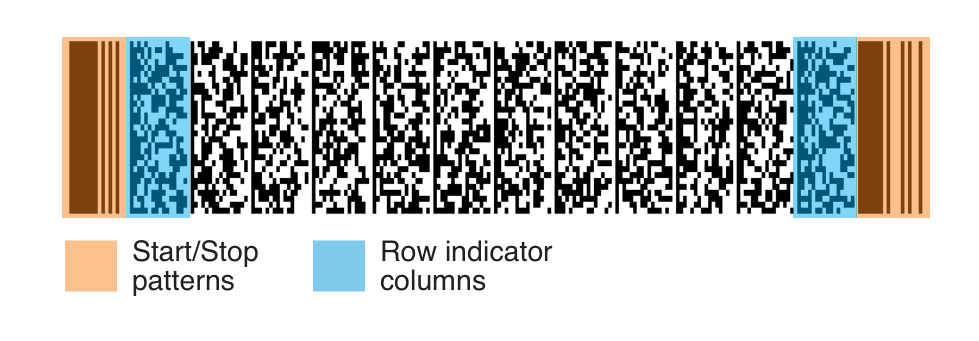
PDF417 barcode with the start and stop patterns and the row indicator columns highlighted
Start and stop patterns (orange) and row indicator columns (blue). The data columns sit between them.

PDF417 variants and the data formats inside them

The symbology comes in a few forms. What changes most from one document to the next is the data format inside the barcode.

PDF417 variants and what they mean for scanning
Variant What it is Scanning notes
PDF417 The standard symbol, with start and stop patterns and row indicators on both sides of every row Enable the PDF417 decoder
Compact PDF417 Drops part of the right-hand row overhead for higher density in clean environments. Older documents call it Truncated PDF417. Read by the same PDF417 decoder
MicroPDF417 A smaller multi-row symbology derived from PDF417, with a limited set of sizes and a fixed error correction level for each barKoder has a separate MicroPDF417 decoder
Macro PDF417 An optional feature that splits one data file across up to 99,999 linked PDF417 symbols Each linked symbol carries a Macro PDF417 control block
AAMVA DL/ID data The data layout on US and Canadian driver's licenses and ID cards: name, address, date of birth, document number, dates, class and more Parse it with the AAMVA parser
South African driving license data An encrypted payload that includes the holder's photo Decrypt and parse it with the SA DL parser

Where PDF417 barcodes are used

PDF417 is chosen when a printed document has to carry a full record that can be read without a network connection.

Government and ID verification

AAMVA DL/ID, South African IDs

US states and Canadian provinces encode license holder data in a PDF417 barcode on the back of driver's licenses and ID cards, following the AAMVA standard. South African driving licenses and Smart ID cards carry PDF417 too. Police, KYC and access-control apps scan them to capture identity data.

Barcode scanning for government →

Automotive, rental and fleet

Driver check-in, vehicle license discs

Car rental and fleet apps scan the driver's license at check-in. In South Africa, vehicle license discs carry a PDF417 barcode that is scanned through the windshield. Automotive parts labels also use PDF417, alongside Code 128.

Barcode scanning for automotive →

Travel and hospitality

IATA Resolution 792

PDF417 is the default barcode on printed airline boarding passes, carrying the passenger name, flight and seat details. The boarding pass parser returns them as separate fields. Hotels and venues scan driver's licenses in their visitor management systems.

Barcode scanning for hospitality →

Logistics

Shipping labels

Shipping labels use PDF417 when sender and recipient details or shipment data must travel with the parcel on a single label. FedEx packages, for example, carry Code 128 and PDF417.

Barcode scanning for logistics →

Scanning PDF417 with barKoder

The barKoder Barcode Scanner SDK reads PDF417 on iOS, Android, the web, Windows and Linux, and in Flutter, React Native, .NET MAUI, Capacitor, Cordova and NativeScript apps. This page explains the format. For damaged-code reading and ID scanning, go to the product and parser pages below.

LineSight® for worn and damaged codes

Most decoders need the start and stop patterns and the row indicators. LineSight keeps reading when they are worn, cut off or missing, and when data columns are missing from the side or the middle of the barcode.

PDF417 Barcode Scanner SDK →

AAMVA parser for US and Canadian licenses

Turns the PDF417 payload on driver's licenses and ID cards into labeled JSON fields, following the AAMVA DL/ID Card Design Standard, with check digit and formatting validation. It runs on the device.

AAMVA Driver's License Parser →

SA DL parser for South African documents

Decrypts and parses the PDF417 barcode on South African driving licenses, including the holder photo, without a remote parsing service. Parsers for South African Smart ID cards and vehicle license discs are enabled as options of the same parser.

SA Driver's License Parser →

PDF417 barcode reader SDK: enable the decoder

Enable only the decoders you need. This Web SDK example from the barKoder docs enables PDF417 and turns on automatic formatting, so supported documents come back parsed.

Web SDK (JavaScript)

JavaScript
                async function barkoderInit () {
                var Barkoder = await BarkoderSDK.initialize("your_license_key_here");
                //enable symbologies you'd like to scan
                Barkoder.setEnabledDecoders(
                Barkoder.constants.Decoders.PDF417
                );
                //change any additional settings
                Barkoder.setCameraResolution(Barkoder.constants.CameraResolution.FHD);
                Barkoder.setDecodingSpeed(Barkoder.constants.DecodingSpeed.Slow);
                Barkoder.setFormatting(Barkoder.constants.Formatting.Automatic);
                }
                barkoderInit(); //using await requires an async method
              

The parsed fields arrive in the result's formattedJSON. Add Barkoder.constants.Decoders.PDF417Micro if you also scan MicroPDF417.

Get scanning in three steps

  1. Get a free trial license and install the SDK for your platform.
  2. Enable the PDF417 decoder and set formatting to Automatic.
  3. Read the parsed license or ID fields in your result callback.
See the PDF417 web example

South African parser examples for other platforms: Android, iOS, Flutter, React Native, Capacitor, Cordova, .NET MAUI and NativeScript.

Scan a PDF417 barcode on your phone or in your browser

Install the free barKoder demo app, or open the web demo, and scan the back of a driver's license or a printed boarding pass before you integrate the SDK.

iPhone and iPad

barKoder demo app for iOS

Scan with your camera, or point it at the QR code to open the App Store.

Download on the App Store
QR code linking to the barKoder demo app on the App Store

Android phones and tablets

barKoder demo app for Android

Scan with your camera, or point it at the QR code to open Google Play.

Get it on Google Play
QR code linking to the barKoder demo app on Google Play

Any modern browser

barKoder web demo

Runs the Web SDK in your browser, on desktop or mobile, with nothing to install.

Open the web demo
QR code linking to the barKoder web demo

Test with known samples. Print or display the testing sheet and scan each 1D and 2D barcode with the demo app. The data sheet summarizes the SDK for your team.

PDF417 barcode questions

What is the best SDK for PDF417 barcode scanning?

The one that reads your real documents on your target devices. Shortlist SDKs that read worn and partly damaged barcodes, parse the document formats you need and run on your platforms, then test them on your own samples. barKoder covers damaged codes with LineSight®, parses US, Canadian and South African documents on the device, and runs on iOS, Android, the web and frameworks such as Flutter, React Native and .NET MAUI. The free trial runs for 30 days on up to 25 devices.

What does the PDF417 barcode on a driver's license contain?

On US and Canadian licenses, the barcode follows the AAMVA DL/ID Card Design Standard. It holds the full name, address, date of birth, document number, issue and expiration dates, jurisdiction and class, and often gender, eye color, endorsements and restrictions. The AAMVA parser returns these as labeled JSON fields. South African driving licenses use an encrypted format that also contains the holder's photo, which the SA DL parser decrypts on the device.

How much data can a PDF417 barcode hold?

One symbol holds up to 925 data codewords: 1,850 text characters, 1,108 bytes or 2,710 digits at the lowest error correction level. At the minimum recommended error correction level the figures are 1,726 text characters, 1,033 bytes or 2,528 digits. For larger files, Macro PDF417 links up to 99,999 symbols.

Is there a PDF417 scanner app for Android?

Yes. The free barKoder demo app for Android and iOS reads PDF417 with the phone camera, so you can try your own licenses and labels. To add PDF417 scanning to your own Android app, use the Android Barcode Scanner SDK, which supports Android 8.0 (API 26) and newer.

Can I read a PDF417 barcode online or from an image?

Yes. To check a single photo or screenshot, upload it to the free online barcode scanner. To read PDF417 from images inside your own web app, the Web SDK decodes files selected by the user with scanFromLocalFileSystem, described in the Web SDK API reference.

What is the difference between PDF417 and Code 128?

Code 128 is a one-row linear barcode for short IDs such as serial and shipment numbers. PDF417 stacks up to 90 rows and holds a full record, such as a license holder's details, in one symbol. Use Code 128 for a single identifier and PDF417 when the label or card must carry the whole record. barKoder reads both with the same SDK.

Add PDF417 scanning to your app

Test the SDK on your own licenses, ID cards and labels with a free 30-day trial, or talk to an SDK expert about your project.