EAN and UPC Barcode Scanner SDK

EAN and UPC barcodes are the 1D barcodes on retail products worldwide, each carrying the product's GTIN in 8, 12 or 13 digits. barKoder scans EAN-13, EAN-8, UPC-A and UPC-E codes, including heavily blurred ones, with the camera in your iOS, Android and web apps.

EAN and UPC

EAN and UPC at a glance

EAN/UPC symbology key facts
Type Linear (1D), continuous, fixed-length symbology. Four symbol types: EAN-13, EAN-8, UPC-A and UPC-E, with optional 2- and 5-digit add-ons.
Character set Digits 0-9 only. Each digit is 7 modules wide, made of two bars and two spaces.
Capacity 13 digits (EAN-13), 12 digits (UPC-A) or 8 digits (EAN-8), check digit included. UPC-E encodes 6 digits that stand for a 12-digit GTIN with its zeros removed.
Check digit One mandatory modulo 10 check digit, the last digit of the number. Add-ons have no check digit of their own.
Standard ISO/IEC 15420. GS1 General Specifications, section 5.2.
Typical uses Retail point of sale, inventory and stock counts, books and periodicals (with add-ons). EAN-8 and UPC-E go on very small items.

What EAN and UPC barcodes are and how they are built

EAN and UPC are one symbology family, managed by GS1. UPC-A grew up in the US and Canada, EAN-13 in the rest of the world, and today both carry the same kind of number: a GTIN that identifies one product. Scanners at the checkout read them from any direction.

An EAN-13 barcode is built from left to right like this:

  • Quiet zone and guard bars: a blank margin, then a short guard pattern that marks the start.
  • Left half: six digits. The mix of odd and even bar patterns in this half also encodes the 13th digit, the one printed outside the bars on the left.
  • Centre guard: a fixed pattern that splits the code in two.
  • Right half and check digit: six more digits, the last of which is the check digit, then the end guard and quiet zone.

UPC-A has the same layout with 12 digits, so a UPC-A reads as an EAN-13 that starts with 0. EAN-8 is a shorter version with 4 digits on each side. UPC-E drops the centre guard and squeezes zeros out of a UPC number to fit small packs.
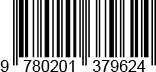
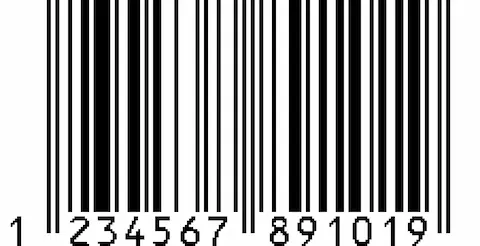
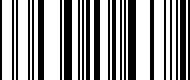
EAN-13 barcode encoding 1234567891019
An EAN-13 barcode. The first digit, 1, is encoded by the pattern of the left half. The last digit, 9, is the check digit.

EAN and UPC variants

Four main symbols and two add-ons. barKoder has a separate decoder for each main symbol.

EAN/UPC variants and what they mean for scanning
Variant Data Where you find it barKoder decoder
EAN-13 13 digits: a GTIN-13 with check digit Retail products worldwide. Also books (ISBN, prefixes 978-979) and serials (ISSN, prefix 977). Ean13
EAN-8 8 digits: a GTIN-8 with check digit Very small retail items where an EAN-13 does not fit Ean8
UPC-A 12 digits: a GTIN-12 with check digit Retail products in the US and Canada UpcA
UPC-E 6 encoded digits standing for a GTIN-12 that starts with 0 and contains a run of zeros Very small retail items, mainly in the US and Canada UpcE, with an option to return the full UPC-A number
2-digit add-on 2 extra digits printed to the right of an EAN-13, UPC-A or UPC-E Magazines and other periodicals Not returned today: barKoder returns the main number without the add-on digits
5-digit add-on 5 extra digits to the right of the main symbol Books, for example the recommended retail price Not returned today: barKoder returns the main number without the add-on digits

The GTIN inside an EAN or UPC barcode

The number in the barcode is a Global Trade Item Number (GTIN). Its structure tells you who issued it, and its last digit lets you check it.

How the number is built

  • GS1 Company Prefix: 4 to 12 digits assigned to the brand owner. Its first digits are a GS1 Prefix that GS1 allocates to a national GS1 organization or to a special use.
  • Item reference: the digits the brand owner assigns to each product.
  • Check digit: the last digit, calculated from all the others.

A GTIN-12 (UPC-A) uses a U.P.C. Company Prefix. Prefixes 02 and 20-29 are restricted circulation numbers, used inside a region or a company, for example for variable-weight items. The GS1 Prefix shows which GS1 organization issued the number, so country of origin is carried separately, in GS1 Application Identifier (422).

How to check an EAN or UPC number

  1. Start from the rightmost digit before the check digit and multiply the digits alternately by 3 and 1.
  2. Add the results. For 123456789101 the sum is 91.
  3. Subtract the sum from the next multiple of 10. 100 - 91 = 9, so the full EAN-13 is 1234567891019.

The same method works for GTIN-8, GTIN-12, GTIN-13 and GTIN-14. A reader uses it to catch misreads and mistyped numbers.

GTIN-14 numbers for cases and pallets are not carried in EAN/UPC symbols. They use ITF-14, GS1-128 or GS1 DataBar. See Code 25 and ITF-14 and GS1 DataBar.

Where EAN and UPC barcodes are used

Wherever a product is sold, counted or restocked, there is an EAN or UPC code on it.

Retail

Checkout, self-scanning, stock counts

UPC and EAN identify products at the checkout, where each scan applies the price from the retailer's database. Store staff scan the same codes to verify stock, and shoppers scan them in self-checkout and product-information apps.

Barcode scanning for retail →

Food and beverage

Shipments, shelves, recalls

UPC is the default retail format in the US and Canada, and EAN elsewhere. Food and beverage companies label cases and units so retailers can verify shipments, confirm product counts and update on-shelf inventory.

Barcode scanning for food and beverage →

Warehousing

Receiving, picking, cycle counts

EAN-13 and UPC-A codes are also read in general distribution, not only at the checkout. Warehouses scan them to receive goods, pick orders and run inventory counts with phones instead of fixed scanners.

Barcode scanning for warehousing →

Logistics

Product identification in transit

Logistics teams scan product barcodes alongside shipping labels to confirm what is in each delivery. Combined with Code 128 and ITF-14 labels, they track goods from the supplier to the shelf.

Barcode scanning for logistics →

Scanning EAN and UPC with barKoder

The barKoder Barcode Scanner SDK reads EAN and UPC on iOS, Android, the web, Windows and Linux, and in Flutter, React Native, .NET MAUI, Capacitor, Cordova and NativeScript apps. These features matter most for retail codes.

DeBlur for blurred codes

A dedicated algorithm for heavily blurred EAN and UPC barcodes, even when separate bars have fused together. It handles lens blur, motion blur and focus blur. Turn it on with the UPC/EAN deblur setting, which is off by default.

DeBlur Barcode Scanner SDK →

Batch MultiScan for shelves and counts

Decodes several barcodes in a single camera view, whatever their type or size. Use it on supermarket price tags and for inventory counting, where many product codes sit side by side.

Batch MultiScan →

Segment Decoding for damaged codes

Handles deformed or damaged 1D barcodes, the kind you find on crushed packaging and worn labels in stores and stockrooms.

Segment Decoding →

Continuous scanning at the checkout

Lets cashiers scan items in rapid succession without pausing for each barcode, and lets staff scan whole shelves during an inventory audit.

Continuous scanning →

EAN and UPC barcode reader API

Enable only the decoders you need. This Android example from the barKoder docs enables EAN-13 and UPC-A, together with QR Code.

Android (Kotlin)

Kotlin
                              private fun setActiveBarcodeTypes() {
                          // There is an option to set multiple active barcodes at once as array
                          bkdView.config.decoderConfig.SetEnabledDecoders(
                          arrayOf(
                          Barkoder.DecoderType.Ean13,
                          Barkoder.DecoderType.Ean8
                          )
                          )
                          // or configure them one by one
                          bkdView.config.decoderConfig.UpcA.enabled = true
                          }
                        

Add Ean8, UpcE and UpcE1 the same way. To have UPC-E results returned as full UPC-A numbers, use the UPC-E expand-to-UPC-A setting in the API reference.

Web SDK: turn on DeBlur

JavaScript
                          Barkoder.setUpcEanDeblur(Barkoder.constants.UpcEanDeblur.Enable);
                        
  1. Get a free trial license and install the SDK for your platform.
  2. Enable the EAN and UPC decoders your products use, and DeBlur if codes are often out of focus.
  3. Look up the GTIN from your result callback in your product or price database.
See the Android example

Decoder setup for other platforms: iOS, Web SDK, Flutter, React Native, .NET MAUI, Capacitor, Cordova and NativeScript.

Scan an EAN or UPC barcode on your phone or in your browser

Install the free barKoder demo app, or open the web demo, and scan the products on your own shelves, including blurred and worn labels, before you integrate the SDK.

iPhone and iPad

barKoder demo app for iOS

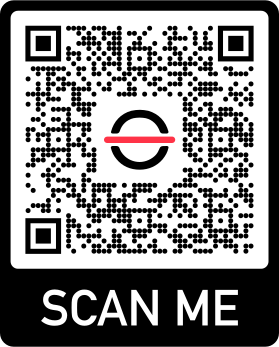
Scan with your camera, or point it at the QR code to open the App Store.

Download on the App Store
QR code linking to the barKoder demo app on the App Store

Android phones and tablets

barKoder demo app for Android

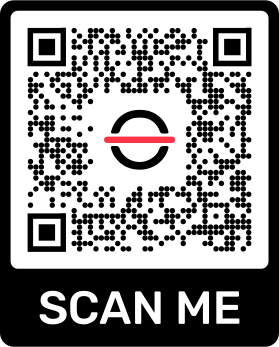
Scan with your camera, or point it at the QR code to open Google Play.

Get it on Google Play
QR code linking to the barKoder demo app on Google Play

Any modern browser

barKoder web demo

Runs the Web SDK in your browser, on desktop or mobile, with nothing to install.

Open the web demo
QR code linking to the barKoder web demo

Test with known samples. Print or display the testing sheet and scan each 1D and 2D barcode with the demo app. The data sheet summarizes the SDK for your team. To make your own test labels, the free barcode generator creates EAN, UPC-A and UPC-E barcodes.

EAN and UPC scanner questions

What is the difference between EAN and UPC?

They are the same symbology family with different lengths. UPC-A holds 12 digits and is used mainly in the US and Canada. EAN-13 holds 13 digits and is used in the rest of the world. Both carry a GTIN, both end in a modulo 10 check digit, and the barcodes share the same bar patterns and guard bars. Retail scanners read both, and the barKoder SDK has a decoder for each: UpcA, UpcE, Ean13 and Ean8.

How do I convert a UPC to an EAN, or an EAN to a UPC?

Add a leading 0 to a 12-digit UPC-A number and you have its 13-digit EAN-13 form. The check digit stays the same. Going the other way only works when the EAN-13 starts with 0: drop the 0 to get the UPC-A. An EAN-13 that starts with any other digit has no UPC-A equivalent. A UPC-E code can be expanded to its full 12-digit UPC-A number, and the barKoder SDK can do this for you with its UPC-E expand-to-UPC-A setting.

How do I check if an EAN code is valid?

Recalculate the check digit. Starting from the rightmost digit before the check digit, multiply the digits alternately by 3 and 1, add the results, and subtract the sum from the next multiple of 10. If the answer matches the last digit, the number is well formed. This confirms the number was read or typed correctly. It does not tell you whether the GTIN is registered to a brand. For that, look the number up with GS1.

Can barcode software handle EAN codes from different countries?

Yes, because there is only one EAN format. Every country uses the same EAN-13 and EAN-8 symbols. The first digits, the GS1 Prefix, show which national GS1 organization issued the number, but the barcode structure and check digit are identical everywhere. A scanner that reads EAN-13 reads codes from every country, along with UPC-A codes from the US and Canada.

Can barKoder read blurry or damaged UPC and EAN barcodes?

Yes. barKoder's DeBlur algorithm decodes heavily blurred EAN and UPC barcodes, even when the bars have fused together, and handles lens, motion and focus blur. Segment Decoding handles deformed or damaged 1D barcodes. Turn on DeBlur with Barkoder.setUpcEanDeblur(Barkoder.constants.UpcEanDeblur.Enable); in the Web SDK, or the matching setting on other platforms.

What is the best EAN barcode scanner SDK?

The one that reads your real products on your target devices. Shortlist SDKs that handle blurred and damaged codes, many codes in one frame and your platforms, then test them on your own shelves. barKoder covers these with DeBlur, Segment Decoding and Batch MultiScan, and runs on iOS, Android, the web and cross-platform frameworks such as Flutter, React Native and .NET MAUI. The free trial runs for 30 days on up to 25 devices.

Add EAN and UPC scanning to your app

Test the SDK on your own products, shelves and price tags with a free 30-day trial, or talk to an SDK expert about your project.