QR Code Scanner SDK for Mobile and Web Apps

QR Code is a square 2D barcode, located by three finder squares in its corners, that stores URLs, text, payment and product data. The barKoder SDK reads QR Code and Micro QR with the camera in your iOS, Android and web apps, including damaged codes that have lost their finder patterns.

QR Code

QR Code at a glance

QR Code key facts
Type 2D matrix symbology with three finder patterns. Micro QR is a smaller variant with one finder pattern.
Character set and data Numeric, alphanumeric (0-9, A-Z, space and $ % * + - . / :), bytes (ISO/IEC 8859-1 by default, other character sets through ECI) and Kanji. GS1 data through FNC1 mode.
Versions and capacity 40 versions, from 21 x 21 modules (version 1) to 177 x 177 modules (version 40). Version 40-L holds up to 7,089 digits, 4,296 alphanumeric characters, 2,953 bytes or 1,817 Kanji characters.
Error correction Reed-Solomon, in four levels: L recovers about 7% of codewords, M 15%, Q 25% and H 30%
Standard ISO/IEC 18004 (current edition 2024). GS1 QR Code is defined in the GS1 General Specifications.
Typical uses Links on packaging and print, mobile payments, event tickets, loyalty programs, menus and part tracking in manufacturing

A QR Code scanner SDK for mobile and web apps

The barKoder Barcode Scanner SDK reads QR Code and Micro QR on iOS, Android, the web, Windows and Linux, and in Flutter, React Native, .NET MAUI, Capacitor, Cordova and NativeScript apps. Scanning runs locally on the device. These features matter most for QR codes.

MatrixSight® for damaged QR codes

Most decoders rely on the three finder patterns and fail when two or more are damaged. MatrixSight reads QR codes with all three finder patterns missing, even when the alignment pattern is gone too and the data area is damaged. It also reads Micro QR codes whose single finder pattern is missing.

MatrixSight® algorithm →

DPM mode for marked QR codes

barKoder's Direct Part Marking decoder reads QR codes engraved or etched on low-contrast and irregular surfaces. Turn it on per symbology with the QR and Micro QR DPM mode settings. Track-and-trace apps read direct-marked QR codes alongside DPM Data Matrix and DotCode.

DPM Barcode Scanner SDK →

Batch MultiScan for many codes at once

Decodes several barcodes in a single camera view, whatever their symbology or size. Use it to register a rack of QR-labeled tubes, vials or specimen cassettes in one pass.

Batch MultiScan →

GS1 parser for GS1 QR Code

Recognizes GS1 data in QR, Data Matrix and 1D codes and splits it into labeled fields such as GTIN, batch, expiry and serial number, so your app gets structured product data instead of a raw string.

GS1 Barcode Parser →

QR code reader SDK: enable QR in a few lines

Enable only the decoders you need. This Web SDK example from the barKoder docs initializes the SDK and enables QR Code, together with EAN-8 and PDF417.

Web SDK (JavaScript)

JavaScript
          var Barkoder = await BarkoderSDK.initialize("LICENSE_KEY");
          Barkoder.setEnabledDecoders(
          Barkoder.constants.Decoders.QR,
          Barkoder.constants.Decoders.QRMicro
          );
        

For QR codes only, keep Barkoder.constants.Decoders.QR. Add Barkoder.constants.Decoders.QRMicro to read Micro QR as well.

Get scanning in three steps

  1. Get a free trial license and install the SDK for your platform.
  2. Enable the QR decoder, plus Micro QR if your labels use it. Turn on QR DPM mode for engraved codes.
  3. Read the result in your callback, and pass GS1 QR Code strings to the GS1 parser.
See the Web SDK example

The same example for other platforms: Android, iOS, Flutter, React Native, Capacitor, Cordova, .NET MAUI, NativeScript and Python.

What a QR code is and how it is built

Denso Wave invented the QR (Quick Response) code in 1994 to track vehicles and parts on automotive assembly lines. A QR code stores data in a square grid of dark and light modules. Because it holds data in two directions, it carries far more than a 1D barcode in the same space, and any phone camera can read it.

Every QR code has these parts:

  • Finder patterns: three large squares in the corners. The scanner uses them to find the code and work out its size and rotation.
  • Timing patterns: rows of alternating dark and light modules between the finder patterns. They give the decoder the module grid.
  • Alignment patterns: smaller squares that help the decoder correct distortion in larger symbols.
  • Format and version information: the error correction level, the data mask and, in larger symbols, the version.
  • Data and error correction: the remaining modules, masked so dark and light are evenly balanced.
  • Quiet zone: a blank margin on all four sides.

The Reed-Solomon error correction lets a reader rebuild data from a scratched, dirty or partly covered code. Higher levels recover more but need a larger symbol for the same data. QR codes can be read in any rotation, and the standard allows light-on-dark and mirror-image symbols.

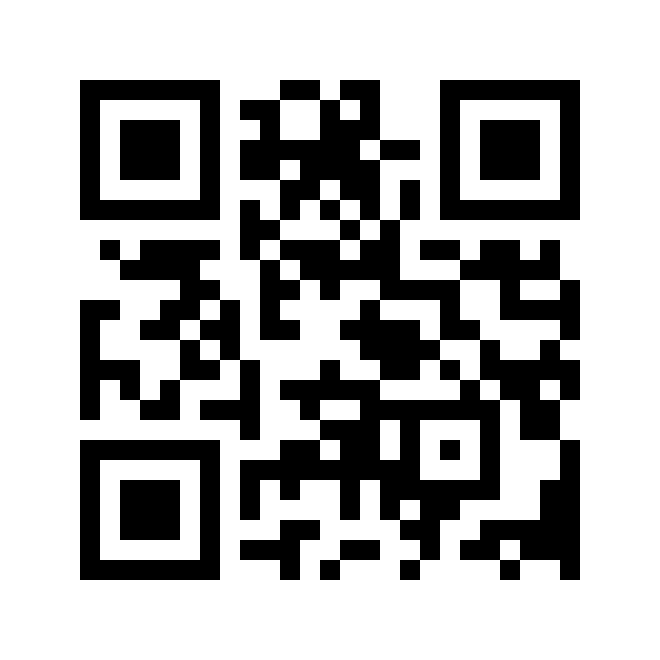
Sample QR Code 2D barcode
A version 1 QR code (21 x 21 modules). The finder patterns sit in three corners. Version 1 is too small to need an alignment pattern.

QR Code variants

Almost every QR code you scan today is a standard QR Code. Micro QR, GS1 data, multi-symbol messages and direct marking change what your scanner has to handle.

QR Code variants and what they mean for scanning
Variant What it is Scanning notes
QR Code The current format, based on Model 2, with alignment patterns for larger symbols. Versions 1 to 40 and four error correction levels. Decoder constant QR
QR Code Model 1 The original 1994 specification, without alignment patterns. Recommended only for closed systems. Rare today
Micro QR Versions M1 to M4, from 11 x 11 to 17 x 17 modules, with a single finder pattern. Holds up to 35 digits, 21 alphanumeric characters or 15 bytes. No level H, and M1 offers error detection only. Decoder constant QRMicro. Fits small parts and tight label space.
GS1 QR Code QR Code in FNC1 mode carrying GS1 Application Identifiers, such as (01) GTIN, (10) batch or lot and (17) expiration date Parse the fields with the GS1 parser
Structured append One message split across up to 16 QR Code symbols, which can be scanned in any order. Not available in Micro QR. Turn on multi-part merge to get one result once all parts are found
Direct-marked QR QR Code or Micro QR engraved or etched on the part itself Low contrast and glare. Turn on DPM mode

Where QR codes are used

QR codes connect physical things to data, for consumers with a phone and for workers with a scanning app.

Retail

Loyalty, payments, product links

Loyalty programs commonly use QR codes because they store customer data and scan quickly. In markets such as Japan, shoppers pay by scanning QR codes at the checkout.

Barcode scanning for retail →

Food and beverage

Packaging, menus

QR codes on packaging take customers to ingredient lists, allergen data and preparation instructions, and the same code can lead to a survey or loyalty page. Restaurants and hotels use them for menus, specials and promotions.

Barcode scanning for food and beverage →

Entertainment and events

Tickets, access control

QR codes are universally accepted for ticketing. They scan with a smartphone and need no special hardware, still read when partly damaged, and use an open format that is free to use.

Barcode scanning for entertainment →

Automotive

Parts tracking, anti-counterfeiting

The QR code began on automotive assembly lines. Today manufacturers print serialized QR or Data Matrix codes on genuine parts and packaging, so distributors and repair shops can check authenticity with a phone.

Barcode scanning for automotive →

Scan a QR code on your phone or in your browser

Install the free barKoder demo app, or open the web demo, and scan your own QR and Micro QR codes before you integrate the SDK. The web demo has a QR Code mode for standard and Micro QR codes, powered by MatrixSight®.

iPhone and iPad

barKoder demo app for iOS

Scan with your camera, or point it at the QR code to open the App Store.

Download on the App Store
QR code linking to the barKoder demo app on the App Store

Android phones and tablets

barKoder demo app for Android

Scan with your camera, or point it at the QR code to open Google Play.

Get it on Google Play
QR code linking to the barKoder demo app on Google Play

Any modern browser

barKoder web demo

Runs the Web SDK in your browser, on desktop or mobile, with nothing to install.

Open the web demo
QR code linking to the barKoder web demo

Test with known samples. Print or display the testing sheet and scan each 1D and 2D barcode with the demo app. The data sheet summarizes the SDK for your team. Need your own test codes? Make them with the free QR code generator.

QR code SDK questions

Which SDKs can embed a QR code scanner in a web app?

Commercial SDKs and open-source libraries both do this. The barKoder WASM Barcode Scanner SDK decodes QR Code and Micro QR in the browser with the device camera, in any browser that supports WebAssembly and ResizeObserver, including Chrome, Firefox, Safari and Edge. Enable the decoder with Barkoder.setEnabledDecoders(Barkoder.constants.Decoders.QR); and follow the Web SDK general example. Try it first in the barKoder web demo.

What is the best QR code scanner SDK for web and mobile apps?

The one that reads your real codes on your target devices. Shortlist SDKs that cover all the platforms you ship on, handle damaged and direct-marked codes, and parse GS1 data if you need it, then test them on your own samples. barKoder runs on iOS, Android, the web, Windows and Linux and in frameworks such as Flutter, React Native and .NET MAUI, with MatrixSight® for damaged QR codes. The free trial runs for 30 days on up to 25 devices.

Which QR code reader SDK supports offline mobile scanning?

With barKoder, all scanning runs locally on the device: the SDK decodes the camera frames inside your app on iOS, Android or in the browser. It connects to the internet only for its license check. See the barKoder FAQ for the details.

Can an SDK read damaged or partially obscured QR codes?

Up to a point, every QR decoder can, because Reed-Solomon error correction recovers about 7% to 30% of the codewords depending on the level. Most decoders still fail when two or more finder patterns are damaged. barKoder's MatrixSight® reads QR codes with all three finder patterns missing, and Micro QR codes with no finder pattern at all. See how to scan damaged and broken barcodes.

How much data can a QR code hold?

The largest QR code, version 40 (177 x 177 modules) at error correction level L, holds up to 7,089 digits, 4,296 alphanumeric characters, 2,953 bytes or 1,817 Kanji characters. Higher error correction levels hold less. The optional structured append feature spreads one message over up to 16 symbols. The largest Micro QR, version M4, holds up to 35 digits.

What types of QR code are there?

The QR family has QR Code Model 1 (the original, now used only in closed systems), Model 2 and the current QR Code, and Micro QR, a smaller version with a single finder pattern for tight spaces. GS1 QR Code is a QR Code that carries GS1 Application Identifiers. barKoder reads QR Code and Micro QR, and decodes GS1 data with its GS1 parser.

Add QR Code scanning to your app

Test the SDK on your own QR codes, labels and screens with a free 30-day trial, or talk to an SDK expert about your project.