AAMVA Parser

AAMVA Driver's License Parser SDK

Scan the PDF417 barcode on U.S. and Canadian driver's licenses and ID cards and get labeled fields back: name, address, date of birth, license number and dates. Parsing follows the AAMVA DL/ID Card Design Standard and runs on the device, on iOS, Android and the web.

aamva

From driver's license barcode to labeled fields

Reading the barcode and interpreting its contents are two separate steps. barKoder does both on the device, so your driver license barcode scanner returns data your app can use directly.

  1. Scan The user points the device camera at the PDF417 barcode on the back of the license or ID card.
  2. Decode PDF417-LineSight reads the barcode, even when parts of it are worn or missing.
  3. Parse The AAMVA parser maps the payload to the AAMVA data elements and validates check digits and formatting.
  4. Use Your app receives the fields as JSON and key/value pairs and fills its own forms.

What is the AAMVA barcode on a driver's license?

The American Association of Motor Vehicle Administrators (AAMVA) defines the standard for driver's license barcode data across the United States and Canada.

Most states and provinces print a PDF417 barcode on the back of driver's licenses and ID cards. PDF417 is only the container. The AAMVA DL/ID Card Design Standard defines what goes inside: labeled fields, each marked by a three-letter code.

Because every jurisdiction uses the same codes, one AAMVA parser can read the birth date or license number from a card issued anywhere in the U.S. or Canada. Read more in AAMVA standards and their role in barcode scanning and in our AAMVA PDF417 driver license barcode guide.

Common AAMVA data elements
Code Data element Good to know
DCS Family name Stored in capital letters
DAC First name Middle names have their own field
DBB Date of birth U.S. cards typically use month-day-year, Canadian cards year-month-day
DBC Sex A numeric code
DAQ License number Each state and province has its own format
DBA Expiration date Use it to flag expired cards
DBD Issue date Tells newer cards from older ones
DAJ Issuing jurisdiction Two-letter state or province code

What the AAMVA parser returns

barKoder's AAMVA parser extracts structured identity data from U.S. and Canadian driver's licenses and ID cards and returns key/value pairs mapped to the AAMVA data elements.

Fields you can map

  • Full name (first, middle, last)
  • Address (street, city, state, ZIP)
  • Date of birth
  • Document number (DL/ID)
  • Issue and expiration dates
  • Jurisdiction and class
  • Gender and eye color
  • Donor status, endorsements and restrictions

Parser features

  • Follows the AAMVA DL/ID Card Design Standard, v1.0.0 to v10.0
  • Parses fixed and optional data groups
  • Handles all U.S. states and most Canadian provinces
  • Check digit and formatting validation
  • Works offline and in real time
  • Returns parsed data as formattedJSON and formattedText

Add an AAMVA barcode scanner to your app

Enable the PDF417 decoder, set the formatting to AAMVA, and read the parsed result. This example uses the Web SDK.

JavaScript
              async function barkoderInit () {
              var Barkoder = await BarkoderSDK.initialize("your_license_key_here");
              //enable symbologies you'd like to scan
              Barkoder.setEnabledDecoders(
              Barkoder.constants.Decoders.PDF417
              );
              //change any additional settings
              Barkoder.setCameraResolution(Barkoder.constants.CameraResolution.FHD);
              Barkoder.setDecodingSpeed(Barkoder.constants.DecodingSpeed.Slow);
              Barkoder.setFormatting(Barkoder.constants.Formatting.Automatic);
              }
              barkoderInit(); //using await requires an async method
            

Automatic detects whether a result is parsable and applies the matching parser. To force the AAMVA parser, set the formatting explicitly:

JavaScript
                Barkoder.setFormatting(Barkoder.constants.Formatting.AAMVA);
              

2. Read the parsed fields

Each parsed result carries formattedJSON, a JSON string with all parsed data that you pass to JSON.parse, and formattedText with the same data as key/value pairs.

Native and framework SDKs expose the same option as formattingType, with AAMVA among the formatting modes.

Get a trial license key

Reads worn license barcodes

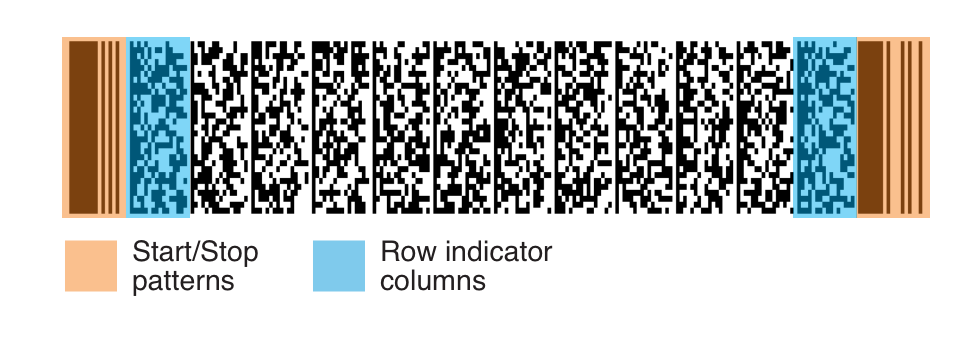
License barcodes get scratched, faded and bent in wallets. Most PDF417 decoders depend on the Start and Stop patterns and the row indicator columns.

barKoder's LineSight doesn't, so it keeps reading when those elements are worn, cut off or missing.

See every damage case on the PDF417 Barcode Scanner SDK page.

Complete PDF417 barcode with the Start and Stop patterns and the row indicator columns highlighted
A complete PDF417 barcode with all its elements

What parsing does and doesn't prove

The AAMVA parser tells you what the barcode says. Plan the rest of your ID check around it.

What you get

  • The data encoded in the PDF417, as labeled fields
  • Check digit and formatting validation of that data
  • Dates you can use for expiry and age checks

What you still need to check

  • That the card itself is genuine
  • That it belongs to the person presenting it
  • Any checks your industry or regulator requires

Where teams use an ID scanner SDK

A drivers license barcode scanner replaces typing names, addresses and license numbers with one scan.

Parse driver's license barcodes on every major platform

The AAMVA parser ships with the barKoder SDK. Set the formatting to AAMVA in native, web or cross-platform apps and read the parsed fields from the scan result.

  • 7 native & desktop SDKs
  • 6 cross-platform integrations
  • One consistent scanning core

PDF417 scanning in production

Teams using barKoder to read dense PDF417 barcodes on licenses and ID cards.

License data stays on the device

Decoding and parsing run locally. The SDK goes online only for the license check, at least once every 30 days, and it does not store any personal information retrieved from scanning a barcode. Your application decides what it keeps.

Try barKoder on your phone or in your browser

Install the free barKoder demo app, or open the web demo, and scan your own barcodes before you integrate the SDK.

iPhone and iPad

barKoder demo app for iOS

Scan with your camera, or point it at the QR code to open the App Store.

Download on the App Store
QR code linking to the barKoder demo app on the App Store

Android phones and tablets

barKoder demo app for Android

Scan with your camera, or point it at the QR code to open Google Play.

Get it on Google Play
QR code linking to the barKoder demo app on Google Play

Any modern browser

barKoder web demo

Runs the Web SDK in your browser, on desktop or mobile, with nothing to install.

Open the web demo
QR code linking to the barKoder web demo

Test with known samples. Print or display the testing sheet and scan each 1D and 2D barcode with the demo app. The data sheet summarizes the SDK for your team.

AAMVA parser and driver's license barcode questions

What is the barcode on the back of a driver's license?

U.S. and Canadian driver's licenses and ID cards carry a PDF417 barcode. Its contents follow the AAMVA DL/ID Card Design Standard: labeled fields such as name, address, date of birth, license number and dates, each marked by a three-letter code.

Which AAMVA versions and jurisdictions does the parser support?

The barKoder AAMVA parser follows the AAMVA DL/ID Card Design Standard from v1.0.0 to v10.0. It handles all U.S. states and most Canadian provinces, and parses both fixed and optional data groups.

How do I scan a driver's license barcode in my app?

Add the barKoder SDK, enable the PDF417 decoder and set the formatting to AAMVA, or to Automatic. The parsed fields arrive in formattedJSON with the scan result. The Web SDK guide walks through setup. Get a key with a free trial license.

Does the driver license scanner SDK need an internet connection?

Only for the license check, which each device needs at least once every 30 days. Scanning and AAMVA parsing run on the device, and the SDK does not store personal information retrieved from scans.

Can I scan driver's licenses in a web browser?

Yes. The barKoder Web SDK includes the PDF417 decoder and the AAMVA formatting option, and works in browsers that support WebAssembly. See the WASM Barcode Scanner SDK.

Does parsing prove that a driver's license is genuine?

No. The parser interprets and validates the data encoded in the barcode. It doesn't establish that the card is authentic or that it belongs to the person presenting it, so add the checks your application needs.

Can I generate PDF417 barcodes for testing?

Yes. barKoder's free online Barcode Generator creates PDF417 barcodes from the data you enter. Use made-up test data, never a real person's details.

Does barKoder parse licenses from outside North America?

Yes. The SA DL parser decrypts South African driver's licenses, and the MRZ parser reads passports and other ID documents with a machine-readable zone.

Add driver's license barcode scanning to your app

Test the AAMVA parser on your own license samples with a free 30-day trial, or talk to an SDK expert about your project.