Web SDK
Web Barcode Scanner SDK for JavaScript & WebAssembly
Add camera barcode scanning to your own web app. The barKoder Web SDK pairs a WebAssembly decoder with a JavaScript API, and every barcode is decoded locally in the user's browser.
Add camera barcode scanning to your own web app. The barKoder Web SDK pairs a WebAssembly decoder with a JavaScript API, and every barcode is decoded locally in the user's browser.
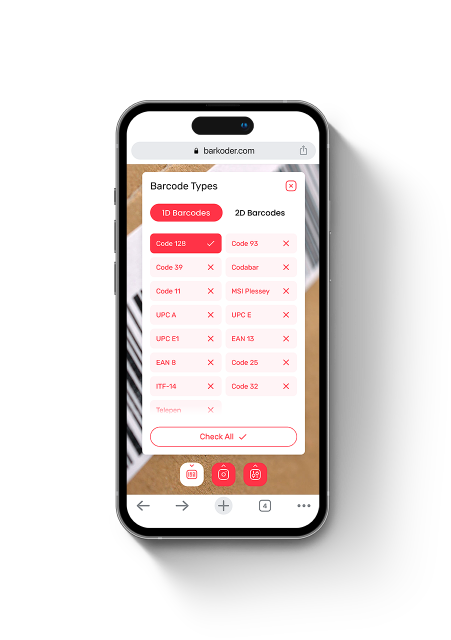
barKoder Web is a browser barcode scanner SDK for teams building their own web applications, PWAs and portals. You install the JavaScript barcode SDK from npm, place the scanner inside your page and receive each result in your code. The WebAssembly decoder runs in the browser, so barcodes are decoded on the user's device.
barkoder-container element with a defined size.startScanner from a user action and handle the result in your callback. Serve the page over HTTPS.Initialization and scanning, as published in the barkoder-wasm README:
npm install barkoder-wasmasync function barkoderInit () {
var Barkoder = await BarkoderSDK.initialize("your_license_key_here");
//enable symbologies you'd like to scan
Barkoder.setEnabledDecoders(
Barkoder.constants.Decoders.QR,
Barkoder.constants.Decoders.Ean8,
Barkoder.constants.Decoders.PDF417
);
//change any additional settings
Barkoder.setCameraResolution(Barkoder.constants.CameraResolution.FHD);
Barkoder.setDecodingSpeed(Barkoder.constants.DecodingSpeed.Normal);
}
barkoderInit(); //using await requires an async methodlet callbackMethod = (result)=>alert(result.barcodeTypeName + '\n' + result.textualData);
Barkoder.startScanner(callbackMethod);
Barkoder.stopScanner();
Barkoder.scanImage('test.png', callbackMethod);The SDK ships as a UMD module that works as a plain script tag or through CommonJS, with TypeScript type definitions included in the npm package. Use it with the framework you already have.
Include barkoder-umd.js with a script tag, or require the barkoder-wasm module, and call the same API from any page.
General Web SDK exampleInitialize the scanner on the client side of a React component. A React demo is available to try in the browser and on GitHub.
React.js integration exampleAdd the scanner to an Angular application by following the documented WASM integration example.
Angular integration examplebarKoder publishes its web demo as a Vue.js project on GitHub, so you can see a complete scanner UI built with Vue.
Vue.js WASM demo on GitHubBecause of server-side rendering, camera access and the scanner run client-side only. The guide shows how to set that up.
Next.js integration guideThe Web SDK is also listed as compatible with progressive web apps, NuxtJS, RequireJS and Electron.
All Web SDK examplesA WebAssembly barcode scanner has to share the browser with your UI. Version 1.7.0 of the web barcode scanning SDK adds options to control how much of the device it uses.
maxThreads from 1 to 4; if a device can't support the value, the closest available one is used.requestVideoFrameCallback.useMainThreadOnly switches to the earlier single-threaded mode, which can reduce CPU, battery and memory use when multithreading isn't needed.wasmPath sets a custom path or filename for the barcode SDK WASM binary, so you can serve it from your own location.obtainVersionedBinary appends the SDK version to the .wasm URL to prevent browser caching issues after an update.All four options are passed to initialize:
initialize(license: string, options?: { maxThreads?: number, wasmPath?: string, obtainVersionedBinary?: boolean, useMainThreadOnly?: boolean }): Promise<Barkoder>The WASM barcode scanner SDK uses the same decoding engine as the barKoder mobile SDKs, including its modes for difficult codes.
Code 128, Code 39, EAN, UPC, ITF-14, GS1 DataBar, QR Code, Data Matrix, PDF417, Aztec, DotCode, MaxiCode and more. Enable each one with setEnabledDecoders.
MatrixSight® for damaged QR and Data Matrix, PDF417-LineSight® for worn PDF417, and DeBlur for blurred EAN and UPC barcodes.
How MatrixSight worksRead multiple barcodes in one camera view, and highlight each detected code with an AR overlay in the browser.
Enable MultiScan on the webTemplates for Data Matrix codes marked on parts, Vehicle Identification Numbers and DotCode, documented for the Web SDK.
DPM mode web exampleParse PDF417 driver's licenses with AAMVA and SADL formatting. MRZ scanning uses an MRZ-capable build of the SDK and a license with MRZ enabled.
Enable MRZ modeBesides the live camera, decode barcodes from an image with scanImage or from the user's local files with scanFromLocalFileSystem.
Check these before you put a browser barcode scanner into production.
The first camera start in a session can take 2 to 4 seconds while the SDK selects the best camera. Later starts are faster.
Production web apps that scan with barKoder in the browser.
Verified credentials
Certified information security management built around internationally recognized controls.
Official Solution Provider supporting standards-based barcode and data-capture workflows.
Solution Provider listing covering barcode, mobile application and 2D barcode capabilities.
Discover the barKoder Web SDK listing and connect through Microsoft Marketplace.
Registered Independent Software Vendor in Zebra's PartnerConnect ecosystem.
Install the free barKoder demo app, or open the web demo, and scan your own barcodes before you integrate the SDK.
iPhone and iPad
Scan with your camera, or point it at the QR code to open the App Store.

Android phones and tablets
Scan with your camera, or point it at the QR code to open Google Play.

Any modern browser
Runs the Web SDK in your browser, on desktop or mobile, with nothing to install.


Test with known samples. Print or display the testing sheet and scan each 1D and 2D barcode with the demo app. The data sheet summarizes the SDK for your team.
No. This page is about the JavaScript barcode scanner SDK, which developers install in their own web apps with a license key. If you only want to read a barcode from your camera or an image right now, use the free online barcode scanner. It's also a quick way to check a sample before you start an SDK trial.
No. The WebAssembly barcode scanner decodes on the user's device, inside the browser. The SDK goes online only for the license check, at least once every 30 days; scanning runs locally.
Chrome 67+, Firefox 69+, Edge 79+, Safari 14+ and iOS Safari 14+, or any browser that supports WebAssembly and ResizeObserver. Live scanning needs camera permission, and the page must be served over HTTPS with the MIME type for .wasm files configured. On iOS, browsers may ask for camera permission on each page load unless the user sets camera access to Allow.
Yes. barKoder documents React, Angular and Next.js integrations and publishes a Vue.js demo on GitHub. In Next.js, run the scanner client-side only.
Yes. startScanner reads from the live camera, scanImage decodes an image by URL and scanFromLocalFileSystem scans an image from the user's local files. Each one passes the result to your callback.
barKoder published a comparison of its Web SDK with the Shape Detection API, Scanbot and Scandit on 27 damaged, low-resolution or blurred samples. Run the same test with your own barcodes and target devices before you decide.
Each license is an annual subscription for one app, mobile or web, with unlimited scans, all features, support and upgrades. Plans differ by the number of devices; see SDK pricing. To evaluate, register and generate a free trial key, selecting WASM: it lasts 30 days and covers up to 25 devices.
Install barkoder-wasm, generate a free 30-day trial key and test the scanner on your own barcodes and devices, or talk to an SDK expert about your project.