DotCode

DotCode Scanner SDK for Mobile and Web Apps

Read DotCode on tobacco packs, beverage bottles and shipping labels with barKoder. The DotCode scanner SDK runs on Android, iOS and in the browser, so you can build EU tobacco traceability and track-and-trace apps for the phones and mobile computers your teams already use.

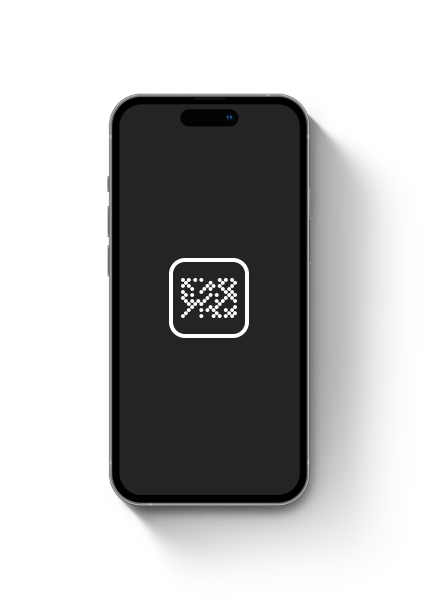
Smartphone screen showing a DotCode symbol

Test DotCode scanning on your own packs

DotCode is printed at high speed by inkjet printers and laser coders, so print quality varies from pack to pack, and pack-level codes are small. Test the DotCode scanner SDK on real production samples, on the devices your inspectors and warehouse staff use.

Collect real samples

Gather DotCodes from your own supply chain:

  • Inkjet-printed tobacco packs
  • Laser-coded packaging
  • Beverage bottles and cans
  • Shipping and pallet labels
  • Partly damaged or obscured codes
  • Codes under different lighting

Record successful reads, failures and time to result per device.

Start an SDK trial

Enable DotCode scanning

  1. Get a trial key and install the SDK for your platform.
  2. Enable the DotCode decoder.
  3. Set a thin, horizontal region of interest, as in the DotCode example.
  4. Use the decoding speed and camera resolution recommended for your platform.
See the DotCode web example

What makes DotCode different

DotCode is a 2D matrix symbology made of separate dots on a checkerboard grid. The AIM industry association released it in 2009 for high-speed production lines, where industrial inkjet printers and CO2 or fiber lasers mark a very large number of items in a short time.

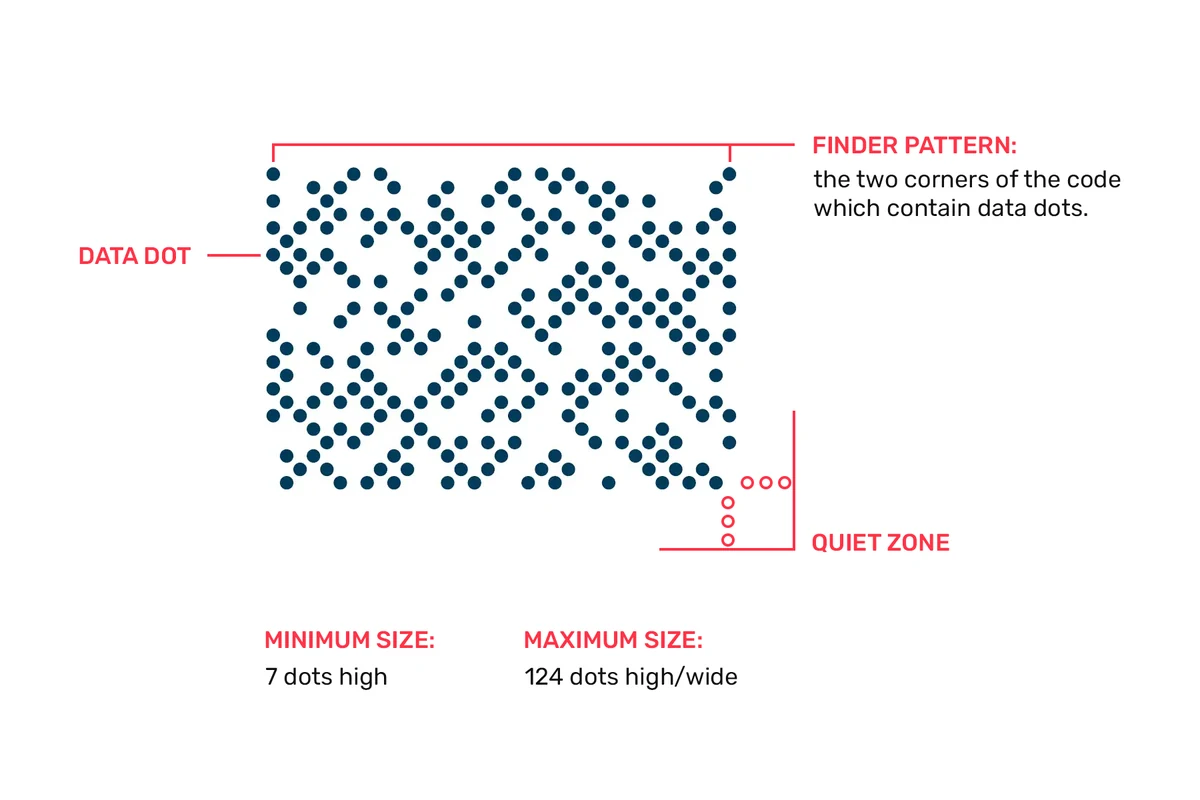
A DotCode is at least 7 dots high. There is no fixed maximum, but printers usually stop at 124 dots in either direction, and it needs a three-dot quiet zone on every side. It encodes GS1 data structures, all 128 ASCII characters and extended ASCII, and uses Reed-Solomon error correction, so partly damaged codes can still be decoded.

For the full specification, see the DotCode barcode type guide.
DotCode symbol with its data dots, finder pattern corners and quiet zone labelled, minimum 7 dots high and maximum 124 dots
DotCode structure: data dots, finder pattern and quiet zone

Tobacco DotCode scanning for EU traceability

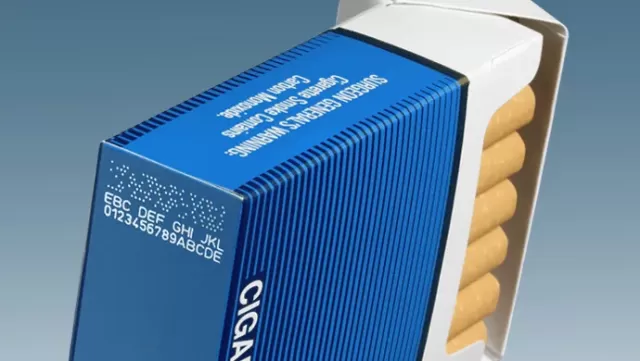
After the Tobacco Products Directive (TPD II), and following GS1 standards for DotCode in tobacco, manufacturers print DotCodes across the tobacco supply chain to meet the EU tobacco traceability regulation EU 2018/574, most of all on individual packs. Track-and-trace apps for tobacco need to read them reliably.

Cigarette pack with a printed DotCode and a human-readable code on its side

Tobacco manufacturing

TPD II, EU 2018/574

DotCode packs serial numbers and other variable data into a very small footprint, which suits small packs with little free space. This has made tobacco track-and-trace a sought-after feature in both enterprise and consumer-facing apps.

Barcode scanning for manufacturing →
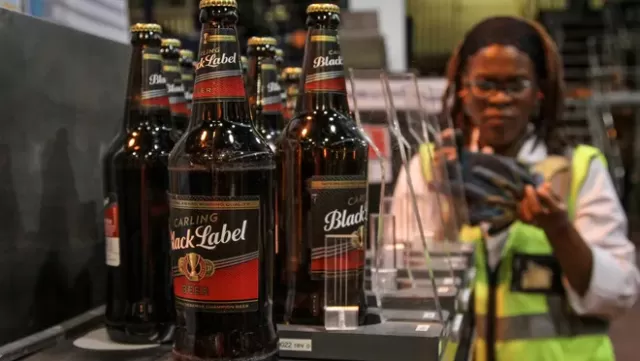
Beer bottles on a production line with a worker inspecting them

Food and beverage

Serialization and authentication

Alcohol producers print serial numbers in DotCode for track-and-trace and authentication across the supply chain. It is also used to track raw materials, monitor production batches and support food safety compliance.

Barcode scanning for food and beverage →
Overhead view of a worker moving a boxed pallet with a pallet jack in a warehouse

Logistics

Packages, pallets and containers

DotCode tracks packages, pallets and containers through shipping, and stays readable after rough handling in transit.

Barcode scanning for logistics →

Track-and-trace apps rarely see one symbology. The same barKoder scanner reads DotCode next to Data Matrix, including direct part marks, QR codes and 1D barcodes, as in inexto's factory and logistics projects. To capture several codes in one frame, add Batch MultiScan.

DotCode reading performance

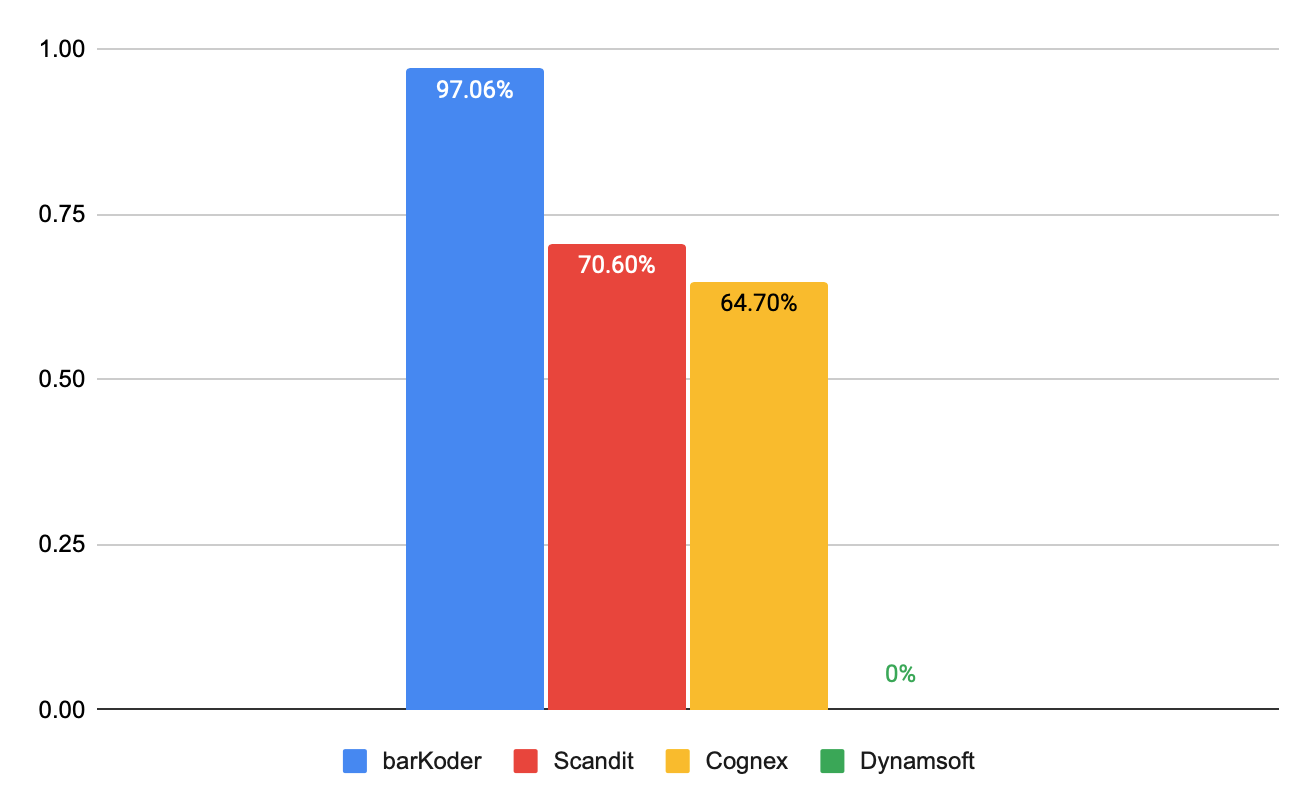
The DotCode decoder shares the image processing behind the rest of the barKoder SDK and is built to capture challenging DotCode samples, not only clean prints. To check that, barKoder benchmarked DotCode reading against other software SDKs on 34 hard-to-read DotCode samples from different applications. Scores were based on reading rate, accuracy, speed, lighting and scanning angles.

barKoder had the highest reading accuracy, 97.06%. The full method and results are in our barcode scanner SDK comparison.

Your packs, printers and devices will differ, so run the same test on your own samples during the trial.

Bar chart of DotCode reading accuracy on 34 samples: barKoder 97.06%, Scandit 70.60%, Cognex 64.70%, Dynamsoft 0%
DotCode reading accuracy in barKoder's 2024 comparison

Add a DotCode scanner SDK to your app

These recommended DotCode settings are copied from the barKoder docs.

Web (WASM)

JavaScript
            Barkoder.setEnabledDecoders(Barkoder.constants.Decoders.Dotcode);
            Barkoder.setRegionOfInterest(30, 40, 40, 9);
            Barkoder.setDecodingSpeed(Barkoder.constants.DecodingSpeed.Slow);
            Barkoder.setCameraResolution(Barkoder.constants.CameraResolution.FHD);
          

iOS (Swift)

Swift
            barkoderView.config?.decoderConfig?.dotcode.enabled = true
            try? barkoderView.config.setRegionOfInterest(CGRect(x: 30, y: 40, width: 40, height: 9))
            barkoderView.config?.decoderConfig?.decodingSpeed = .init(2)
            barkoderView.config?.barkoderResolution = .FHD
          

Android (Kotlin)

Kotlin
            bkdView.config.let { config ->
            config.decoderConfig.Dotcode.enabled = true
            config.setRegionOfInterest(30f, 40f, 40f, 9f)
            config.decoderConfig.decodingSpeed = Barkoder.DecodingSpeed.Fast;
            config.barkoderResolution = BarkoderResolution.HIGH;
            }
          

DotCode examples: Android, iOS, Web, Flutter, React Native, Capacitor, .NET MAUI and Python.

DotCode track-and-trace in production

inexto builds track-and-trace solutions and reads DotCode alongside direct-marked Data Matrix and QR codes with barKoder.

inexto

Manufacturing and logistics · Switzerland

Replaced Cognexon Zebra TC industrial mobile computers

Two factory and logistics track-and-trace projects read DPM Data Matrix, DotCode and QR codes with barKoder, after comparing it with Scandit.

What truly made us choose barKoder was the simplicity of integration and high performance in DPM barcode scanning, outperforming competitors by 40%-50%.Nicolas Schaefer, Head of R&D, inexto
Read the inexto story →

Related DotCode resources

Try barKoder on your phone or in your browser

Install the free barKoder demo app, or open the web demo, and scan your own barcodes before you integrate the SDK.

iPhone and iPad

barKoder demo app for iOS

Scan with your camera, or point it at the QR code to open the App Store.

Download on the App Store
QR code linking to the barKoder demo app on the App Store

Android phones and tablets

barKoder demo app for Android

Scan with your camera, or point it at the QR code to open Google Play.

Get it on Google Play
QR code linking to the barKoder demo app on Google Play

Any modern browser

barKoder web demo

Runs the Web SDK in your browser, on desktop or mobile, with nothing to install.

Open the web demo
QR code linking to the barKoder web demo

Test with known samples. Print or display the testing sheet and scan each 1D and 2D barcode with the demo app. The data sheet summarizes the SDK for your team.

DotCode scanner SDK questions

What is DotCode?

DotCode is a 2D matrix barcode made of separate dots on a grid, developed by AIM in 2009 for high-speed printing. It holds GS1 data structures, ASCII and binary data in a small footprint and uses Reed-Solomon error correction. The DotCode barcode type guide has the full specification.

Why is DotCode printed on cigarette packs?

Following TPD II and GS1 standards for tobacco, DotCode is used to meet the EU tobacco traceability regulation 2018/574, especially at pack level. It can be printed at line speed by inkjet or laser coders and packs serial numbers into the little space a pack has free.

Can a smartphone scan DotCode?

Yes, with a DotCode-capable SDK in your app. barKoder reads DotCode with the camera of ordinary Android and iOS devices and Android-based industrial mobile computers, such as the Zebra TC series inexto uses. No dedicated DotCode reader is needed.

Does the Web SDK read DotCode?

Yes. The WASM Barcode Scanner SDK reads DotCode in the browser. Enable Barkoder.constants.Decoders.Dotcode and follow the Web DotCode example.

How do I generate DotCode samples for testing?

Use the free barKoder barcode generator, which creates DotCode alongside Data Matrix, QR Code and many 1D types. Then test real printed packs as well, because inkjet and laser prints behave differently from generated images.

Can I read a DotCode from an image online?

Yes. The free online barcode scanner reads DotCode from your camera, a photo or a screenshot in the browser, using the same barKoder engine as the SDK.

Which settings work best for DotCode?

The docs recommend enabling only the DotCode decoder and setting a thin region of interest across the middle of the view, 30, 40, 40, 9. The Web and iOS examples add slow decoding and Full HD resolution, the Android example fast decoding and high resolution. Start there, then tune on your own packs.

Since when does barKoder support DotCode?

DotCode decoding arrived in barKoder SDK version 1.2.5 in January 2024. DotCode examples are now documented for Android, iOS, Web, Flutter, React Native, Capacitor, .NET MAUI and Python.

Add DotCode scanning to your app

Test DotCode on your own packs and labels with a free 30-day trial for 25 devices, or talk to an SDK expert about your tobacco traceability project.