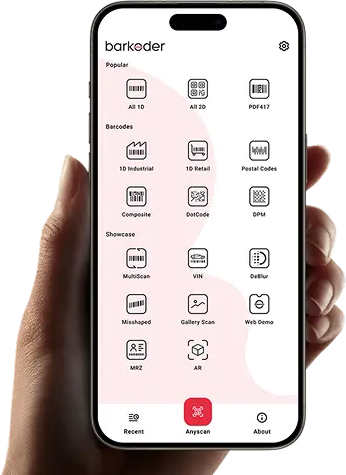
Try barKoder before you write any code. Install the free barKoder demo app on iOS or Android, open a web demo in your browser, or clone an open-source sample app for Flutter, React Native, Capacitor, Cordova, .NET MAUI, NativeScript, Android or the web.
Pick the barcode scanner demo that fits your evaluation
Every demo on this page runs the same barKoder scanning engine that ships in the SDK. Product owners can test real barcodes in minutes with the store app or a browser. Developers can open a sample app in the framework they already use and see how the SDK is wired into a working project.
Barcode Scanner by barKoder is free, with no ads and no in-app purchases. It reads barcodes and MRZ from the camera or from image files, and it is a demo of what the SDK can do. It also works as a standalone scanner, with exports to CSV or a webhook.
Damaged, deformed and blurry barcodes
MatrixSight®, Segment Decoding, DeBlur
MatrixSight reads QR and Data Matrix codes that are missing key elements. Segment Decoding reads deformed or misshapen 1D barcodes. DeBlur reads severely blurred EAN and UPC codes.
Batch MultiScan reads several barcodes from a single image. The AR modes highlight each barcode on screen in real time, show its result and let you choose which of many barcodes to scan.
LineSight reads PDF417 barcodes without start and stop patterns, row indicators or whole data columns. The app parses US and South African driver's licenses and GS1 barcodes, and reads the MRZ on passports, ID cards and visas.
DPM mode reads Data Matrix codes and QR codes engraved by Direct Part Marking. VIN mode reads the barcodes that carry Vehicle Identification Numbers. A DotCode template is built in.
Export scans to a .csv file, or turn on the webhook to POST each scan to your server. A secret word signs every request with a hash your server can check. Optional confirmation feedback shows your server's reply in the app.
To type each scan into a text field in another app instead, use barKoder Keyboard on iPhone, iPad or Android.
Supported devices: iPhone and iPad (iOS 15 or later), Macs with macOS 13 or later, Apple Vision, and Android phones and tablets.
The web demos run the barKoder Web SDK in WebAssembly. Your browser asks for camera access, and decoding happens on the page.
barKoder web demo
1D and 2D barcodes
Scan all barcodes, pick a barcode type first, or scan an image file. Reads EAN/UPC, Code 128, Code 39, QR, Data Matrix, PDF417, Aztec, DotCode, DPM and VIN.
Reads the machine-readable zone of passports (TD3), ID cards (TD1 and TD2) and visas (MRV-A and MRV-B), with check digits. Scan with the camera or pick a photo of the page.
Install the free barKoder demo app, or open the web demo, and scan your own barcodes before you integrate the SDK.
iPhone and iPad
barKoder demo app for iOS
Scan with your camera, or point it at the QR code to open the App Store.
Android phones and tablets
barKoder demo app for Android
Scan with your camera, or point it at the QR code to open Google Play.
Any modern browser
barKoder web demo
Runs the Web SDK in your browser, on desktop or mobile, with nothing to install.
Test with known samples. Print or display the testing sheet and scan each 1D and 2D barcode with the demo app. The data sheet summarizes the SDK for your team.
Clone a sample app in the framework you build with. Each repository below is maintained by barKoder in the barKoderSDK GitHub organization and was updated in 2026.
Full demo apps by framework
Each full demo app is a working application built with one framework and the official barKoder plugin. The Flutter, React Native and .NET MAUI apps include the whole scanner UI flow (camera lifecycle, permissions, configuration and result handling) and let you test all supported 1D and 2D symbologies, AR overlays, DPM, VIN, MRZ and VIN OCR, Segment Decoding, MatrixSight, PDF417-LineSight, DeBlur and Batch MultiScan. Each README shows how to add the plugin to your own project.
Flutter barcode scanner example
Flutter · barkoder_flutter on pub.dev
A Flutter app for Android and iOS built on the barKoder Flutter plugin.
The source of the Barcode Scanner by barKoder Android app. Add your google-services.json from the Firebase console, set barkoderLicenseKey in BKDDemo/app/src/scanner/res/values/config.xml, then build the scannerDebug or scannerRelease variant. The README also shows how to change the icon, colors and application ID.
A smaller Flutter sample that shows selected scanning features and settings: decoding speed, resolution, continuous scanning, Segment Decoding, DeBlur and region of interest. Pass your key as licenseKey on BarkoderView.
A Web SDK demo built as a Vue 3 app, with template selection, camera and resolution settings, MultiScan, CSV export and result overlays. It loads the SDK from barkoder-umd.js, and the license key goes in the setBarkoderWasmScanner method.
The source of the ReactJS web demo. Needs Node.js 14 or later. After cloning, install, build and start it. Your key goes in BarkoderSDK.initialize("YOUR_LICENCE_KEY").
A multi-screen starter: a home grid of scanning modes (1D, 2D, Continuous, MultiScan, VIN, DPM, DeBlur, DotCode, AR Mode, MRZ, Gallery), a scanner with settings, recent scans, barcode details and an About screen. Put your key in my-vue-app/.env as VUE_APP_BARKODER_LICENSE_KEY.
A step-by-step guide to a React app inside Cordova, from cordova create to cordova run android, with a complete scanner component. The key is passed to window.Barkoder.registerWithLicenseKey.
A React (Create React App) project with the barKoder Capacitor plugin. Its README covers installing the plugin; follow the Capacitor installation guide for the native setup.
Yes. Barcode Scanner by barKoder is free on the App Store and Google Play, with no ads and no in-app purchases. It is a demo of the SDK, and it also works as a standalone scanner with CSV and webhook export.
Which barcode types can I test in the demo app?
1D: Codabar, Code 11, Code 25, Code 32, Code 39, Code 93, Code 128, COOP 2 of 5, Datalogic 2 of 5, EAN-8, EAN-13, IATA 2 of 5, Interleaved 2 of 5, ITF 14, Matrix 2 of 5, MSI Plessey, Telepen, UPC-A, UPC-E and UPC-E1. 2D: Aztec and Aztec Compact, Data Matrix, DotCode, MaxiCode, PDF417 and Micro PDF417, QR Code and Micro QR Code. It also reads MRZ. See all supported barcode types.
Do I need a license key to run the sample apps?
The SDK starts without a key, but it marks each result (Unlicensed) and shows only part of it. A free trial license covers up to 25 devices for 30 days. Use trial keys in development only, and never commit one to a public repository or publish it in a store app.
Where can I find a Flutter barcode scanner example?
Each repository has a LICENSE file with the terms for its contents. The barKoder SDK itself needs a barKoder license in production; see pricing or request a quote.
How should I test the scanner before I integrate it?
Scan the barcodes your users actually scan, on the devices they use. Add the printed SDK testing sheet for known 1D and 2D samples. For help, write to support@barkoder.com.
Move from the demo to your own app
Get a free 30-day trial license for up to 25 devices, run a sample app with your key, and scan your own barcodes.
We use cookies to enhance your browsing experience, analyze site traffic, and personalize content.
You can choose which cookies to accept.
Cookie Preferences
We use different types of cookies to optimize your experience on our website.
Click on the categories below to learn more and adjust your preferences.
Necessary Cookies
These cookies are essential for the website to function and cannot be disabled. They are usually set in response to actions you take, such as setting privacy preferences, logging in, or filling out forms.
Always ActiveView Cookies
barkoderCookieConsent - Stores your cookie preferences
barkoder_session - Session identifier for logged-in users
csrf_token - Security token for form submissions
Functional Cookies
These cookies enable enhanced functionality and personalization, such as chat support, videos, and social media features. They may be set by us or third-party providers.
View Cookies
user_preferences - Stores UI preferences
language - Language selection
theme - Theme preferences
Analytics Cookies
These cookies help us understand how visitors interact with our website by collecting and reporting information anonymously. This includes Microsoft Clarity and Google Analytics.
View Cookies
_ga, _gid, _gat - Google Analytics
_clck, _clsk, CLID - Microsoft Clarity
Marketing Cookies
These cookies are used to track visitors across websites to display relevant and personalized advertisements. They help measure the effectiveness of advertising campaigns and conversions.
View Cookies
_fbp - Facebook Pixel
_gcl_au - Google Ads
IDE, test_cookie - Google DoubleClick
_uetmsclkid, _uetvid, _uetsid, MUID - Microsoft Bing UET (Universal Event Tracking)