Education

Barcode scanning SDK for schools, universities and libraries

Add barcode and QR scanning to library, attendance and device-loan apps. barKoder runs on student phones, school tablets and in the browser, and it doesn't collect or store the personal information in the codes it scans.
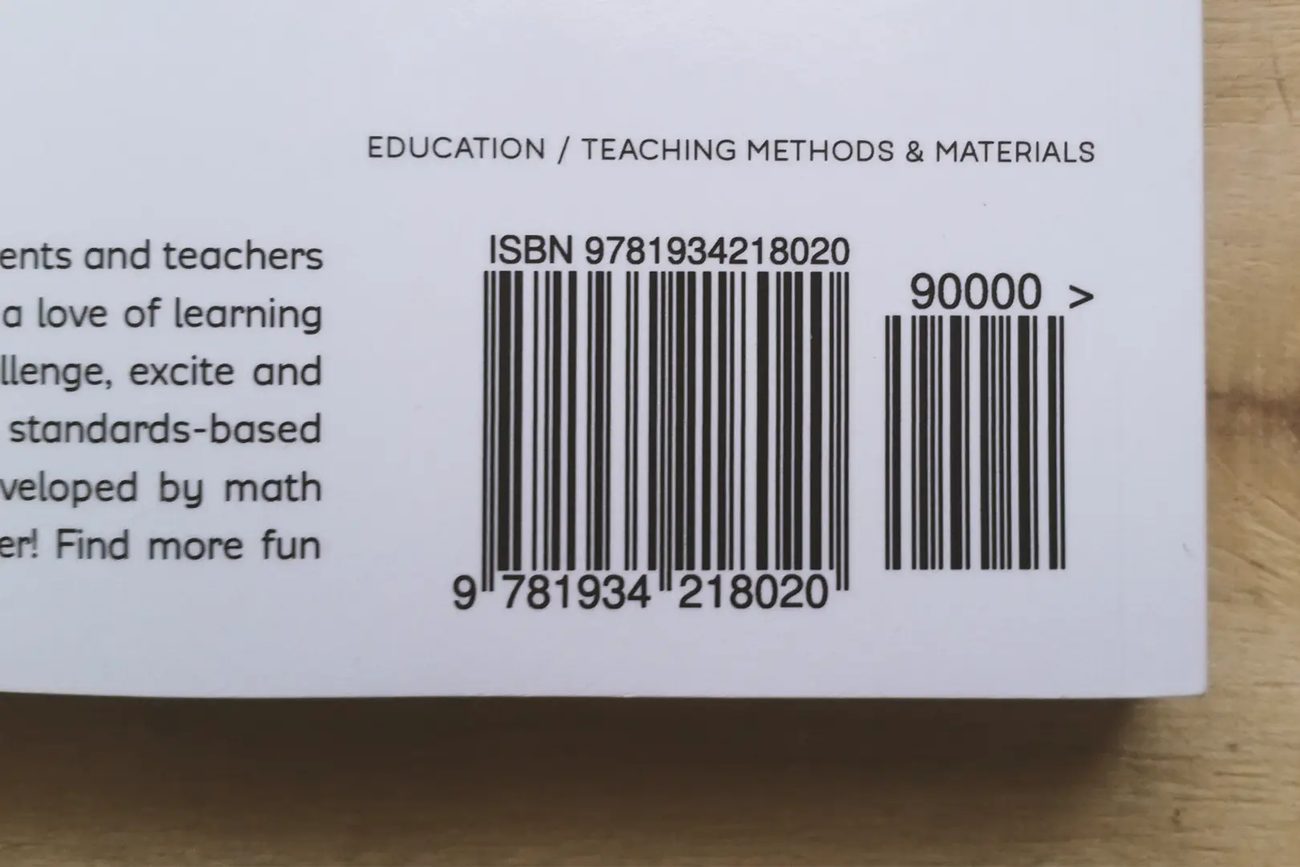

Barcode on the back cover of an education book, with a 5-digit add-on

Barcode scanning for schools and campuses

Schools and universities use barcodes to track library books, record attendance and manage inventory. barKoder adds the scanning step to the school app or portal you build, on devices students and staff already have.

What school apps scan

  • Library books at the circulation desk and on the shelf
  • Student ID cards for attendance at the door or in class
  • Laptops and tablets lent to students and staff
  • Asset labels on equipment and furniture
  • QR codes on event tickets and printed handouts
Get a trial license key

Where it runs

  • Student and staff phones, in your iOS or Android app
  • Shared school tablets
  • Laptops and desktops, in any browser that supports WebAssembly and ResizeObserver
  • Library and front-desk PCs, with the Windows SDK

No dedicated scanner is needed. Try the barKoder web demo on a school laptop to see browser scanning first.

Classroom and campus barcode solutions you can build

Each use case maps to a barKoder feature you can enable in your own app.

Library circulation

Codabar, EAN/UPC

Libraries have used Codabar for decades, and books carry EAN barcodes with the EAN-5 add-on that is used mainly on books. barKoder reads both, so one app can check books in and out.

EAN and UPC barcodes →

Shelf inventory

Batch MultiScan

Capture the barcodes on many books on a shelf in one camera view. Your app sends the values to the catalog to confirm each book is present and in the right place.

Batch MultiScan →

Attendance with ID cards

Continuous scanning

Scan the barcode on each student ID card as students arrive. Continuous scanning keeps the camera open between cards, and a duplicate delay stops the same card from being counted twice.

Continuous scanning →

Laptop and tablet loans

Code 128, QR Code

Label each device, then scan the device and the borrower's ID card at check-out and check-in. The scan fills the loan record, so staff don't type serial numbers.

Code 128 barcodes →

Scanning in a school portal

Web SDK (WebAssembly)

Add scanning to a browser-based school system with nothing to install. The Web SDK decodes with WebAssembly in the browser, on laptops, tablets and phones.

Web Barcode Scanner SDK →

Worn labels and blurry scans

DeBlur, MatrixSight®

Book barcodes fade and student cards get scratched. DeBlur reads heavily blurred EAN and UPC barcodes, and MatrixSight reads QR and Data Matrix codes with damaged patterns.

MatrixSight →

Barcodes your school app can read

barKoder supports the common 1D and 2D symbologies, so one SDK covers books, cards and labels.

Symbology Where you'll find it
Codabar Library barcodes; one of the oldest symbologies, widely used by libraries
EAN and UPC Book covers, with the EAN-5 add-on used mainly on books for the recommended retail price
Code 39 and Code 128 Alphanumeric asset and inventory labels
QR Code Event tickets, links and contact details on printed material
Data Matrix Small labels on equipment where space is limited

Student data stays in your app

School apps handle personal data. barKoder is designed so that scanning doesn't add a new place where that data goes.

Processed on the device

Decoding runs inside your app, on the device or in the browser. Decoded barcode content is not sent to barKoder because you used the SDK, and barKoder doesn't collect or store the personal information in scanned barcodes. Read the Privacy Policy.

Works when Wi-Fi is weak

The SDK connects only to check the license key, and each device must reach the licensing server at least once every 30 days. Scanning in a basement library or a sports hall keeps working; your app syncs the records when it's back online.

Build school apps on any platform

Add the same scanning engine to native Android and iOS apps, browser-based school portals, Windows desktops and every major cross-platform framework.

  • 7 native & desktop SDKs
  • 6 cross-platform integrations
  • One consistent scanning core

Try barKoder with your own books and cards

Test on the barcodes your school actually uses before you write any code.

  1. Scan in the browser Open the web demo and scan a library book, an ID card and a device label.
  2. Try the demo app Install Barcode Scanner by barKoder on iOS or Android and test on school devices.
  3. Get a trial key Start a free 30-day trial for up to 25 devices.
  4. Add it to your app Follow the barKoder docs for your platform and connect the results to your school system.

Try barKoder on your phone or in your browser

Install the free barKoder demo app, or open the web demo, and scan your own barcodes before you integrate the SDK.

iPhone and iPad

barKoder demo app for iOS

Scan with your camera, or point it at the QR code to open the App Store.

Download on the App Store
QR code linking to the barKoder demo app on the App Store

Android phones and tablets

barKoder demo app for Android

Scan with your camera, or point it at the QR code to open Google Play.

Get it on Google Play
QR code linking to the barKoder demo app on Google Play

Any modern browser

barKoder web demo

Runs the Web SDK in your browser, on desktop or mobile, with nothing to install.

Open the web demo
QR code linking to the barKoder web demo

Test with known samples. Print or display the testing sheet and scan each 1D and 2D barcode with the demo app. The data sheet summarizes the SDK for your team.

Barcode scanning for schools: questions

Do schools need to buy barcode scanners?

Not with barKoder. The SDK turns the camera of an Android or iOS phone or tablet into a barcode scanner inside your app, and the Web SDK does the same in a browser on laptops and desktops. Phones and tablets need Android 8.0 or iOS 15 or newer, with at least an HD camera.

Can barKoder read library barcodes?

Yes. It reads Codabar, which libraries have long used, and the EAN barcodes on books, including the EAN-5 add-on. Batch MultiScan can capture the barcodes on several books on a shelf at once.

Can we add attendance scanning to our school app?

Yes. If your attendance app is yours to build or extend, add the barKoder SDK and scan the barcode or QR code on each student ID card. Continuous scanning keeps the camera open for the next card. The SDK returns the scanned value; your app records the attendance.

How can schools track laptops and tablets on loan?

Put a barcode or QR label on each device, then scan the device and the borrower's card at check-out and check-in. barKoder reads the codes; your app or asset system stores who has which device and when it's due back.

Does it work in a browser, without an app install?

Yes. The Web Barcode Scanner SDK works in any browser that supports WebAssembly and ResizeObserver, including Chrome, Edge, Firefox and Safari. Try it now in the barKoder web demo.

Is student data sent to barKoder?

No. Decoding runs on the device or in the browser, decoded barcode content is not sent to barKoder because you used the SDK, and barKoder doesn't collect or store personal information from scanned barcodes. See the Privacy Policy.

How can we test barKoder before committing?

Start a free 30-day trial for up to 25 devices, or contact support@barkoder.com with questions about your school project.

Add barcode scanning to your school app

Test barKoder on your library books, ID cards and device labels with a free 30-day trial for 25 devices, or talk to an SDK expert about your project.