Code 25 (2 of 5) and ITF-14 Barcode Reader SDK

Code 25, also called 2 of 5, is a family of numeric 1D barcodes in which each digit is drawn with five elements, two wide and three narrow. barKoder reads all seven 2 of 5 variants, from Industrial and Interleaved 2 of 5 to ITF-14 on shipping cartons, with the cameras in your iOS, Android and web apps.

Code 25

Code 25 at a glance

Code 25 (2 of 5) key facts
TypeA family of linear (1D) numeric symbologies. Each digit uses five elements, two wide and three narrow.
Character setDigits 0 to 9 only
CapacityVariable length. Interleaved 2 of 5 always holds an even number of digits. ITF-14 is fixed at 14 digits.
Check digitOptional modulo 10 check digit on Industrial, Interleaved and Matrix 2 of 5. In ITF-14 the last digit is the GTIN check digit and is mandatory.
StandardInterleaved 2 of 5: ISO/IEC 16390. ITF-14: GS1 General Specifications. The other variants follow older industry and vendor definitions.
Typical usesITF-14 on cases, cartons and pallets. Interleaved 2 of 5 in warehousing and distribution. Industrial and Matrix 2 of 5 in warehouse sorting and photofinishing, IATA 2 of 5 in air cargo.

What Code 25 is and how it is built

Code 25, also called Code 2 of 5, takes its name from its encoding: each digit is drawn with five elements, two of them wide and three narrow. The first version, Industrial 2 of 5, dates from 1968. The variants differ in which elements carry the data.

  • Industrial 2 of 5: each digit is five bars, two of them wide. The spaces between the bars are all the same width and carry no data, so the barcode is long for the number of digits it holds.
  • Interleaved 2 of 5: digits are encoded in pairs. The five bars encode the first digit and the five spaces between them encode the second. Because the spaces carry data too, it is shorter than Industrial 2 of 5, and it always has an even number of digits (a leading zero pads an odd number).
  • Matrix 2 of 5 and its relatives: each digit uses both bars and spaces, with two of the five elements wide, which makes them denser than Industrial 2 of 5.

Every variant has quiet zones, a start pattern, the data, an optional check digit and a stop pattern. ITF-14 is Interleaved 2 of 5 carrying a 14-digit GTIN, usually framed by a thick bearer bar that supports the printing plate on corrugated board.
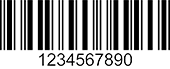
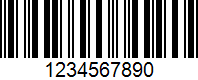
Code 25 barcode encoding 1234567890
A Code 25 barcode encoding 1234567890. Numeric data only, with no letters or symbols.

Code 25 variants barKoder reads

barKoder has a separate decoder for each of the seven 2 of 5 variants. Enable only the ones your labels use.

2 of 5 variants and their barKoder decoder constants
VariantWhat it isWeb SDK decoder
Industrial 2 of 5Also called Standard 2 of 5. Five bars per digit, two wide; the spaces carry no data. Optional modulo 10 check digit.Code25
Interleaved 2 of 5 (ITF)Pairs of digits, the first in the bars and the second in the spaces. Even number of digits, optional check digit. ISO/IEC 16390.Interleaved25
ITF-14Interleaved 2 of 5 holding a 14-digit GTIN, defined by GS1 for cases, cartons and pallets. The last digit is the mandatory check digit. Used in distribution, not at retail checkout.ITF14
IATA 2 of 5Also called Airline 2 of 5. Industrial 2 of 5 with different start and stop patterns, used by the International Air Transport Association for air cargo.IATA25
Matrix 2 of 5Bars and spaces both encode data, two of five elements wide. Denser than Industrial 2 of 5. Optional modulo 10 check digit.Matrix25
Datalogic 2 of 5Developed by Datalogic. Matrix 2 of 5 with different start and stop patterns, also known as China Post code. Rarely used today.Datalogic25
COOP 2 of 5A 2 of 5 variant, also known as NEC 2 of 5COOP25

Where Code 25 barcodes are used

Today you will meet Code 25 mostly as Interleaved 2 of 5 and ITF-14 on shipping cases. The older variants live on in closed systems.

Logistics

ITF-14, GTIN on shipping cases

ITF-14 encodes the 14-digit GTIN of a case and holds up to rough handling and printing on corrugated cardboard. Distributors scan it to track goods from the manufacturer to the retailer.

Barcode scanning for logistics →

Warehousing

Cartons and pallets

Interleaved 2 of 5 is printed on packaging and shipping cartons. Warehouses scan it in bulk during sorting, receiving and dispatch.

Barcode scanning for warehousing →

Food and beverage

Pallet and case labels

ITF and ITF-14 print well on corrugated boxes, so food and beverage distributors use them on case and pallet labels, including in cold storage where pallets are scanned on arrival and rotated by expiry date.

Barcode scanning for food and beverage →

Retail

Back of store, stock management

Retail items carry EAN or UPC at checkout, while the cases and pallets they arrive in carry ITF-14. Store teams scan both when receiving stock and counting inventory.

Barcode scanning for retail →

Scanning Code 25 and ITF-14 with barKoder

The barKoder Barcode Scanner SDK reads all seven 2 of 5 variants on iOS, Android, the web, Windows and Linux, and in Flutter, React Native, .NET MAUI, Capacitor, Cordova and NativeScript apps. These features matter most for this code.

Batch MultiScan for stacked cartons

Decodes several barcodes in a single camera view, whatever their type or size. Count a pallet of ITF-14-labeled cases in one pass.

Batch MultiScan →

Continuous scanning for receiving

Keeps the scanner running so workers can scan box after box or pallet after pallet on the move, without stopping for each barcode.

Continuous scanning →

Segment Decoding for deformed labels

Reads supported 1D barcodes with strong deformation, where no straight line crosses all the bars, such as labels on crushed or curved surfaces. It is off by default and turned on in the SDK settings.

Segment Decoding® →

Check digit and length settings

Turn check digit verification on or off for Industrial, Interleaved, IATA, Matrix, Datalogic and COOP 2 of 5, and set a minimum and maximum length per decoder to accept only the number of digits you expect.

Android SDK API reference →

Code 25 and ITF-14 barcode reader API

Each 2 of 5 variant has its own decoder constant in the barKoder SDK. This Web SDK call enables all seven.

Web SDK (JavaScript)

JavaScript
Barkoder.setEnabledDecoders(
	Barkoder.constants.Decoders.Code25,
	Barkoder.constants.Decoders.Interleaved25,
	Barkoder.constants.Decoders.ITF14,
	Barkoder.constants.Decoders.IATA25,
	Barkoder.constants.Decoders.Matrix25,
	Barkoder.constants.Decoders.Datalogic25,
	Barkoder.constants.Decoders.COOP25
);

For shipping cases, ITF14 and Interleaved25 are usually enough.

Get scanning in three steps

  1. Get a free trial license and install the SDK for your platform.
  2. Enable the 2 of 5 decoders your labels use, and set a length range if you know how many digits to expect.
  3. Read the result in your callback. For ITF-14, the 14 digits are the case GTIN.
See the Web SDK example

The same decoders on other platforms: Android, iOS and NativeScript general examples, and the Web SDK API reference.

Scan a Code 25 or ITF-14 barcode on your phone or in your browser

Install the free barKoder demo app, or open the web demo, and scan your own carton labels and 2 of 5 barcodes before you integrate the SDK.

iPhone and iPad

barKoder demo app for iOS

Scan with your camera, or point it at the QR code to open the App Store.

Download on the App Store
QR code linking to the barKoder demo app on the App Store

Android phones and tablets

barKoder demo app for Android

Scan with your camera, or point it at the QR code to open Google Play.

Get it on Google Play
QR code linking to the barKoder demo app on Google Play

Any modern browser

barKoder web demo

Runs the Web SDK in your browser, on desktop or mobile, with nothing to install.

Open the web demo
QR code linking to the barKoder web demo

Test with known samples. Print or display the testing sheet and scan each 1D and 2D barcode with the demo app. The data sheet summarizes the SDK for your team. Need a 2 of 5 sample of your own? Make one with the free barcode generator.

Code 25 barcode questions

What is Code 25 and what does the name mean?

Code 25, or Code 2 of 5, is a family of numeric 1D barcodes. The name describes the encoding: each digit is drawn with five elements, two of them wide and three narrow. It covers several variants, the most common today being Interleaved 2 of 5 and ITF-14.

What is the difference between Industrial 2 of 5 and Interleaved 2 of 5?

In Industrial 2 of 5, each digit is five bars, two of them wide, and the spaces carry no data. In Interleaved 2 of 5, the digits are encoded in pairs: the bars carry the first digit of each pair and the spaces carry the second. That makes Interleaved 2 of 5 shorter for the same number. An Industrial 2 of 5 symbol is about 50% longer for the same data.

Is ITF-14 the same as Interleaved 2 of 5?

ITF-14 is Interleaved 2 of 5 with a fixed format. GS1 defines it to carry a 14-digit GTIN on cases, cartons and pallets, with the last digit as a mandatory check digit, and it is usually printed with a thick bearer bar around it. It is used in distribution, not at retail checkout. barKoder has separate decoders for both: Interleaved25 and ITF14.

Why does an Interleaved 2 of 5 barcode always have an even number of digits?

Because digits are encoded in pairs, one in the bars and one in the spaces. If your number has an odd number of digits, add a leading zero before encoding it. When you know the expected length, set a length range for the decoder so your app accepts only numbers of that length.

Can a phone camera read ITF-14 barcodes on cartons?

Yes. The barKoder SDK reads ITF-14 and the other 2 of 5 variants with the camera on iOS and Android phones and in web apps through the WASM Barcode Scanner SDK. With Batch MultiScan you can read several case labels in one camera view.

How do I create a 2 of 5 barcode for testing?

Use the free barKoder barcode generator. It creates Code 2 of 5 Standard, Interleaved 2 of 5, ITF-14, IATA 2 of 5 and Datalogic 2 of 5 barcodes that you can download as images and print.

Add Code 25 scanning to your app

Test the SDK on your own carton labels and 2 of 5 barcodes with a free 30-day trial, or talk to an SDK expert about your project.