Code 11 Barcode: Specification and Reader SDK

Code 11 is a numeric 1D barcode that encodes the digits 0 to 9 and the dash, developed by Intermec in 1977 and used mainly to label telecommunications equipment. barKoder reads Code 11 and checks its C and K check digits with the cameras in your iOS, Android and web apps.

Code 11

Code 11 at a glance

Code 11 (USD-8) key facts
TypeLinear (1D), discrete, numeric symbology. Also known as USD-8.
Character setThe digits 0 to 9 and the dash (-), the 11 data characters that give Code 11 its name, plus a start/stop character
CapacityVariable length. The symbology sets no fixed maximum, and labels usually carry short identifiers.
Check digitsC: the weighted sum of the data, with weights 1 to 10 from the right, modulo 11. K: the same over the data plus C, with weights 1 to 9, modulo 11. Short messages (about 10 characters or fewer) use C only; longer ones use C and K.
StandardDeveloped by Intermec in 1977. There is no ISO/IEC symbology standard; encoders and readers follow the original Intermec definition.
Typical usesLabeling telecommunications equipment and components

What Code 11 is and how it is built

Code 11 was developed by Intermec in 1977 to track small telephone components. It stores numbers, with the dash as the only other character, in a short and dense bar pattern.

A Code 11 symbol has five parts:

  • Quiet zones: blank margins on both ends.
  • Start and stop character: a twelfth pattern that marks both ends of the symbol.
  • Data characters: each one is three bars and two spaces. The first and last elements are bars, and every element is either narrow or wide. Characters are separated by a narrow space.
  • Check digit C: calculated from the data characters.
  • Check digit K: calculated from the data plus C, and added for longer messages.

Code 11 is not self-checking. A single misread bar can turn one valid character into another, so the check digits are what catch a bad read. Readers can be set to expect no check digit, one (C) or two (C and K). With barKoder, use no check or the single (C) setting, which validates C and removes it from the result.

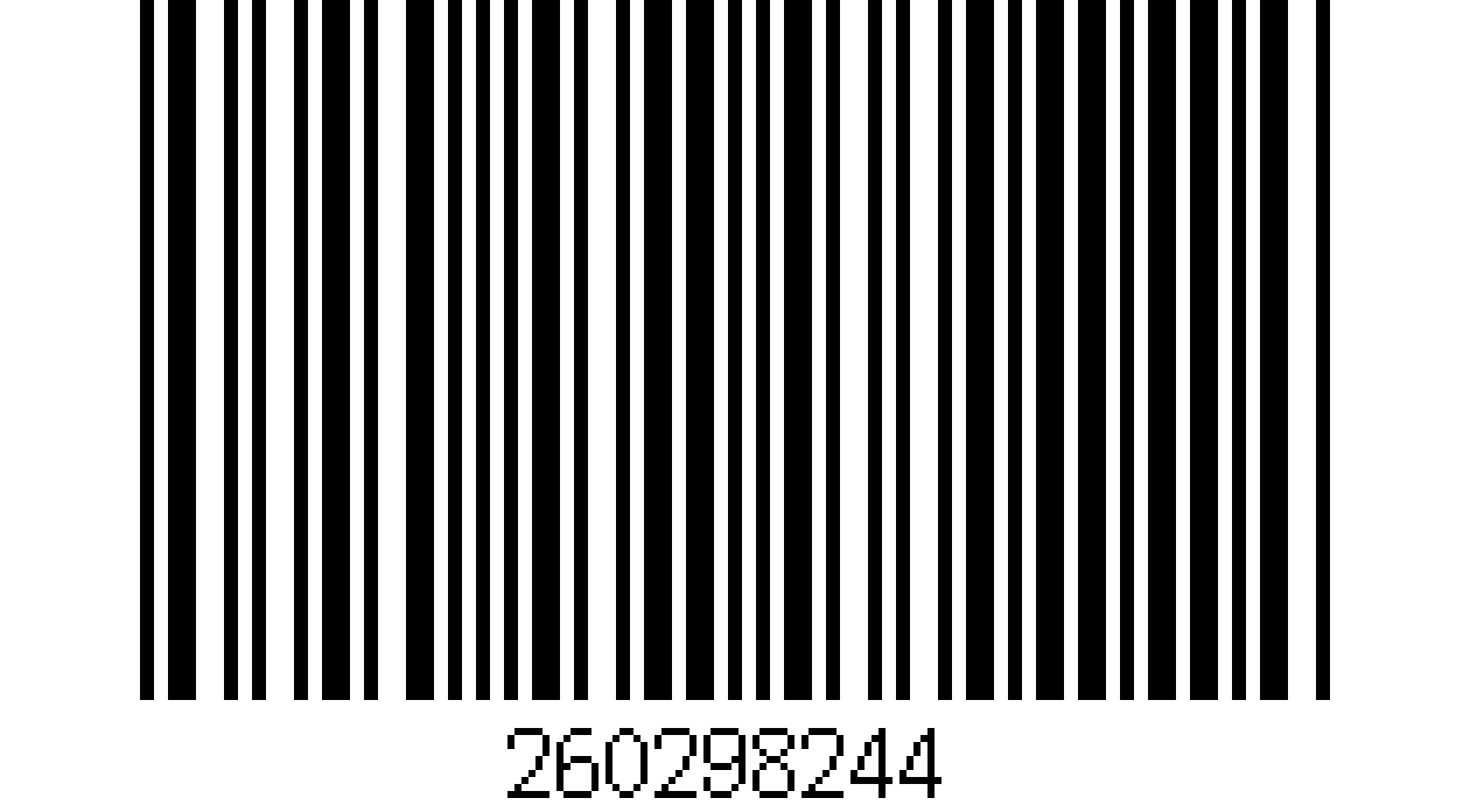
Code 11 barcode encoding 260298244
A Code 11 barcode with the human-readable value 260298244 printed below the bars.

How the Code 11 C and K check digits work

The dash counts as the value 10. Both check digits are calculated modulo 11, so a result of 10 is printed as a dash. Here is the calculation for the data 123-45.

Worked example: data 123-45
StepCalculationResult
C check digitWeights 1 to 10 from the right (restart at 1 after 10): 5×1 + 4×2 + 10×3 + 3×4 + 2×5 + 1×6 = 71. 71 modulo 11 = 5.C = 5
K check digitAdd C to the data (123-455) and use weights 1 to 9 from the right: 5×1 + 5×2 + 4×3 + 10×4 + 3×5 + 2×6 + 1×7 = 101. 101 modulo 11 = 2.K = 2
Encoded dataData, then C, then K, between the start and stop characters123-4552

Where Code 11 barcodes are used

Code 11 is a niche code. You will rarely meet it at a retail checkout, but it is still printed on telecom hardware, and that hardware passes through factories, stores and service depots.

Telecom equipment manufacturing

Components, boards, assemblies

Code 11 was built for telecommunications, and labeling telecom equipment is still its main use. Its short, dense pattern fits on small components and the edges of boards and modules.

Barcode scanning for manufacturing →

Warehousing and spare parts

Receiving, stock counts

Labeled telecom equipment and spare parts are received, counted and picked like any other stock. A phone app that reads Code 11 next to the EAN, Code 128 and QR codes on the same shelves saves a second device.

Barcode scanning for warehousing →

Logistics and returns

Shipping, repair depots

Equipment is shipped to sites, returned and sent for repair. Scanning the Code 11 label at each handover keeps the item's history tied to the right number, and the check digits stop a misread from creating a wrong record.

Barcode scanning for logistics →

Scanning Code 11 with barKoder

The barKoder Barcode Scanner SDK reads Code 11 on iOS, Android, the web, Windows and Linux, and in Flutter, React Native, .NET MAUI, Capacitor, Cordova and NativeScript apps. These features matter most for this code.

Check digit validation

Set the Code 11 checksum type to match your labels: disabled, or single (C). The setting is available in every SDK, from the Web SDK to Android, iOS and the cross-platform plugins.

Web SDK API reference →

Segment Decoding for deformed labels

Reads supported 1D barcodes with strong deformation, where no straight line crosses all the bars, such as labels on curved or uneven surfaces. It is off by default and turned on in the SDK settings.

Segment Decoding® →

Batch MultiScan for many labels at once

Decodes several barcodes in a single camera view, whatever their type or size. Use it to count a shelf of labeled equipment in one pass.

Batch MultiScan →

Test labels from the barcode generator

barKoder's free online generator creates Code 11 barcodes from any numeric input with check digits, so you can print test labels before your real ones arrive.

Free barcode generator →

Code 11 barcode reader API

Enable only the decoders you need. In the Web SDK, Code 11 is Barkoder.constants.Decoders.Code11, and the checksum type is set separately.

Web SDK (JavaScript)

JavaScript
Barkoder.setEnabledDecoders(Barkoder.constants.Decoders.Code11);

Barkoder.setCode11ChecksumType(Barkoder.constants.Code11ChecksumType.single);

The checksum type takes disabled, single or double. Use single when your labels carry a C check digit, or disabled to read the data with its check digits included.

Get scanning in three steps

  1. Get a free trial license and install the SDK for your platform.
  2. Enable the Code 11 decoder and set the checksum type that matches your labels.
  3. Read the result in your callback and store it against the item's record.
See the Web SDK example

The Code 11 checksum setting on other platforms: Android, iOS, Flutter, React Native, Capacitor, Cordova, .NET MAUI, NativeScript and Python.

Scan a Code 11 barcode on your phone or in your browser

Install the free barKoder demo app, or open the web demo, and scan your own Code 11 labels before you integrate the SDK.

iPhone and iPad

barKoder demo app for iOS

Scan with your camera, or point it at the QR code to open the App Store.

Download on the App Store
QR code linking to the barKoder demo app on the App Store

Android phones and tablets

barKoder demo app for Android

Scan with your camera, or point it at the QR code to open Google Play.

Get it on Google Play
QR code linking to the barKoder demo app on Google Play

Any modern browser

barKoder web demo

Runs the Web SDK in your browser, on desktop or mobile, with nothing to install.

Open the web demo
QR code linking to the barKoder web demo

Test with known samples. Print or display the testing sheet and scan each 1D and 2D barcode with the demo app. The data sheet summarizes the SDK for your team. Need a Code 11 sample of your own? Make one with the free barcode generator.

Code 11 barcode questions

What is Code 11 and what does the name mean?

Code 11 is a numeric 1D barcode developed by Intermec in 1977 and used mainly to label telecommunications equipment. The name comes from its character set: the ten digits 0 to 9 plus the dash make 11 data characters. It is also known as USD-8.

Is a Code 11 barcode the same as an 11-digit barcode?

No. Code 11 is a symbology, a way of drawing characters as bars, and it can hold any number of digits. An 11-digit product number is a different thing. In retail, the 11 data digits of a UPC-A code are followed by a check digit, and they are printed as a UPC-A barcode. See the EAN and UPC barcode page for those.

How do the Code 11 C and K check digits work?

C is the sum of each data character times a weight from 1 to 10, counted from the right, modulo 11. K is calculated the same way over the data plus C, with weights from 1 to 9. The dash counts as 10, and a result of 10 is printed as a dash. Short messages use C only; longer ones use C and K. In barKoder you set the expected checksum type to disabled, single or double.

How do I create a Code 11 barcode?

Use the free barKoder barcode generator. Choose Code 11, type your number and download the image. The generator adds the check digits for you. Print a few labels to test your scanning app before your real labels arrive.

Can a phone camera read Code 11 barcodes?

Yes, if the scanning app includes a Code 11 decoder. Code 11 is rarely found on retail scanners, so check that your decoder supports it. The barKoder SDK reads Code 11 with the camera on iOS and Android phones and in web apps through the WASM Barcode Scanner SDK. Try it in the free demo app first, then enable Barkoder.constants.Decoders.Code11 in your own app.

Add Code 11 scanning to your app

Test the SDK on your own equipment labels with a free 30-day trial, or talk to an SDK expert about your project.