GS1 Composite barcodes

A GS1 Composite barcode is a linear barcode, such as GS1 DataBar, EAN/UPC or GS1-128, with a small 2D component (CC-A, CC-B or CC-C) printed directly above it to carry extra GS1 data such as batch, expiry or serial number. barKoder reads both parts in one scan and splits the data into labeled fields with its GS1 parser.

GS1 Composite

GS1 Composite at a glance

GS1 Composite symbol key facts
TypeComposite symbology: a linear (1D) component with a 2D Composite Component printed above it, joined by a separator pattern
Character setGS1 Application Identifier data: a subset of ISO/IEC 646 plus FNC1. The 2D component uses a compaction mode designed for AIs.
Capacity2D component: CC-A up to 56 digits, CC-B up to 338 digits, CC-C up to 2,361 digits
Error correctionLinear component: a modulo check value for error detection. 2D component: Reed-Solomon error correction codewords.
StandardISO/IEC 24723 (GS1 Composite bar code symbology specification) and the GS1 General Specifications
Typical usesAdding batch, expiry or serial data next to a GTIN: healthcare packaging outside retail, production control and logistics labels

What a GS1 Composite barcode is and how it is built

A GS1 Composite barcode stacks two symbols into one. The linear component carries the item's primary identification, usually the GTIN, so any scanner can still read it. The 2D Composite Component above it carries supplementary data such as a batch number and expiration date.

  • Linear component: EAN-13, EAN-8, UPC-A or UPC-E, any member of the GS1 DataBar family, or GS1-128.
  • Separator pattern: a thin pattern, at least 1 module high (6 modules with EAN/UPC), between the two parts.
  • 2D Composite Component: CC-A, CC-B or CC-C, built on MicroPDF417 or PDF417 and sized to match the linear part.

The two parts are linked. A linkage flag in the 2D component tells the reader to send no data unless the linear component is decoded too, so a scan never returns batch or expiry data without its GTIN. The reader then sends both parts as one string, with the 2D data appended to the linear data.
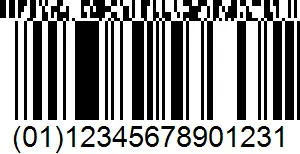
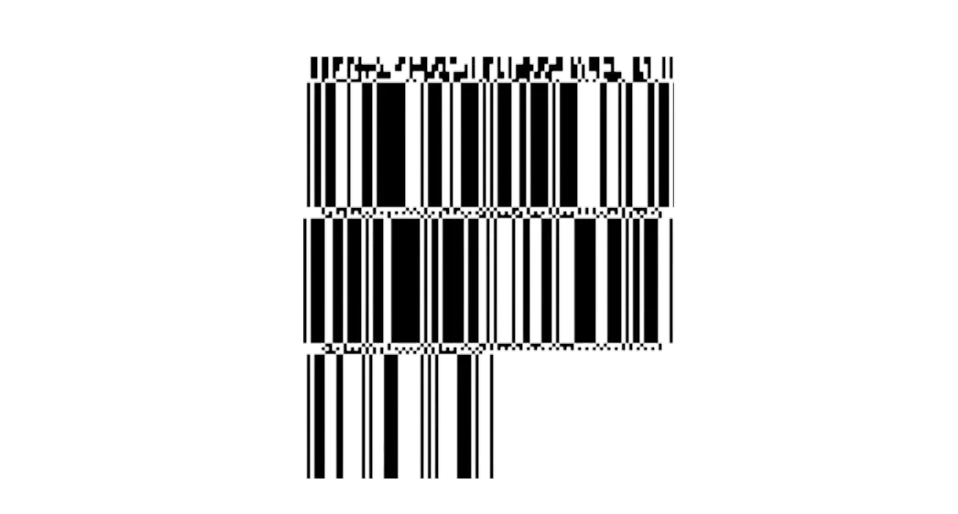
GS1 DataBar Expanded Stacked Composite symbol with a CC-A component
A GS1 DataBar Expanded Stacked Composite symbol. The CC-A 2D component sits on top, the separator pattern below it, and the stacked linear DataBar component at the bottom.

CC-A, CC-B and CC-C composite components

The encoder uses CC-A unless the data is too long for it, then moves to CC-B. CC-C is a larger option for GS1-128 only.

GS1 Composite Components compared
ComponentBuilt onCapacity and sizeLinear components
CC-AA variant of MicroPDF417 with its own row address patternsUp to 56 digits. 3 to 12 rows, 2 to 4 columns. The smallest component.EAN/UPC, GS1 DataBar, GS1-128
CC-BMicroPDF417, marked by codeword 920 at the startUp to 338 digits. 10 to 44 rows, 2 to 4 columns.EAN/UPC, GS1 DataBar, GS1-128
CC-CPDF417, marked by codeword 920 after the length descriptorUp to 2,361 digits. 3 to 30 rows, 1 to 30 data columns. The largest component, suited to logistics.GS1-128 only

What a GS1 Composite barcode decoder returns

Take the GS1 example of a GS1 DataBar Limited symbol with a CC-A component. The linear part carries (01)13112345678906 and the 2D part carries (17)010615(10)A123456. The reader returns them as one GS1 string, and the barKoder GS1 parser splits it into labeled fields.

Common Application Identifiers in composite symbols
AIGS1 titleFormat
(01)Identification of a trade item (GTIN)14 digits
(10)Batch or lot numberUp to 20 characters
(17)Expiration date6 digits, YYMMDD
(21)Serial numberUp to 20 characters
(7005)Catch areaUp to 12 characters, used together with a GTIN

Where GS1 Composite barcodes are used

Composite symbols let a label keep its familiar linear barcode while adding the batch, expiry or serial data that traceability needs. GS1 now prefers GS1 DataMatrix for many new applications, but composites remain a permitted option.

Healthcare

Primary and secondary packaging

GS1 lists the Composite Component as a permitted carrier for healthcare primary and secondary packaging outside retail, with GS1 DataMatrix preferred for regulated retail medicines.

Barcode scanning for healthcare →

Logistics

GS1-128 with CC-C

A GS1-128 barcode with a CC-C component carries far more data than a linear code alone. GS1 names logistics as the application that suits its larger capacity.

Barcode scanning for logistics →

Manufacturing

Production control

GS1 also permits Composite Components for consumer trade item production control, where batch and date data travel with the GTIN through the plant.

Barcode scanning for manufacturing →

Retail

GS1 DataBar on small and fresh items

GS1 DataBar is built for small products and loose produce. With a 2D composite component, the same DataBar label can also carry expiration dates, batch numbers and serial numbers.

Barcode scanning for retail →

Scanning GS1 Composite with barKoder

The barKoder Barcode Scanner SDK reads GS1 Composite symbols on iOS, Android, the web, Windows and Linux, and in Flutter, React Native, .NET MAUI, Capacitor, Cordova and NativeScript apps. These features matter most for this code.

GS1 parser for composite data

Recognizes the GS1 Application Identifiers from both the linear and 2D parts and returns them as labeled fields such as GTIN, batch, expiry and serial number. It handles fixed- and variable-length AIs and follows the GS1 General Specifications.

GS1 Barcode Parser →

Composite mode

One setting enables GS1 Composite scanning, in the Web SDK, the Android and iOS SDKs and the cross-platform plugins. Enable the linear decoder together with PDF417 and MicroPDF417, which read the 2D component. barKoder then returns the linear and 2D data as one GS1 string, and the GS1 parser splits it into Application Identifiers. GS1-128 composites read in full; for EAN/UPC composites, barKoder currently returns only the linear number. On Android, a predefined composite template sets it up for you.

Web SDK API reference →

Composite flag in the result

For PDF417 and some 1D barcodes, the result metadata includes a link value that is 1 when the barcode is part of a composite symbol, so your app can tell composite reads from standalone ones.

Extra metadata in results →

Decoders for the linear components

barKoder has decoders for the linear symbols composites are built on: EAN-13, EAN-8, UPC-A and UPC-E, Code 128 for GS1-128, and three GS1 DataBar decoders (DataBar 14, Limited and Expanded).

GS1 DataBar barcodes →

GS1 Composite barcode reader API

Turn on composite mode and GS1 formatting. This Web SDK example uses settings from the barKoder docs.

Web SDK (JavaScript)

JavaScript
Barkoder.setEnableComposite(Barkoder.constants.EnableComposite.Enable);

Barkoder.setFormatting(Barkoder.constants.Formatting.GS1);

The first line enables GS1 Composite scanning. The second applies the GS1 parser to the results.

Get scanning in three steps

  1. Get a free trial license and install the SDK for your platform.
  2. Enable the decoders for the linear components on your labels, such as GS1 DataBar, EAN/UPC or Code 128, and turn on composite mode.
  3. Read the result in your callback and use the parsed GS1 fields instead of splitting the string yourself.
See the GS1 parser

The composite setting on other platforms: Android, iOS, Flutter, React Native, Capacitor, Cordova, .NET MAUI, NativeScript and Python.

Scan a GS1 Composite barcode on your phone or in your browser

Install the free barKoder demo app, or open the web demo, and scan your own composite labels and see the parsed GS1 fields before you integrate the SDK.

iPhone and iPad

barKoder demo app for iOS

Scan with your camera, or point it at the QR code to open the App Store.

Download on the App Store
QR code linking to the barKoder demo app on the App Store

Android phones and tablets

barKoder demo app for Android

Scan with your camera, or point it at the QR code to open Google Play.

Get it on Google Play
QR code linking to the barKoder demo app on Google Play

Any modern browser

barKoder web demo

Runs the Web SDK in your browser, on desktop or mobile, with nothing to install.

Open the web demo
QR code linking to the barKoder web demo

Test with known samples. Print or display the testing sheet and scan each 1D and 2D barcode with the demo app. The data sheet summarizes the SDK for your team. Need a composite sample of your own? Make a GS1 DataBar Composite symbol with the free barcode generator.

GS1 Composite barcode questions

What is a GS1 Composite barcode?

A GS1 Composite barcode is a linear barcode (EAN/UPC, GS1 DataBar or GS1-128) with a 2D Composite Component printed above it. The linear part carries the primary identification, usually the GTIN. The 2D part carries supplementary GS1 data such as the batch number, expiration date or serial number. It is defined in ISO/IEC 24723 and the GS1 General Specifications.

What is the difference between CC-A, CC-B and CC-C?

They are the three sizes of 2D Composite Component. CC-A is a MicroPDF417 variant that holds up to 56 digits and is used whenever the data fits. CC-B is MicroPDF417 and holds up to 338 digits. CC-C is PDF417, holds up to 2,361 digits and can only be used with GS1-128. CC-A and CC-B work with EAN/UPC, GS1 DataBar and GS1-128 linear components.

Which barcode reader supports 1D and 2D formats in a single API?

A composite symbol needs exactly that, because the reader has to decode a linear barcode and a 2D component together. The barKoder SDK reads 1D, 2D and composite symbols through one API on iOS, Android and the web. Enable the decoders you need with setEnabledDecoders and turn on composite mode with setEnableComposite.

Can a scanner read only the 2D part of a composite symbol?

No. The 2D component contains a linkage flag that tells the reader to send no data unless the linear component is decoded too. This keeps batch or expiry data from being recorded without its GTIN. The reverse is allowed: readers have an option to send only the linear component and ignore the 2D part.

How do I decode the GS1 data in a composite barcode?

The reader returns the linear and 2D data as one GS1 string of Application Identifiers, such as (01) GTIN, (17) expiration date and (10) batch or lot. Set barKoder's formatting to GS1 and the GS1 parser returns those values as labeled fields, with no manual string splitting.

Add GS1 Composite scanning to your app

Test the SDK and the GS1 parser on your own composite labels with a free 30-day trial, or talk to an SDK expert about your project.