MaxiCode Reader and Decoder SDK

MaxiCode is the fixed-size 2D barcode with a bullseye in the center that UPS prints on its package labels. barKoder reads and decodes MaxiCode with the phone and tablet cameras in your iOS, Android and web apps, so your app can scan parcels the way sorting systems do.

MaxiCode

MaxiCode at a glance

MaxiCode key facts
TypeFixed-size 2D matrix symbology. Offset rows of hexagonal modules around a central bullseye finder pattern.
Character setAll 256 byte values, through code sets A to E
CapacityUp to 93 alphanumeric characters or 138 digits per symbol. Structured append links up to 8 symbols.
Error correctionReed-Solomon. The primary message always uses enhanced error correction; the secondary message uses standard error correction except in mode 5.
StandardISO/IEC 16023:2000. Developed by UPS.
Typical usesUPS package labels (modes 2 and 3), parcel sorting and tracking

What MaxiCode is and how it is built

MaxiCode is a 2D matrix barcode that UPS developed in 1992 to track and sort packages. It was designed to be read quickly, even on parcels moving along a conveyor. Unlike QR Code or Data Matrix, it never changes size: a symbol is about one inch square, 1.11 x 1.054 inches nominal including its quiet zone.

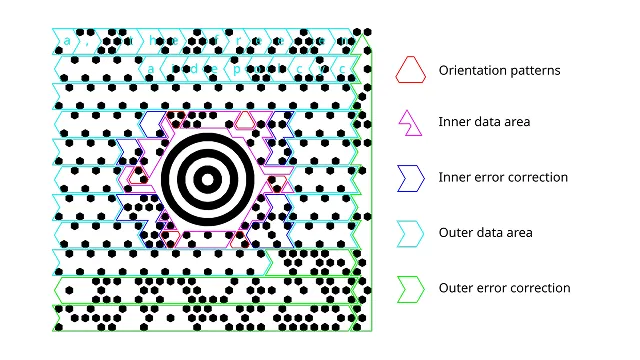
Every symbol has three parts:

  • Bullseye: concentric rings in the center that let a scanner find the symbol and its orientation from any angle.
  • Primary message: the ring of modules closest to the bullseye. In UPS labels it holds the postal code, a 3-digit country code and a 3-digit class of service, protected by enhanced error correction.
  • Secondary message: the outer modules, with the rest of the data, such as tracking and address details.

Reed-Solomon error correction lets a reader rebuild the data when part of a label is scratched or torn. Structured append spreads a longer message over up to eight symbols, which can be scanned in any order.

MaxiCode 2D barcode used for high-speed logistics and parcel tracking in industrial environments
MaxiCode's hexagonal modules surround a central bullseye that scanners use to locate the symbol.

MaxiCode modes, including the UPS structured carrier message

A mode indicator in the symbol tells the reader how the data is laid out. UPS labels use mode 2 or mode 3, the structured carrier message. barKoder returns the whole message as one string, starting with the postal code, country code and class of service, so your app splits out the fields it needs.

MaxiCode modes and what they carry
ModeWhat it isTypical use
Mode 2Structured carrier message with a numeric postal code of up to 9 digits, plus a 3-digit ISO 3166 country code and a 3-digit class of serviceUPS domestic shipments, mainly in the US
Mode 3Structured carrier message with an alphanumeric postal code of up to 6 characters, plus country code and class of serviceUPS international shipments
Mode 4Standard symbol: free-form data with standard error correction on the secondary messageGeneral use outside carrier labels
Mode 5Full enhanced error correction on both the primary and secondary messageLabels that need extra protection
Mode 6Reader programmingConfiguring scanners by scanning a symbol

Where MaxiCode is used

MaxiCode was built for one job: moving parcels through automated sorting at high speed.

Logistics and parcel delivery

UPS labels, routing, tracking

UPS labels carry the destination postal code, country and service class in the MaxiCode primary message, which sorting systems read to route each package. Depots, transit hubs and customs checkpoints scan parcel labels again along the way.

Barcode scanning for logistics →

Warehousing and receiving

Inbound parcels, sorting

Receiving teams scan the UPS label on inbound parcels to log deliveries and route them inside the building. Reading MaxiCode with a phone camera lets any device in the warehouse do this.

Barcode scanning for warehousing →

Retail distribution

Distribution centers, returns

Retail distribution centers handle large volumes of carrier-labeled parcels, outbound and returned. Scanning MaxiCode alongside the 1D tracking barcode keeps throughput up in the supply chain.

Barcode scanning for retail →

Decoding MaxiCode with barKoder

The barKoder Barcode Scanner SDK reads MaxiCode on iOS, Android, the web, Windows and Linux, and in Flutter, React Native, .NET MAUI, Capacitor, Cordova and NativeScript apps. These features matter most for this code.

Tested on damaged MaxiCodes

barKoder tested its MaxiCode decoder on 44 blurred, damaged, aged and otherwise altered samples, under different lighting, angles and backgrounds, and published the results against five other SDKs. barKoder scored highest.

MaxiCode support and test results →

AR Mode for parcels

AR Mode outlines and labels each detected code on the camera view in real time, so a user sees which parcels are already scanned and which are not.

Augmented reality barcode overlays →

Batch MultiScan for shipping labels

Decodes several barcodes in one camera view, whatever their type or size. Read the MaxiCode and the 1D barcodes on a shipping label, or several labels, in one pass.

Batch MultiScan →

Read a MaxiCode from a photo

The free online barcode scanner reads MaxiCode with your camera or from a photo or screenshot, with no app and no sign-up. It is a quick way to check what a label contains.

Free online barcode scanner →

MaxiCode decoder API

Enable only the decoders you need. This Web SDK call enables MaxiCode, using the decoder constant from the barKoder docs.

Web SDK (JavaScript)

JavaScript
Barkoder.setEnabledDecoders(Barkoder.constants.Decoders.MaxiCode);

On Android the same decoder is Barkoder.DecoderType.MaxiCode.

Get scanning in three steps

  1. Get a free trial license and install the SDK for your platform.
  2. Enable the MaxiCode decoder, plus the 1D decoders your labels also carry.
  3. Read the decoded message in your callback and map the postal code, country and service class into your shipment record.
See the Web SDK API reference

Decoder lists for other platforms: Android general example and Android API reference.

Scan a MaxiCode on your phone or in your browser

Install the free barKoder demo app, or open the web demo, and scan the MaxiCode on a real UPS label before you integrate the SDK. To read a MaxiCode from a photo or screenshot, use the free online barcode scanner.

iPhone and iPad

barKoder demo app for iOS

Scan with your camera, or point it at the QR code to open the App Store.

Download on the App Store
QR code linking to the barKoder demo app on the App Store

Android phones and tablets

barKoder demo app for Android

Scan with your camera, or point it at the QR code to open Google Play.

Get it on Google Play
QR code linking to the barKoder demo app on Google Play

Any modern browser

barKoder web demo

Runs the Web SDK in your browser, on desktop or mobile, with nothing to install.

Open the web demo
QR code linking to the barKoder web demo

Test with known samples. Print or display the testing sheet and scan each 1D and 2D barcode with the demo app. The data sheet summarizes the SDK for your team.

MaxiCode reader questions

What is MaxiCode used for?

MaxiCode was developed by UPS to track and sort packages. On a UPS label it carries the destination postal code, country code and class of service in its primary message, and further shipment details in its secondary message. Its fixed size and central bullseye let fixed scanners read it on parcels moving along a conveyor.

Can a phone camera read a UPS MaxiCode?

Yes, with a decoder that supports MaxiCode. Not every library has one: Google's ML Kit, for example, does not list MaxiCode among its formats. barKoder reads MaxiCode with the camera on iOS and Android phones and tablets and in web browsers. Try it on your own UPS labels with the free demo app or the web demo.

What is the difference between MaxiCode mode 2 and mode 3?

Both are the structured carrier message that UPS uses. Mode 2 holds a numeric postal code of up to 9 digits and is used mainly for US domestic shipments. Mode 3 holds an alphanumeric postal code of up to 6 characters and is used mainly for international shipments. In both modes the primary message also carries a 3-digit country code and a 3-digit class of service.

How much data can a MaxiCode hold?

One symbol holds up to 93 alphanumeric characters or 138 digits. Structured append links up to eight symbols for longer messages, and the reader can put them back together in any order. Because MaxiCode has one fixed size, its capacity is lower than that of QR Code or Data Matrix.

How is MaxiCode different from QR Code and Data Matrix?

MaxiCode uses hexagonal modules around a central bullseye and always has the same size, about one inch square. QR Code and Data Matrix use square modules, grow with the data and hold much more. MaxiCode is specialized for carrier labels and conveyor scanning, while QR Code and Data Matrix are general-purpose codes. barKoder reads all three.

Add MaxiCode scanning to your app

Test the SDK on your own UPS labels and parcels with a free 30-day trial, or talk to an SDK expert about your project.