GS1 DataBar Barcodes: Variants and Scanner SDK

GS1 DataBar is a family of seven compact linear barcodes that carry a product's GTIN and, in the Expanded versions, extra GS1 data such as weight, batch and expiry date. barKoder reads GS1 DataBar with the camera in your iOS, Android and web apps and parses the GS1 data into fields.

GS1 DataBar

GS1 DataBar at a glance

GS1 DataBar key facts
TypeFamily of linear (1D) GS1 symbologies, formerly called Reduced Space Symbology (RSS). Seven variants in three groups, including two-row and multi-row stacked versions.
Character set and dataDigits only for Omnidirectional, Truncated, Stacked, Stacked Omnidirectional and Limited. Expanded versions encode GS1 Application Identifier (AI) data in the GS1 subset of ISO/IEC 646.
CapacityA 14-digit GTIN, AI (01), for all variants except Expanded. Expanded and Expanded Stacked hold up to 74 numeric or 41 alphabetic characters.
Check digit and error detectionThe GTIN check digit plus a symbol checksum: modulo 79 (first group), modulo 89 (Limited) or modulo 211 (Expanded). No quiet zone required.
StandardISO/IEC 24724. GS1 General Specifications, section 5.5.
Typical usesFresh produce and variable-weight items, coupons, small retail items, healthcare items with little label space

What GS1 DataBar is and how it is built

GS1 DataBar was designed for items where an EAN or UPC barcode is too big or carries too little: loose fruit, small packs, coupons and products sold by weight. It packs a full 14-digit GTIN into less space, and its Expanded versions add data such as the weight, batch or best-before date.

A DataBar symbol is made of three kinds of parts:

  • Guard patterns: a narrow space and bar at each end. DataBar needs no quiet zone around it.
  • Finder patterns: fixed shapes in the middle of the symbol that let a scanner find each segment. In the first group, the two finder patterns also encode the modulo 79 check value.
  • Data characters: wide symbol characters that each encode thousands of combinations, which is how DataBar fits a GTIN into a short symbol.

A scanner can read a DataBar symbol in separate segments, each a symbol character next to a finder pattern. The stacked versions print those segments in two or more rows. Any DataBar symbol can also carry a 2D Composite Component printed above it, making a GS1 Composite barcode.
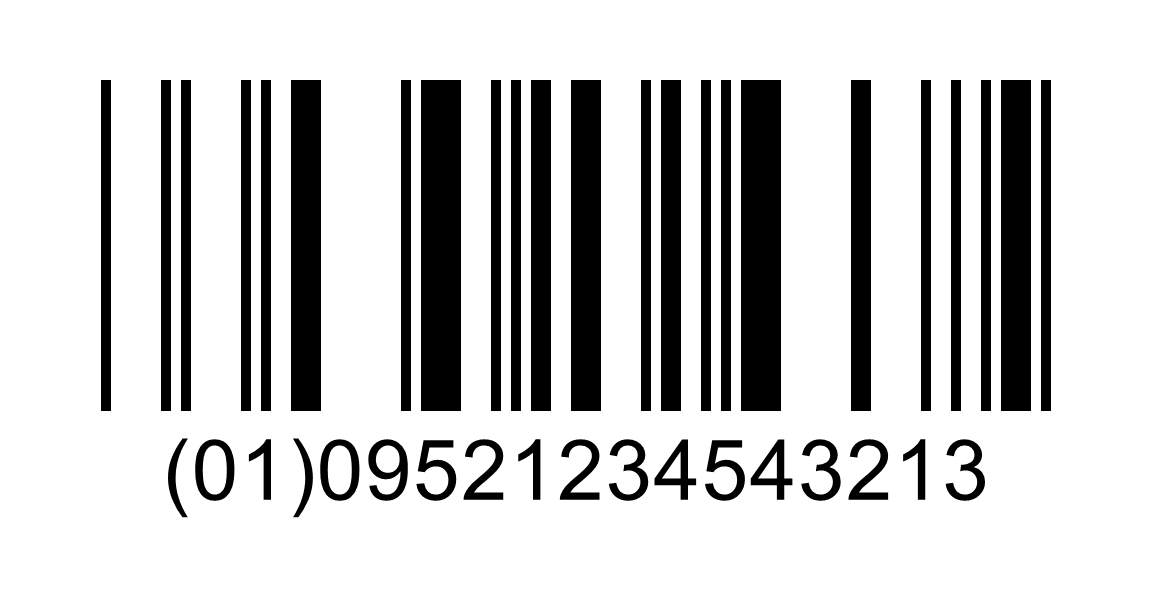
GS1 DataBar Omnidirectional barcode encoding (01)09521234543213
A GS1 DataBar Omnidirectional barcode. The human-readable line shows AI (01) and the 14-digit GTIN it encodes.

GS1 DataBar variants: Omnidirectional, Stacked, Limited and Expanded

GS1 sorts the seven variants into three groups. Sizes are minimums in modules (X), from the GS1 General Specifications.

GS1 DataBar variants and what they mean for scanning
VariantGS1 groupDataShape and sizeRead by omnidirectional POS scanners
DataBar Omnidirectional1AI (01) GTINOne row, 96X wide by 33X highYes
DataBar Truncated1AI (01) GTINOne row, 96X by 13X, for small itemsNo
DataBar Stacked1AI (01) GTINTwo short rows, 50X by 13X, for small and narrow itemsNo
DataBar Stacked Omnidirectional1AI (01) GTINTwo full-height rows, 50X by 69XYes
DataBar Limited2AI (01) GTIN. A GTIN-14 must start with indicator 1.One row, 79X by 10X, for very small itemsNo
DataBar Expanded3GTIN plus other AIs, such as weight and best-before date, up to 74 digitsOne row, variable lengthYes
DataBar Expanded Stacked3Same as Expanded2 to 11 rows, 2 to 20 segments wideYes

For items scanned at a retail checkout, GS1 recommends Omnidirectional or Stacked Omnidirectional when only the GTIN is needed, and Expanded or Expanded Stacked when extra AIs are needed.

Where GS1 DataBar is used

DataBar shows up where items are small, sold by weight or need a date or batch on the label.

Retail

Fresh foods, coupons, variable-weight items

Retailers use DataBar on small items, fresh foods, coupons and variable-weight products. DataBar Expanded can carry the weight with the GTIN, so the checkout gets both from one scan.

Barcode scanning for retail →

Food and beverage

Perishables, expiry and batch

Producers of perishable goods put DataBar on each unit to store the expiration date and batch number. A yogurt maker, for example, can trace each container back to its batch.

Barcode scanning for food and beverage →

Healthcare

Pharmaceuticals, medical devices

DataBar identifies pharmaceuticals and medical devices where label space is limited. DataBar Limited and the stacked versions fit on small packs and narrow items.

Barcode scanning for healthcare →

Logistics

Traceability on small packaging

DataBar supports item tracking and supply chain traceability where packaging is too small for larger barcodes.

Barcode scanning for logistics →

Scanning GS1 DataBar with barKoder

barKoder reads all seven DataBar variants with three decoders: Databar14 reads Omnidirectional, Truncated, Stacked and Stacked Omnidirectional, DatabarLimited reads Limited, and DatabarExpanded reads Expanded and Expanded Stacked. The decoders are available for iOS, Android and Python, and in Flutter, React Native, .NET MAUI, Capacitor and Cordova apps.

GS1 parser for DataBar data

Turns the raw string into labeled fields, such as (01) GTIN, (17) expiration date, (10) batch or lot and (21) serial number. It handles fixed- and variable-length Application Identifiers and follows the GS1 General Specifications.

GS1 Barcode Parser →

Composite mode for DataBar with a 2D component

When a DataBar symbol has a Composite Component above it, turn on composite mode to read the linear and 2D parts together.

GS1 Composite barcodes →

Batch MultiScan for many items

Decodes several barcodes in a single camera view, whatever their type or size, so a tray of labeled produce or a row of small packs can be read in one pass.

Batch MultiScan →

Continuous scanning at the checkout

Lets cashiers and stock counters scan item after item without pausing for each barcode, for DataBar and EAN/UPC codes in the same session.

Continuous scanning →

GS1 DataBar reader API

Turn on the DataBar decoders in your decoder configuration. These lines are taken from the iOS general example in the barKoder docs.

iOS (Swift)

Swift
guard let decoderConfig = barkoderView.config?.decoderConfig else { return } //get decoder config

decoderConfig.databar14.enabled = true
decoderConfig.databarLimited.enabled = true
decoderConfig.databarExpanded.enabled = true

The full example enables every symbology.

Web SDK: read DataBar with a Composite Component

JavaScript
Barkoder.setEnableComposite(Barkoder.constants.EnableComposite.Enable);
  1. Get a free trial license and install the SDK for your platform.
  2. Enable the DataBar decoders, and composite mode if your labels carry a 2D component.
  3. Pass the result to the GS1 parser to get the GTIN, weight, batch and dates as fields.
See the iOS example

Decoder lists for other platforms: Android, Web SDK, Flutter, React Native, .NET MAUI, Capacitor, Cordova and Python.

Scan a GS1 DataBar code on your phone or in your browser

Install the free barKoder demo app, or open the web demo, and scan the DataBar labels on your own produce, coupons and small packs before you integrate the SDK.

iPhone and iPad

barKoder demo app for iOS

Scan with your camera, or point it at the QR code to open the App Store.

Download on the App Store
QR code linking to the barKoder demo app on the App Store

Android phones and tablets

barKoder demo app for Android

Scan with your camera, or point it at the QR code to open Google Play.

Get it on Google Play
QR code linking to the barKoder demo app on Google Play

Any modern browser

barKoder web demo

Runs the Web SDK in your browser, on desktop or mobile, with nothing to install.

Open the web demo
QR code linking to the barKoder web demo

Test with known samples. Print or display the testing sheet and scan each 1D and 2D barcode with the demo app. The data sheet summarizes the SDK for your team. To make your own test labels, the free barcode generator creates DataBar Omnidirectional, Stacked, Limited and Expanded barcodes.

GS1 DataBar scanner questions

What is GS1 DataBar Expanded?

GS1 DataBar Expanded is the variable-length member of the DataBar family. Besides the GTIN, it carries other GS1 Application Identifiers, such as net weight, best-before date or batch, up to 74 numeric or 41 alphabetic characters. GS1 designed it for variable-weight and perishable products, traceable retail products and coupons, and it can be read by omnidirectional checkout scanners. DataBar Expanded Stacked prints the same data in 2 to 11 rows when the label is too narrow for a single row.

What is a stacked barcode, and how do I create a stacked GS1 DataBar?

A stacked barcode splits one linear symbol into two or more shorter rows, so it fits a narrow label. DataBar has three stacked versions: Stacked (two short rows for small items), Stacked Omnidirectional (two full-height rows for checkout scanners) and Expanded Stacked (2 to 11 rows of Expanded data). To make test labels, the free barKoder barcode generator creates GS1 DataBar Stacked and other DataBar variants.

How do I decode the data in a GS1 barcode?

A GS1 barcode holds element strings: an Application Identifier, such as (01) for the GTIN or (17) for the expiration date, followed by its value. Decoding the barcode gives you the full string. The barKoder GS1 parser then splits it into labeled fields, handling fixed- and variable-length AIs, so your app gets the GTIN, weight, batch and dates without manual parsing. The same parser works for GS1 data from DataBar, GS1-128 and GS1 DataMatrix.

Is GS1 DataBar the same as RSS?

Yes. GS1 DataBar was previously called Reduced Space Symbology (RSS), and you may still see the RSS name in older documents and software. The family is now defined in ISO/IEC 24724 and the GS1 General Specifications. In the barKoder SDK, enable the Databar14, DatabarLimited and DatabarExpanded decoders.

What is the best way to read GS1 DataBar on small items?

Use a scanner that reads the small and stacked variants and parses the GS1 data. Truncated, Stacked and Limited symbols are designed for small items that are not scanned by omnidirectional checkout scanners, so a handheld or phone camera is the natural reader. With the barKoder SDK, enable the DataBar decoders, scan the item with the phone camera and pass the result to the GS1 parser. Test your own labels in the free demo app first.

What are the top mobile SDKs for scanning GS1 barcodes?

Look for an SDK that reads all the GS1 carriers you use (EAN/UPC, DataBar, GS1-128, GS1 DataMatrix and Composite), parses Application Identifiers into fields and runs on your platforms. Then test it on your own labels. barKoder reads all of these, includes a GS1 parser, and runs on iOS, Android, the web and cross-platform frameworks such as Flutter, React Native and .NET MAUI. barKoder is an official GS1 US and GS1 Germany solution provider, and the free trial runs for 30 days on up to 25 devices.

Add GS1 DataBar scanning to your app

Test the SDK on your own produce labels, coupons and small packs with a free 30-day trial, or talk to an SDK expert about your project.