Best Barcode Scanner SDK for Enterprise Apps
Choosing the best barcode scanner SDK is less about finding a universal winner and more about finding the SDK that fits the way your application actually works. A warehouse application may prioritize speed, batch scanning, and damaged labels. A healthcare application may need reliable Data Matrix and GS1 support. An automotive application may depend on VIN scanning, while a browser-based enterprise platform may require WebAssembly and broad browser compatibility. For enterprise teams, the right barcode scanning SDK should do more than recognize a clean QR code. It should fit your platforms, support the barcode formats your workflows depend on, perform reliably with real-world samples, and offer licensing and support that make sense at scale.
This guide explains what to evaluate when choosing an enterprise barcode scanner SDK, how software compares with open-source libraries and dedicated hardware, and where barKoder fits into the decision.
What Makes a Barcode Scanner SDK Enterprise-Ready?
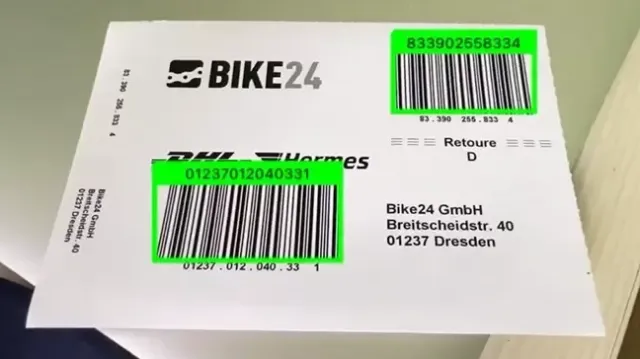
Enterprise scanning is fundamentally different from a simple barcode demo. A production application may encounter scratched labels, curved surfaces, low contrast, poor lighting, motion blur, small codes, multiple barcodes in one camera frame, or barcodes printed on products that are difficult to position. That means an enterprise-ready barcode reader SDK should be evaluated across several dimensions:
- Recognition performance: How consistently does it decode real-world barcodes rather than only perfect samples?
- Barcode coverage: Does it support the 1D and 2D symbologies your business requires?
- Platform support: Can your team deploy it across mobile, web, desktop, or cross-platform applications?
- Offline operation: Can scanning continue without a constant network connection?
- High-volume workflows: Does it support continuous, batch, or multi-barcode scanning?
- Difficult barcode handling: Can it deal with damaged, blurred, low-contrast, or distorted codes?
- Integration: Does the SDK provide the APIs, documentation, and frameworks your development team already uses?
- Licensing: Can the licensing model scale with your deployment and procurement requirements?
- Support: Is technical assistance available when scanning becomes part of a mission-critical workflow?
A useful starting point is the barKoder Barcode Scanner SDK, where you can review supported platforms and barcode formats before testing the SDK against your own requirements.
Core Features to Compare
Not every application needs every feature. The important question is whether an SDK covers the requirements that matter to your particular workflow.
Feature | Why it matters |
1D and 2D barcode support | Covers common retail, logistics, manufacturing, and identification workflows |
PDF417, Data Matrix, QR, and GS1 | Important for enterprise, healthcare, logistics, and identity applications |
Offline scanning | Useful when applications operate in warehouses, field environments, or areas with unreliable connectivity |
Web and mobile support | Makes it easier to deploy one scanning strategy across different application environments |
Batch / multi-scan | Helps process multiple barcodes without requiring a separate scan action for every code |
Damaged-code handling | Reduces failed scans when labels are scratched, blurred, folded, or poorly printed |
Licensing flexibility | Helps procurement teams accommodate different device counts, applications, and deployment models |
Developer support | Documentation, APIs, examples, and technical assistance can significantly affect integration time |
1D and 2D Barcode Support
Enterprise applications rarely rely on a single barcode format. Depending on the industry, you may encounter Code 128, Code 39, EAN, UPC, Data Matrix, PDF417, QR Code, GS1 formats, or specialized formats. A broad symbology portfolio can reduce the need to maintain different scanning technologies for different workflows.
PDF417, Data Matrix, QR, and GS1
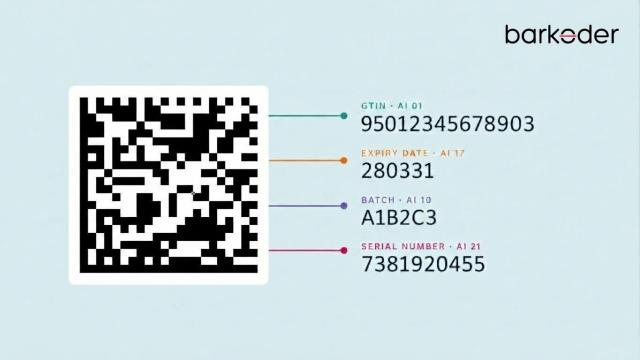
Some barcode formats deserve particular attention during an enterprise SDK evaluation. Data Matrix is especially relevant to healthcare and manufacturing. GS1 identifies GS1 DataMatrix as an important data carrier for healthcare product identification and traceability, including information such as GTIN, batch or lot number, expiration date, and serial number. PDF417 is widely used when a relatively large amount of structured data needs to be encoded in a barcode, making support important for identity and document-related workflows. QR Codes are common across consumer and enterprise applications, while GS1 formats become important when applications need to interpret structured supply-chain and product information. The best barcode scanner SDK for your application should therefore be evaluated against the actual formats in your data, not just the number of symbologies listed on a product page. For organizations preparing for broader 2D barcode adoption, the barKoder guide to GS1 DataMatrix and GS1 QR Code provides additional context on how these standards differ.
Offline Scanning
A scanning workflow should not necessarily depend on an internet connection. Warehouses, manufacturing floors, delivery routes, field-service locations, and other operational environments can have unreliable connectivity . For these applications, processing barcode data locally can help keep scanning available even when network access is limited.
A real-world example is Tenaris, which integrated barKoder into its .NET MAUI applications for field workflows. The company needed scanning that worked across phones and tablets and supported offline use in the field. After implementation, its drivers successfully scanned thousands of VINs in real-world conditions. Read the Tenaris customer story.
Web and Mobile Support
Enterprise applications increasingly span multiple environments. Your organization may have a native Android application for warehouse workers, an iOS application for field teams, and a browser-based application for office staff. Using an SDK with broad platform coverage can simplify technology decisions and reduce the need to maintain completely different scanning solutions. barKoder currently supports Android, iOS, WebAssembly , Windows, Linux, Python, C#, and multiple cross-platform frameworks.
For browser-based applications, WebAssembly allows compiled code to run inside modern web browsers alongside JavaScript.
You can also test the browser implementation directly through the barKoder WASM Demo.
A practical example is Penguin Pickup, which integrated the barKoder Web SDK to scan 1D and 2D barcodes directly in the browser. The company reported faster first-pass scans, fewer retries, reduced manual barcode entry, and consistent performance across laptops, tablets, and phones. Read the Penguin Pickup customer story.
For developers working with cross-platform applications, barKoder also provides integration resources for Flutter, React Native, Capacitor, and other frameworks.
Test with barKoder Web DemoMulti-Scan & Continuous Scan
Scanning one barcode at a time is not always efficient. Inventory, warehouse picking, receiving, sorting, and asset-management applications may need to capture multiple codes from a single camera view or continuously scan items as a user moves through a workflow. When comparing SDKs, test the complete workflow rather than simply measuring how quickly one clean barcode can be decoded.
barKoder's Batch MultiScan is designed for workflows where multiple barcodes need to be detected and processed from a single camera view. The SDK also provides continuous scanning modes for high-volume workflows.
Damaged and Difficult Barcodes
Real-world labels do not always look like textbook examples. Barcodes can be:
- Scratched
- Partially damaged
- Folded
- Blurred
- Low contrast
- Printed at small sizes
- Positioned on curved surfaces
- Affected by reflections
- Marked directly onto industrial parts
This is one of the most important areas to benchmark. A scanner that performs perfectly on clean samples may behave very differently in production. barKoder provides specialized technologies for difficult scanning conditions, including MatrixSight for damaged 2D codes and DeBlur for heavily blurred EAN and UPC barcodes.
Best features by Use Case
There is no single definition of the "best" SDK across every enterprise. Different applications have different priorities.
Use case | What to prioritize |
Warehouse | Speed, multi-scan, continuous scanning, damaged-label handling |
Healthcare | Data Matrix, GS1, accuracy, reliable decoding |
Automotive | VIN scanning, Code 39/128, Data Matrix, OCR where required |
Manufacturing | DPM, Data Matrix, low contrast, difficult surfaces |
Web apps | WebAssembly, browser compatibility, camera access, performance |
Identity | PDF417, MRZ, structured data extraction, accuracy |
Warehouse Applications
Warehouse teams often scan hundreds or thousands of items during a shift. The evaluation should therefore focus on throughput rather than a single impressive scan. Multi-scan capabilities, fast autofocus behavior, continuous scanning, and performance with damaged shipping labels can have a much greater operational impact than support for an obscure barcode format. barKoder also covers warehouse and logistics workflows where mobile devices are used for inventory, tracking, and operational scanning. See the barKoder warehouse solutions for more information.
Healthcare Applications
Healthcare is a particularly strong example of why barcode support needs to go beyond QR and EAN. GS1 notes that GS1 DataMatrix can encode product identification and traceability information such as GTIN, expiration date, batch number, and serial number for healthcare applications. For healthcare software, evaluate not only whether an SDK recognizes Data Matrix, but also how reliably it handles the small, dense, and sometimes challenging codes encountered in real workflows. barKoder also has experience with healthcare applications. Sentinel Healthcare reports that integrating barKoder improved the speed and accuracy of workflows involving medical records and patient data, while the support team helped with implementation. Read more customer feedback from Sentinel Healthcare . For more information about barcode technology in healthcare workflows, see the barKoder healthcare industry page.
Automotive Applications
Automotive applications can require a combination of barcode and text recognition. VINs may be encoded using formats such as Code 39 or Code 128, while VIN information can also appear as plain text on vehicle documentation or physical vehicle locations. barKoder provides dedicated VIN scanning capabilities, including VIN barcode recognition and VIN OCR functionality. For a deeper look at the workflow, see VIN scanning with barKoder. A particularly relevant customer example is VAL'Utility, which integrated the barKoder Web SDK into a vehicle warranty onboarding workflow. The company needed to extract data from South African driver's licenses and vehicle license discs in a browser environment, including difficult situations involving reflective glass and glare. The customer story reports improved field-extraction reliability after barKoder tuning and a custom WASM build. Read the VAL'Utility customer story. For a broader look at barcode scanning in the automotive sector, visit the barKoder automotive industry page.
Manufacturing Applications
Manufacturing environments can introduce some of the hardest scanning conditions. Direct Part Marking (DPM) can involve Data Matrix codes etched, engraved, dot-peened, or otherwise permanently marked onto metal, plastic, glass, and other surfaces. These codes can have low contrast, reflections, surface irregularities, or inconsistent marking quality.
When evaluating an SDK for manufacturing, test it with the actual DPM samples used on your production line.
A strong real-world example is Inexto, which uses barKoder in factory and logistics track-and-trace projects running on industrial mobile computers. Its workflow involves DPM Data Matrix, DotCode, and QR scanning. The company highlighted barKoder's DPM performance, damaged-code handling, broad platform support, and ease of integration. Read the Inexto customer story.
Web Applications
For web applications, the technical requirements are slightly different. Look for:
- WebAssembly support
- Broad browser compatibility
- Camera integration
- Performance on mobile browsers
- Configurable scanning behavior
- Multi-scan support
- Image/file scanning where relevant
WebAssembly is broadly supported across modern browsers, although individual browser features and environments should still be tested for your target devices. barKoder's Web SDK provides a browser-based scanning implementation and an online demo for testing different barcode formats, camera settings, scanning speeds, and multi-scan functionality. The barKoder WASM Demo can be particularly useful during the evaluation stage because teams can test browser-based scanning before building the complete application. A practical example of this approach is Pool Digital, which integrated the Web SDK into an unmanned grocery kiosk platform. By bringing barcode scanning directly into the web browser, the company achieved faster scan speeds and better reliability compared to their previous mobile camera-based solution. Read the Pool Digital customer story.
Identity Applications
Identity workflows can involve PDF417, MRZ, QR codes, and other machine-readable data formats. Here, decoding is only part of the requirement. The application may also need to extract
structured information, validate results, and integrate that information into an existing identity or onboarding workflow. barKoder provides dedicated MRZ scanning for passports, visas, and identity documents, as well as PDF417 support for identity-related workflows.
A relevant example is VAL'Utility, which integrated the barKoder Web SDK into a vehicle warranty onboarding workflow. The company needed to extract data from South African driver's licenses and vehicle license discs in a browser environment, including difficult situations involving reflective glass and glare. The customer story reports improved field-extraction reliability after barKoder tuning and a custom WASM build. Read the VAL'Utility customer story.
Barcode Scanner SDK vs Open-Source Libraries
Open-source barcode libraries can be an effective starting point for prototypes, internal tools, and applications with relatively simple scanning requirements. Their main advantage is accessibility, allowing developers to experiment and build without committing to a commercial SDK upfront.
For enterprise applications, however, the initial license cost should not be the only consideration. Commercial barcode scanner SDKs can provide capabilities that become increasingly important as scanning becomes part of a critical business workflow, including:
- Broader platform support across mobile, web, desktop, and cross-platform environments
- Support for more barcode formats, including specialized enterprise symbologies
- Optimized camera processing for faster and more reliable scanning
- Advanced decoding algorithms designed for challenging real-world conditions
- Difficult-code handling for damaged, blurred, low-contrast, or distorted barcodes
- Augmented reality (AR) overlays for real-time visual feedback, matrix targeting, and spatial tracking
- Production-ready documentation and integration resources
- Technical support when development or deployment issues arise
- Commercial licensing suited to business and enterprise deployments
- Ongoing updates and maintenance as platforms and scanning requirements evolve
Ultimately, the right choice depends on the cost of a failed scan. If an occasional failed scan has little impact, an open-source library may be perfectly adequate. But when every failed scan can require manual data entry, slow down a production line, delay warehouse operations, or interrupt a healthcare workflow, the additional capabilities of a production-focused SDK can provide greater value.
The best way to make the decision is to benchmark both approaches using the same real-world barcode samples, devices, and operating conditions. This gives development teams a more meaningful comparison than relying solely on feature lists or theoretical performance.
Barcode Scanner SDK vs Hardware Scanners
Dedicated hardware scanners remain valuable in environments where scanning is the central function and devices need to operate continuously under demanding conditions. A barcode scanning SDK takes a different approach: it turns an existing smartphone, tablet, computer, or other camera-equipped device into a software-based scanning solution. That can reduce the need for dedicated scanning hardware and allows scanning to become part of an application rather than a separate device. The decision usually comes down to the workflow.
An SDK may be preferable when you need:
- Scanning integrated directly into an existing application
- Mobile or web deployment
- Flexible user interfaces
- Multiple business functions on the same device
- Easier software-based deployment
- Cross-platform support
Dedicated hardware may be preferable when you need:
- Highly specialized scanning equipment
- Continuous high-volume operation
- Ruggedized devices
- Fixed-mount scanning
- Very specific physical ergonomics
For a more detailed breakdown, read Barcode Scanning Software SDKs vs Hardware Barcode Scanners. A relevant example of transitioning from physical devices to software scanning is Grupo ampm. The logistics company replaced dedicated scanning hardware with smartphones across its courier network, using barKoder to achieve an 85% improvement in scanning performance at a lower operational cost. Read the Grupo ampm customer story.
Why Test with Real Barcode Samples
Benchmarking is one of the most important steps when selecting a barcode scanner SDK. Instead of evaluating an SDK only with clean, perfectly generated barcode images, test it with samples that reflect the conditions your users will encounter in production.
A meaningful benchmark should reproduce the barcodes, devices, environments, and challenges that are part of your actual workflow.
Build a Production-Ready Test Set
The samples you include should depend on your industry and use case.
For warehouse applications, test with:
- New and damaged shipping labels
- Different print qualities
- Small and large barcodes
- Low-light conditions
- Moving targets
- Multiple barcodes in a single camera frame
- Different smartphone cameras
For manufacturing applications, test with:
- DPM Data Matrix codes
- Reflective metal surfaces
- Low-contrast marks
- Curved surfaces
- Different marking methods
- Different lighting angles
For healthcare applications, test with:
- Small Data Matrix codes
- GS1 DataMatrix
- Different label materials
- Printed and partially damaged codes
- Codes containing realistic production data
Measure What Actually Matters
Once you have your test set, measure performance against metrics that reflect the real business workflow:
- Read rate — How many samples are successfully decoded?
- Time to read — How quickly does the application produce a result?
- False reads — Does the SDK ever return incorrect data?
- User interaction — How much positioning or rescanning is required?
- Device performance — How consistently does it perform across your target phones, tablets, or computers?
- Workflow throughput — Can users complete the business process at the required speed?
This approach provides a much more useful basis for choosing an SDK than simply comparing feature lists. A scanner that performs well on perfect sample images may behave very differently when faced with damaged labels, difficult lighting, reflective surfaces, or multiple barcodes in a real production environment.
To make testing easier, barKoder provides a barcode testing sheet containing a variety of 1D and 2D barcode types, allowing teams to evaluate recognition across different formats before deployment.
The goal is simple: test the SDK under the conditions where it will actually be used, and choose based on measurable workflow performance rather than specifications alone.
Where barKoder Fits
barKoder is designed for organizations that need barcode scanning integrated directly into mobile and web applications.
The SDK supports a broad range of barcode symbologies and platforms, including Android, iOS, WebAssembly , Windows, Linux, Python, C#, and several cross-platform development frameworks. It also includes capabilities relevant to difficult enterprise scanning scenarios, including DPM, VIN scanning, and multi-scan workflows. barKoder's Web implementation provides browser-based scanning through WebAssembly and can be tested through an online demo before integration. For teams evaluating commercial deployment, barKoder offers annual subscription plans, a free trial, unlimited scans within the listed plans, and options for custom licensing requirements. Current plan details are available on the barKoder pricing page.
Enterprise teams can also review the barKoder documentation and integration resources before development begins. If your application needs a barcode scanner that works across mobile, web, or cross-platform environments, the next step should be testing the technology with your own data rather than relying on a generic benchmark.
You can start with the barKoder Barcode Scanner SDK, explore the WASM demo, or review barKoder's barcode and OCR SDK comparison to understand how different technical requirements affect an SDK evaluation. You can also browse the complete collection of barKoder customer stories to see how organizations are using the SDK across automotive, manufacturing, logistics, web applications, and other enterprise workflows.
Final Takeaway
The best barcode scanner SDK is not necessarily the one with the longest feature list or the lowest initial price. For enterprise applications, the better question is: Which SDK delivers reliable scanning under the conditions my users actually face? Evaluate the formats you need, the platforms you deploy on, the environments your users work in, and the consequences of failed scans. Then test the SDK with your own barcode samples. For teams looking for a cross-platform scanning solution, barKoder provides a way to bring barcode scanning into mobile, web, and other application environments while supporting a broad range of enterprise barcode formats and use cases. Ready to test it with your own barcodes? Start with the barKoder SDK or try the WebAssembly demo.
Start Your Free 30-Day TrialFrequently Asked Questions
The best barcode scanner SDK depends on the application's requirements. Enterprise teams should compare barcode support, decoding performance, difficult-code handling, platforms, offline operation, multi-scan capabilities, licensing, and technical support. The most reliable way to choose is to test candidate SDKs using real production barcode samples.
Start with the barcode formats your application actually needs, then evaluate accuracy , speed, damaged-code performance, platform support, offline capabilities, batch or multi-scan support, integration options, licensing, and support. Enterprise readiness is ultimately about how reliably the SDK performs inside the complete business workflow.
Not necessarily. Open-source libraries can work well for simple applications and prototypes. A commercial SDK can be more appropriate when the application requires broader symbology support, difficult barcode handling, multiple platforms, commercial support, or production-oriented features. Benchmark both options with the same real-world samples before making a decision.
In some workflows, yes. A barcode scanner SDK can use the camera of a smartphone, tablet, computer, or other supported device, allowing scanning to be built directly into an application. Dedicated hardware can still be the better choice for specialized, rugged, fixed-mount, or extremely high-volume environments.
Use real samples from your intended workflow rather than relying only on clean test images. Include damaged, blurred, low-contrast, small, curved, and difficult-to-position barcodes where relevant. Measure read rate, time to decode, false reads, device performance, and the number of rescans users need to complete the workflow.