On this page
A Vehicle Identification Number (VIN) is one of the most important pieces of data in an automotive workflow. It identifies an individual vehicle and is used across inspections, insurance, fleet management, logistics, vehicle rentals, maintenance, dealerships, and vehicle sales.
The problem is that capturing a VIN manually can be surprisingly inefficient.
Modern VINs generally contain 17 characters. In the United States, NHTSA regulations require a 17-character Vehicle Identification Number for applicable modern motor vehicles. For technicians, inspectors, drivers, appraisers, rental agents, and other employees who process vehicles throughout the day, manually reading and typing those characters creates unnecessary steps and opportunities for transcription errors.
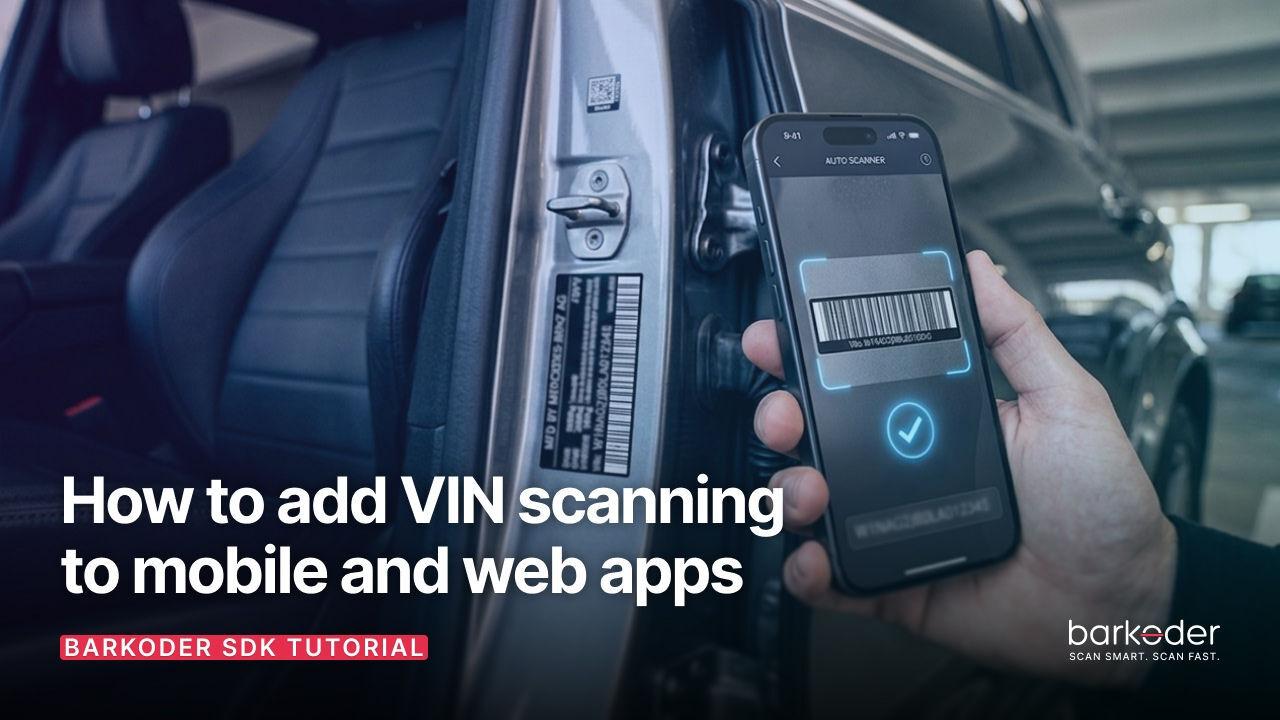
A better approach is to capture the VIN directly from the vehicle using the device camera.
With a barcode scanning SDK, an application can detect and decode a VIN barcode and return the result directly to the application's workflow. Depending on the platform and the condition of the VIN, OCR can also provide an additional way to capture VINs when the human-readable characters are visible but a barcode is unavailable or difficult to scan.
This guide explains how VIN barcode scanning works, which barcode formats can contain VIN data, how to configure VIN scanning in an application, and what developers should consider when implementing VIN scanning on mobile and web platforms.
For product details, demos and licensing information, see the barKoder VIN Scanning SDK.
1. What Is a VIN Barcode?
A VIN, or Vehicle Identification Number, is a unique identifier assigned to a vehicle.
The important distinction for developers is that a VIN is data, not a barcode symbology.
VIN data can be encoded into different barcode formats depending on the vehicle, label, document, or workflow.
The barcode formats supported by barKoder's dedicated VIN scanning mode include:
This distinction matters when developing a VIN scanner. There is no single "VIN barcode" format that every vehicle uses. Instead, the scanner needs to recognize the barcode symbologies in which VIN data may appear.
barKoder's dedicated VIN mode is designed specifically for this purpose and supports Code 39, Code 128, Data Matrix, and QR Code VIN variants.
For a broader explanation of VIN barcoding and the formats used in automotive applications, see Vehicle Identification Number (VIN) via barcoding.
2. VIN Barcode Formats
Different barcode symbologies can be used to represent VIN data. Understanding their characteristics can help developers determine what their application needs to support.
Code 39
Code 39 is a traditional alphanumeric 1D barcode that has been widely used in automotive applications.
It can encode letters, numbers, and several special characters, making it suitable for representing VINs. Code 39 is also a variable-length symbology, although VIN barcodes generally contain the fixed VIN data required by the automotive workflow.
Because Code 39 has a long history in automotive identification, it remains an important format for applications that need to scan VINs from existing vehicle labels and documentation.
Code 128
Code 128 is a high-density alphanumeric 1D barcode.
Compared with Code 39, Code 128 can represent data more compactly. It also incorporates a checksum mechanism for error detection. These characteristics make Code 128 useful in applications where available label space is limited or where efficient data representation is important.
For developers building a VIN scanning application, supporting both Code 39 and Code 128 helps accommodate different automotive labels and workflows.
Data Matrix
Data Matrix is a 2D barcode format that stores information horizontally and vertically.
Because data is encoded across two dimensions, Data Matrix can store information in a relatively small physical area. This makes it useful for compact labels, components, and other space-constrained applications.
Data Matrix is particularly relevant when VIN information is represented using newer 2D automotive identification workflows.
QR Code
QR Code is another 2D barcode format that can be used to represent VIN data.
QR Codes are widely recognized and can encode data in a compact square symbol. Their broad adoption also makes them useful in modern automotive and digital workflows.
barKoder's VIN scanning mode supports all four of these formats: Code 39, Code 128, Data Matrix, and QR Code.
Developers can also explore the complete barKoder barcode symbology directory for other barcode formats supported by the SDK.
3. How VIN Scanning Works Inside an App
A VIN scanning workflow can be thought of as a simple pipeline:
Configure VIN mode → open camera → detect and decode VIN barcode → return result → application workflow
The user points a smartphone, tablet, or computer camera at the VIN barcode.
The scanner analyzes the camera feed and looks for supported barcode patterns. Once a supported VIN barcode is detected, the decoding engine extracts the encoded data.
The application can then use the VIN to:
- find a vehicle record;
- open an inspection;
- retrieve a rental reservation;
- associate a vehicle with a work order;
- update fleet inventory;
- start a logistics event;
- populate an insurance claim;
- create or update a dealership record.
The scanner's job is to capture the identifier. The application then determines what should happen with the resulting VIN.
This distinction is useful when designing the architecture of an automotive application: VIN scanning becomes a reusable data-capture component that can feed multiple downstream workflows.
For browser-based applications, the barKoder Web SDK provides the WebAssembly-based scanning infrastructure needed to perform barcode scanning directly in a web application.
4. What Does barKoder VIN Mode Configure?
A dedicated VIN mode is more than simply enabling four barcode decoders.
barKoder's VIN scanning configuration is designed specifically around VIN capture and supports:
- Code 39
- Code 128
- Data Matrix
- QR Code
- VIN-specific restrictions
- configurable region of interest
- high/FHD camera resolution
- adjustable decoding speed
The Web VIN example demonstrates these settings directly, including the supported VIN decoders, FHD resolution, slow decoding speed, region of interest, and VIN restrictions.
For example, a WebAssembly implementation can configure VIN scanning with settings similar to:
Barkoder.setEnabledDecoders(
    Barkoder.constants.Decoders.Code39,
    Barkoder.constants.Decoders.Code128,
    Barkoder.constants.Decoders.DataMatrix,
    Barkoder.constants.Decoders.QR
);

Barkoder.setCameraResolution(
  Barkoder.constants.CameraResolution.FHD
);

Barkoder.setDecodingSpeed(
    Barkoder.constants.DecodingSpeed.Slow
);

Barkoder.setRegionOfInterest(0, 35, 100, 30);

Barkoder.setEnableVINRestrictions(
    Barkoder.constants.EnableVINRestrictions.Enable
);
The exact API can vary by SDK version and platform, so developers should use the current barKoder documentation for their implementation.
For the browser-specific configuration, see the barKoder Web VIN scanning example.
The important concept is that VIN mode configures the scanner around the characteristics of the data and the environment in which it needs to be captured.
5. VIN Barcode Scanning vs. VIN OCR
Barcode scanning and OCR solve related but different VIN-capture problems.
VIN barcode scanning
Barcode scanning reads VIN data encoded in a barcode.
barKoder's VIN mode supports:
This is useful when a vehicle, label, document, or component contains a readable VIN barcode.
VIN OCR
VIN OCR reads human-readable VIN characters directly from an image—making it an ideal solution when a VIN barcode is not present, damaged, faded, partially obscured, difficult to align in the camera view, or printed/engraved as text.
barKoder provides dedicated VIN OCR functionality to capture VINs directly from visible text. While barcode scanning remains the standard approach, OCR serves as a complementary method for reliable vehicle identification.
Note on Web Apps / Web API: VIN OCR is currently available for mobile native platforms (iOS and Android). Support for Web Apps (Web API / Web SDK) is not yet available, but is coming soon.
When designing your workflow, treating barcode scanning and OCR as complementary tools ensures the highest capture success rate across all real-world conditions. For the latest platform-specific capabilities, release updates, and implementation details, please consult the barKoder documentation.
6. Combining VIN Barcode Scanning and OCR
For some automotive applications, the most useful strategy is to support both barcode scanning and OCR.
A vehicle may have a readable barcode in one situation and only visible VIN text in another.
A combined workflow can therefore follow this pattern:
Attempt barcode scanning → capture VIN if successful → use VIN OCR when supported if barcode capture is unsuccessful
If the barcode cannot be decoded but the human-readable VIN remains visible, VIN OCR can provide another capture method on supported platforms.
barKoder's current VIN materials describe VIN OCR as an additional way of capturing the 17-character VIN when barcode-based capture isn't sufficient.
The exact barcode/OCR workflow should be implemented according to the capabilities documented for the target platform.
7. Adding VIN Scanning to Mobile Applications
VIN scanning can be integrated into native Android and iOS applications as well as supported cross-platform frameworks.
The basic implementation workflow is:
- Add the barcode scanning SDK to the application.
- Enable the VIN scanning configuration.
- Request camera access.
- Present the scanner to the user.
- Detect and decode the VIN barcode.
- Return the VIN to the application.
- Use the VIN in the relevant business workflow.
The barKoder Barcode Scanner SDK provides barcode scanning capabilities across mobile and other supported environments.
For VIN-specific functionality, developers can enable the SDK's dedicated VIN mode.
Developers can explore platform-specific implementation guidance through the barKoder documentation hub.
Supported development environments include native Android and iOS as well as cross-platform frameworks such as Flutter, React Native, Capacitor, Cordova, NativeScript, and .NET MAUI.
This allows developers to add VIN capture without rebuilding the entire application around a barcode scanning workflow.
8. Adding VIN Scanning to Web Applications
VIN scanning does not have to be limited to native mobile applications.
A web application can access the device camera through browser media APIs, while WebAssembly allows the barcode decoding engine to run directly in the browser.
This is particularly useful for businesses that already operate browser-based applications and do not want drivers, inspectors, technicians, or other employees to install a separate native application.
A typical browser workflow is:
Open web application → grant camera permission → scan VIN → return VIN → continue workflow
The barKoder Web SDK provides the underlying WebAssembly-based scanner, while the Web VIN example shows how to configure VIN scanning.
The Web VIN configuration supports:
The barKoder Web SDK documentation provides additional information about installation, browser integration, camera access, and API configuration.
For developers building with JavaScript, the How to Add Barcode Scanning to a Web App with JavaScript guide provides additional implementation context.
9. Choosing the Right VIN Capture Strategy
The appropriate implementation depends on what users encounter in the field.
When a barcode is consistently available
Use VIN barcode scanning as the primary capture method.
Your scanner should support the barcode formats encountered in the workflow, including Code 39 and Code 128 for traditional 1D automotive labels, as well as Data Matrix and QR Code for 2D applications.
When both barcode and printed VIN are available
Use barcode scanning as the primary capture method and consider VIN OCR as an additional capture path on supported platforms.
When the VIN primarily appears as text
VIN OCR may be more appropriate than barcode scanning.
When the application encounters mixed automotive environments
A combined workflow can give users more than one way to identify the vehicle without requiring them to type the VIN manually.
The important point is to design the capture workflow around the actual locations and conditions in which VINs appear.
10. Handling Difficult VIN Barcodes
VIN scanning rarely happens under perfect laboratory conditions.
Production applications may need to scan barcodes:
- through windshields;
- behind glass;
- in direct sunlight;
- in low-light environments;
- on reflective surfaces;
- at an angle;
- from small labels;
- on worn or damaged labels;
- with dirt or other visual interference.
These conditions can significantly affect camera-based scanning.
Difficult Code 39 and Code 128 barcodes
Code 39 and Code 128 are 1D barcode formats.
For difficult or deformed 1D codes, barKoder's Segment Decoding® technology is designed to help recognize barcodes when their shape or appearance makes conventional decoding more difficult.
Damaged Data Matrix and QR Code barcodes
Data Matrix and QR Code are 2D formats.
barKoder's MatrixSight® technology is designed to help decode difficult or damaged 2D symbols, including QR Code and Data Matrix.
This distinction is important: Segment Decoding® and MatrixSight® address different barcode problems rather than functioning as interchangeable generic scanning enhancements.
For more information about barKoder's VIN scanning capabilities, see the barKoder VIN Scanning SDK.
11. Real-World VIN Scanning Examples
VIN scanning becomes most valuable when it is integrated directly into the workflow where vehicles are actually being processed.
Automotive roadside assistance
Club Assist integrated barKoder into mobile applications used in automotive roadside assistance workflows.
The published Club Assist customer story describes the company's use of barKoder for VIN capture in field conditions, including difficult barcode samples and low-light environments.
This illustrates an important point for automotive developers: a VIN scanner needs to work outside controlled testing conditions.
Automotive logistics
eCarMover integrated the barKoder Web SDK into a .NET Blazor application hosted in Azure.
The company's drivers can scan VINs directly within the browser instead of manually entering the vehicle identification number or using a separate native application.
The published eCarMover customer story describes the implementation and the use of browser-based VIN scanning across different devices.
These examples demonstrate why the implementation environment matters. A VIN scanner needs to work as part of the complete workflow, not simply decode a barcode from an ideal test image.
12. Testing Your VIN Scanning Workflow
Testing with clean sample barcodes is only the beginning.
Before deploying a VIN scanning workflow, test with real samples and the devices your users will actually carry.
Include:
- damaged barcodes;
- low-contrast labels;
- small barcodes;
- angled barcodes;
- reflective surfaces;
- windshield glass;
- direct sunlight;
- low-light conditions;
- different camera resolutions;
- different smartphone and tablet models;
- different browsers for WebAssembly applications.
Test all of the barcode formats your application expects to encounter:
You should also test the complete application workflow.
A successful scan should not simply display a VIN. It should correctly pass that VIN into the next step of the application without introducing another manual process.
For Web applications, test:
- camera permissions;
- HTTPS deployment;
- browser compatibility;
- camera positioning;
- different screen sizes;
- repeated scans;
- scanning from glass;
- low-light conditions.
The barKoder Web SDK documentation provides current information for implementing barcode scanning in browser-based applications.
Developers can also use barKoder's barcode testing resources to test different barcode symbologies and scanning conditions.
13. Where VIN Scanning Fits in Automotive Applications
Once VIN capture is automated, the resulting data can become the starting point for a much broader digital workflow.
Fleet and rental
Identify vehicles during pickup, return, inspections, maintenance, and fleet transfers.
Inspection and insurance
Capture the vehicle identifier before recording inspection results, damage, claims, or verification information.
Automotive logistics
Associate a vehicle with loading, unloading, transportation, arrival, departure, and delivery events.
Dealership and service
Use the VIN to retrieve vehicle records, create work orders, update inventory, or connect a vehicle with service history.
The common pattern is:
Physical vehicle → VIN capture → digital vehicle record → business workflow
The scanner removes the manual data-entry step between the physical vehicle and the application.
For broader automotive scanning applications, developers can explore the barKoder Barcode Scanner SDK.
Start Building VIN Scanning Into Your Application
VIN capture is often the first step in connecting a physical vehicle with a digital automotive workflow.
Instead of asking users to locate a VIN, read 17 characters, type them into an application, and verify the result, developers can use camera-based scanning to capture the identifier directly.
For barcode-based workflows, the barKoder Barcode Scanner SDK provides a dedicated VIN mode supporting:
The SDK can be integrated into native mobile applications, cross-platform applications, and browser-based workflows using the barKoder Web SDK.
For difficult or damaged VIN barcodes, barKoder's VIN scanning technology incorporates Segment Decoding® and MatrixSight® for different types of challenging 1D and 2D codes.
When the VIN is available as visible text rather than a readable barcode, VIN OCR can provide an additional capture path on supported platforms.
Frequently asked questions
What is a VIN barcode scanner SDK?
A VIN barcode scanner SDK is software that developers integrate into an application to detect and decode barcodes containing Vehicle Identification Numbers.
The barKoder Barcode Scanner SDK provides a dedicated VIN scanning mode for VIN data encoded in Code 39, Code 128, Data Matrix, and QR Code.
The dedicated barKoder VIN Scanning SDK page provides more information about the VIN-specific functionality.
Which barcode formats can contain VIN data?
VIN data can be represented using multiple barcode formats.
The barKoder VIN scanning mode supports:
You can also explore the complete barKoder barcode types directory.
Can I scan VIN barcodes on mobile devices?
Yes.
VIN barcode scanning can be integrated into mobile applications using the barKoder Barcode Scanner SDK.
The SDK supports native Android and iOS development as well as cross-platform frameworks including Flutter, React Native, Capacitor, Cordova, NativeScript, and .NET MAUI.
See the barKoder documentation for platform-specific implementation guidance.
Can I scan VIN barcodes in a web application?
Yes.
The barKoder Web SDK provides WebAssembly-based barcode scanning for browser applications.
The dedicated Web VIN configuration supports Code 39, Code 128, Data Matrix, and QR Code.
What happens when a VIN barcode is damaged?
Scanning performance depends on the barcode format, severity of the damage, camera conditions, lighting, and other factors.
For difficult 1D VIN barcodes such as Code 39 and Code 128, barKoder provides Segment Decoding® technology.
For difficult 2D VIN barcodes such as Data Matrix and QR Code, MatrixSight® is designed to help decode damaged symbols.
You can learn more on the barKoder VIN Scanning SDK page.