Barcode Scanner SDK for Inventory Management Apps
Barcode scanning plays an important role in inventory management applications. It helps streamline tasks such as receiving goods, counting stock, picking and packing orders, tracking assets, and conducting cycle counts. However, for developers, integrating camera-based scanning is only part of the process. An inventory app must also interpret scanned data correctly, validate barcode values, connect them to the appropriate inventory records, prevent duplicate entries, and synchronize updates with the backend.
A barcode scanner SDK provides the decoding functionality that can be integrated directly into an existing inventory application. Choosing the right SDK means finding one that supports the barcode formats, operating environments, workflow requirements, and data structures your application needs - not simply selecting the solution that supports the largest number of barcode symbologies.
What Can Barcode Scanning Do in an Inventory App?
Barcode scanning can support several essential inventory management tasks:
- Stock counting: Scan products during physical inventory checks and update quantities for the correct product or storage location.
- Receiving: Scan incoming items, cases, pallets, or logistic units and compare them against purchase orders or expected receiving records.
- Picking and packing: Verify that the correct products are selected and packed during order fulfillment.
- Asset tracking: Identify serialized equipment and connect each scan to the relevant asset record, location, or status.
- Cycle counting: Scan specific products or inventory locations during scheduled checks without having to count the entire inventory.
The scanner should be viewed as one part of the overall inventory process rather than a complete workflow on its own.
Designing the Scan-to-Inventory Workflow
A reliable inventory scan flow can be structured as follows:
- Identify the expected barcode. Determine which product, asset, logistic unit, or transaction the user is trying to process.
- Decode the barcode. The scanner SDK converts the camera image into decoded data.
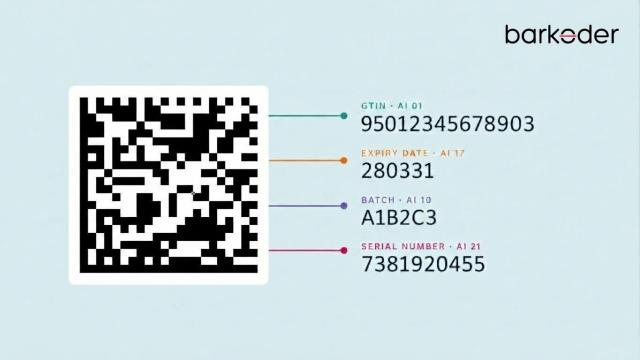
- Parse structured data when necessary. A GS1 barcode may contain multiple data elements identified by Application Identifiers. A GS1 Parser can be used when the application needs to interpret those fields as structured data.
- Validate the result. Check symbology, expected identifier type, required fields, and business rules before changing inventory.
- Query or update the backend. Resolve the decoded identifier against the product, asset, purchase-order, shipment, or inventory record.
- Handle duplicates. Decide whether a repeated scan should increment quantity, be ignored, or trigger a warning.
- Synchronize when necessary. If the application supports offline work, define how local changes are stored, reconciled, and uploaded when connectivity returns.
Common Inventory Scanning Workflows
Stock counting: The user selects a location or count task, scans products, and records quantities. Multi-barcode scanning can reduce repeated camera interactions when several barcodes are visible at once. barKoder specifically describes Batch MultiScan for inventory counting and warehouse inventory management.
Receiving: The app can scan item-level, case-level, or logistic-unit identifiers and compare them with expected receiving data. For cases, pallets and other logistic units, the Serial Shipping Container Code (SSCC) is a standard GS1 identifier commonly used to identify individual logistics units.
Picking and packing: Scanning can be used as a verification step so the application confirms that the selected item matches the order or pick list.
Asset tracking: Serialized equipment and other assets can be linked to individual records rather than treated as interchangeable stock. The application can associate each scan with an asset's identity, current location, assigned user, status, maintenance history, or other business data. Where GS1 identification standards are used, individual assets may be identified with a Global Individual Asset Identifier (GIAI), while reusable transport or storage assets such as pallets, crates, containers, or similar equipment may use a Global Returnable Asset Identifier (GRAI).
Cycle counting: The app can guide a user through a defined subset of locations or SKUs and capture discrepancies without requiring a full inventory shutdown.
Inventory Barcode Data and GS1 Identifiers
Inventory applications often need more than a product identifier. Depending on the workflow, the application may need to preserve several data elements:
- GTIN — Identifies a trade item and is commonly used for product lookup.
- Serial number — Identifies an individual instance.
- Batch/lot — Represents a production or grouping attribute used for traceability and inventory management.
- Expiration date — Represents a date attribute used in workflows such as stock rotation and regulated-product handling.
- Quantity — May be recorded as part of the inventory transaction or, depending on the barcode/data structure, represented by encoded data.
- SSCC — Identifies a logistic unit such as a pallet or shipping unit.
- GLN — A Global Location Number identifies locations or parties in the supply chain. In inventory workflows, a GLN can identify a physical location such as a warehouse, distribution center, dock door, or storage location. When the GLN is encoded in a GS1 barcode to identify the physical location itself, GS1 Application Identifier (414) is used.
- GIAI — Global Individual Asset Identifier. Identifies an individual asset rather than a trade item. In GS1 element strings, GIAI uses Application Identifier (8004). It can be used for assets such as equipment, tools, vehicles, computers, machinery, or other physical assets that need to be tracked individually.
- GRAI — Global Returnable Asset Identifier. Identifies reusable assets or returnable assets. In GS1 element strings, GRAI uses Application Identifier (8003) and may include a serial component to distinguish an individual asset.
Product identification and asset identification are not the same thing. A GTIN identifies a trade item, while a GIAI identifies an individual asset. A physical object can therefore participate in different business processes depending on whether the application is treating it as merchandise, a serialized product instance, or a company asset.
GS1 Application Identifiers define the meaning and format of data attributes. The GS1 Parser can be evaluated when developers need to extract structured information from GS1-formatted barcodes.
Barcode Formats Used in Inventory Applications
Code 128 and GS1-128
Code 128 is a 1D barcode symbology. GS1-128 uses the Code 128 symbology together with an FNC1 character and GS1 Application Identifiers to encode structured GS1 data.
Treating the two terms as interchangeable can lead to incorrect parsing assumptions.
Data Matrix and GS1 DataMatrix
Data Matrix describes the 2D symbology. GS1 DataMatrix uses Data Matrix together with FNC1 and GS1 Application Identifiers to encode structured GS1 data.
EAN and UPC
EAN and UPC symbols are common retail identifiers. They are important when an inventory app must handle products that originate in retail environments.
QR Code and Other 2D Symbols
Depending on the application, 2D barcodes could be used when more data needs to be encoded in a compact symbol.
A QR Code can be used where the application requires a widely supported 2D symbol. Inventory applications should also account for the growing use of 2D barcodes in retail. Under GS1's Ambition 2027, retail POS systems are being prepared to process GS1-compatible 2D symbols alongside traditional EAN/UPC barcodes. Depending on the implementation, these can carry additional data such as batch/lot, expiry or serial information.
barKoder also lists Aztec Code, Aztec Compact, Data Matrix, DotCode, MaxiCode, PDF417, Micro PDF417, and Micro QR Code among its supported 2D formats.
Barcode Scanning and GS1 Parsing Are Different Tasks
Decoding provides you an answer to one basic question: "What data is encoded in this symbol?"
Parsing is different. It asks: "What does each part of that data mean?".
With plain product identifiers, decoding may do the job on its own. But when a GS1-encoded value bundles multiple Application Identifiers together, things get messier. The application often needs a parsing layer to split those fields apart and tie each one to a business object, a GTIN for a trade item, an SSCC for a logistic unit, a GIAI or GRAI for an asset, plus serial number, batch/lot, and expiration details connected to the scanned object.
So developers ought to test both scanner decoding and structured-data parsing. If a scanner reads a symbol, that is not automatically proof the application has interpreted every field correctly.
Barcode Scanner SDK vs. Standalone Scanner App
A scanner app you open on its own was built around scanning as the thing it does. SDK support comes into play when you've already got the rest of the app, the screens and all the business logic tied down. You just need to fold scanning into it.
Think about inventory software specifically. Receiving, cycle counts, picking, pulling up an asset, moving stock around a warehouse. Barcode capture being an SDK makes the most sense right there inside those screens where it actually gets used. The host app stays in charge of what a good scan does with the data, and nobody gets bounced over to some other scanning program.
Barcode Scanner SDK vs. Dedicated Hardware
Specialist scanners. Specialist scanners may also be useful if you are working in an environment, which needs specialist ergonomics, increased scan volumes, physical triggers, ruggedised devices or close integration with warehouse hardware.
You can consider camera-based SDK scanning in these case: Existing inventory application can be easily used on phones tablets browsers, and other standard computers.
The optimal method varies by environment, scan quantity, label conditions, device fleet, user workflow and integration needs. Camera-based scanning and dedicated hardware can even be implemented within the same deployment.
Features to Look For in an Inventory Barcode Scanner SDK
Multi-Barcode Scanning
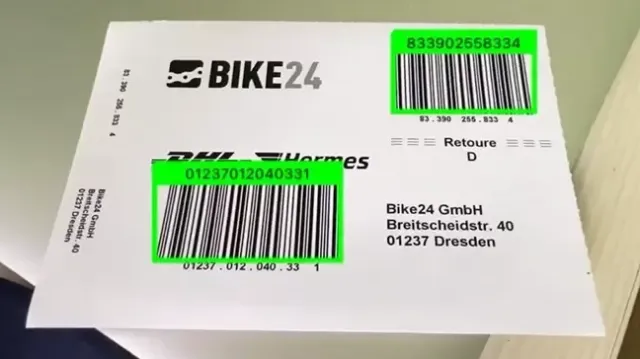
Multi-barcode scanning is useful when several barcodes are visible in the camera frame and the workflow requires capturing multiple items in one interaction.
Batch MultiScan enables multiple barcodes to be decoded in a single camera view. barKoder describes the feature for inventory counting, stock taking, receiving, and warehouse workflows.
Continuous Scanning
Continuous Scanning is useful for workflows where users repeatedly scan items without manually restarting the scanning process after each successful scan. barKoder describes continuous scanning as a real-time, uninterrupted scanning workflow for high-volume environments.
Search & Find
Multi-barcode scanning is useful when the application needs all visible codes. Other workflows need the opposite: finding one specific item among many visible barcodes. Search & Find can continuously evaluate detected results until the requested barcode value or configured match is found.
Difficult, Damaged, and Deformed Barcodes
Real inventory environments rarely provide perfect labels. Developers should test the SDK with actual labels, including damaged, distorted, blurry, low-quality, or poorly positioned barcodes.
barKoder's SDK includes MatrixSight for difficult or damaged barcodes, Segment Decoding for deformed 1D barcodes, and capabilities for blurry EAN and UPC barcodes.
For direct-part-marked applications, developers can also evaluate DPM barcode scanning.
Platform and Framework Support
Confirm that the SDK supports the application's actual platforms and framework choices.
barKoder provides SDKs and integrations for Android, iOS, WebAssembly, Windows, Linux, C# and Python, with cross-platform integrations for Flutter, React Native, .NET MAUI, Capacitor, Cordova and NativeScript.
For browser-based inventory applications, the WebAssembly barcode scanner SDK can be evaluated for web-based scanning workflows. It supports major browsers and provides options for barcode formats, cameras, scanning speed, camera resolution, and Batch MultiScan.
Offline Operation
Clarify exactly what "offline" means.
Offline scanning and offline inventory synchronization are separate concerns. Local barcode decoding, SDK license validation, application persistence and backend synchronization are separate architectural concerns and should be tested independently.
What Developers Should Test Before Choosing an Inventory Barcode Scanner SDK
A practical evaluation should include:
- The actual barcode symbologies used by the inventory environment.
- GS1-128, GS1 DataMatrix, or other GS1 formats if they appear on real labels.
- The identifiers and data elements required by the application, such as GTIN, SSCC, GLN, GIAI, GRAI, serial, batch/lot and expiry.
- Mapping from decoded values to the correct product, asset, shipment, or inventory record.
- Scan volume and expected user interaction speed.
- Multi-barcode workflows.
- Continuous-scanning workflows.
- Damaged, low-contrast, curved, reflective, small, or poorly positioned labels.
- The actual phones, tablets, browsers, desktops, or other devices used by staff.
- Offline behavior and synchronization.
- Duplicate-scan handling.
- Quantity changes and count reconciliation.
- Supported application platforms and frameworks.
- GS1 parsing behavior, including variable-length fields and Application Identifiers relevant to the workflow.
- Real labels and real devices from the target deployment—not only vendor demos.
How barKoder Fits Inventory Applications
barKoder positions its Barcode Scanner SDK as an embedded scanning component for mobile and web application environments. Its SDK supports a broad range of 1D and 2D barcode formats and includes capabilities such as damaged-barcode recognition, deformed-barcode recognition, blurry-barcode scanning, DPM scanning, Batch MultiScan, Continuous Scanning and Search & Find.
For inventory applications specifically, Batch MultiScan can address workflows where multiple codes need to be captured from a single camera view, while Continuous Scanning addresses repeated scanning workflows.
The GS1 Parser can be evaluated when the inventory application needs to turn GS1 barcode data into structured fields such as GTIN, batch, expiry, and serial numbers.
For an inventory implementation, the important evaluation is not simply whether a feature exists. Developers should test the SDK against the exact symbologies, labels, devices, data fields, scan volumes, and backend workflows used by the intended deployment.
Start Your Free 30-Day TrialHealthcare and Regulatory Workflows
Healthcare inventory and device-tracking workflows may involve additional identification and regulatory requirements.
For regulated workflows, developers should validate the full data path: barcode capture, parsing, identifier validation, database mapping, auditability, and any applicable regulatory controls.
A barcode scanner or SDK by itself does not make an application or product compliant with a particular regulatory framework. Compliance depends on the complete device, labeling, identification, data, software, quality, and regulatory context.
FDA explains that its UDI system identifies medical devices from manufacturing through distribution and patient use, and some reusable/reprocessed devices require a UDI directly marked on the device. Where those identifiers are represented as DPM Data Matrix symbols, the scanning application should be tested against the actual marked surfaces and devices used in production.
Build Barcode Scanning Into the Inventory Workflow
The most useful inventory scanner is the one that fits the complete workflow.
Start with the business transaction—receiving, counting, picking, packing, asset tracking, or traceability—and work backward to the barcode data and scanning behavior required to complete it.
Then evaluate the SDK using real labels and devices. Confirm decoding, GS1 parsing where relevant, duplicate handling, offline behavior, synchronization, platform coverage, and performance under realistic operating conditions.
For implementation details, the barKoder Barcode Scanner SDK documentation provides information about supported symbologies, platforms, frameworks, scanning capabilities, and SDK features.
Test barKoder with your actual product labels, warehouse devices and GS1 data.
Frequently Asked Questions
A barcode scanner SDK is a software component that developers integrate into an inventory application to decode barcode data inside their own user interface and business workflow.
A scanner is the capture and decoding capability; an SDK provides that capability as an integration component that an application can embed and control.
Yes, provided it supports the barcode formats, devices, scan patterns, and data processing required by the warehouse workflow. Multi-scan and continuous-scanning features can be useful for high-volume processes.
That depends on the SDK and its licensing model as well as the application's own backend architecture. Offline scanning should be evaluated separately from offline inventory synchronization.
Code 128 is a barcode symbology. GS1-128 uses that symbology with GS1 Application Identifiers and GS1 data rules.